

Roles

Site records for contractors, from the indent to the DPR

SuperWise is construction management software for contractors. Your site team records indents, deliveries, labour, progress and issues, and the daily progress report (DPR) reads those records.

A site engineer in a white helmet and orange hi-vis vest standing on a reinforced slab and looking at his phone, with a half-built tower and the city skyline behind him
Progress logged · 16:40

Podium slab · Reinforcement checked

Mumbai100%
Photo attachedGPS verifiedSent for approval

The firm’s headache

The slab was cast on Tuesday.The office heard on Friday.

Morning, site, office

A contractor's day on SuperWise

  1. Morning 7:30

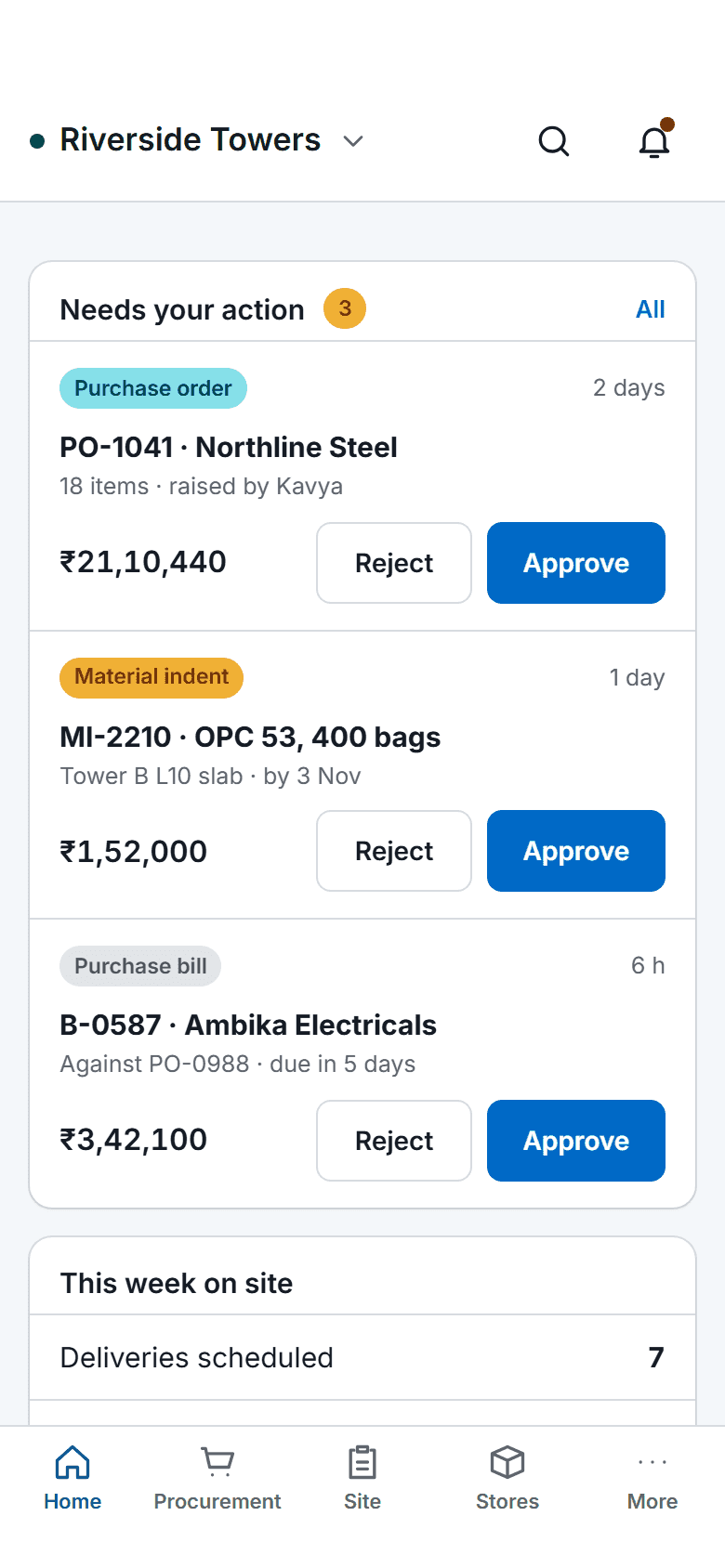
    The SuperWise phone app home screen: key figures, three items waiting for approval with Approve and Reject buttons, a week-on-site summary, quick actions for checklists, photos, progress and material receipt, and bottom tabs.

    Indents raised before the truck is due

    The site engineer raises an indent with the quantity, the required-by date, photos and a GPS location, and links it to a BOQ item. Procurement sees it the same morning.

  2. On site 11:00

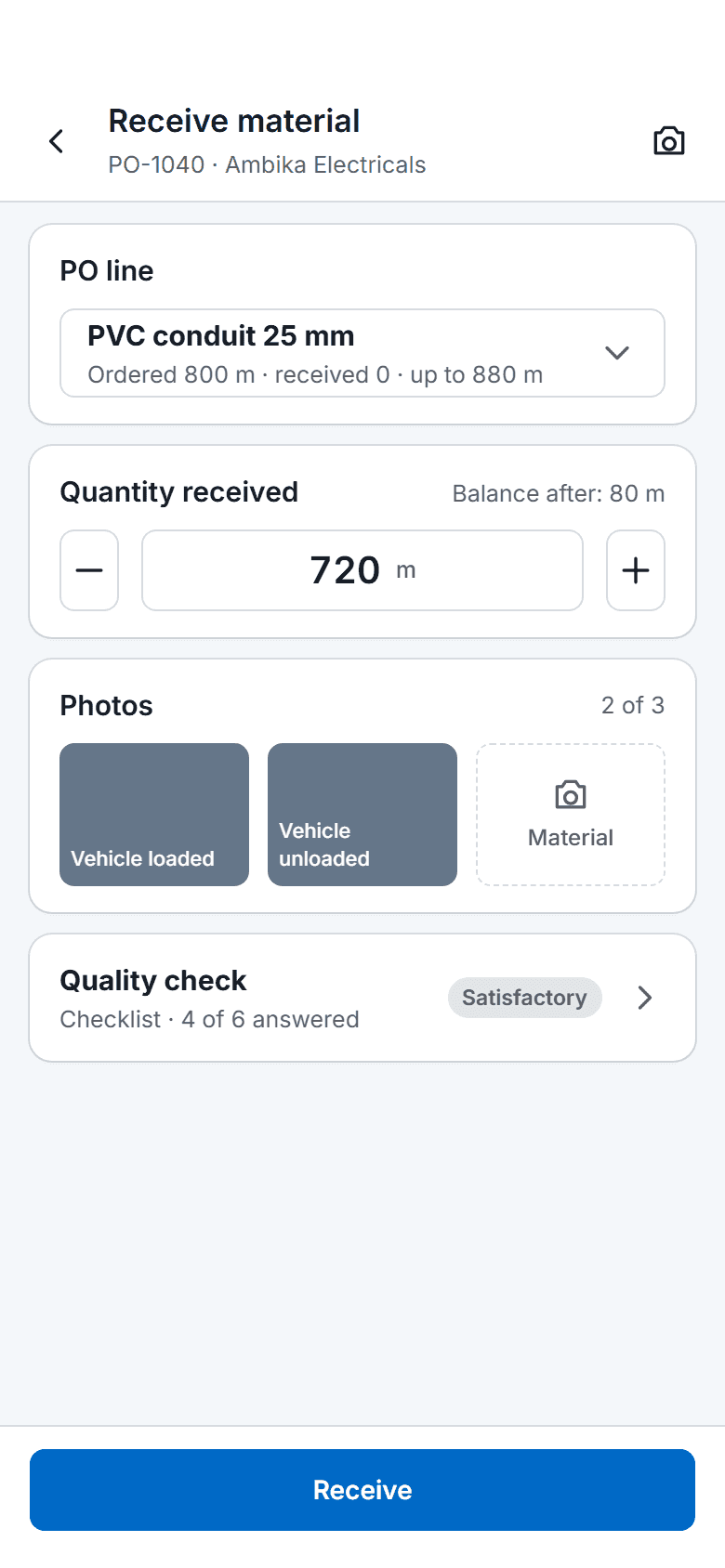
    The SuperWise phone app receiving material against a purchase order: the chosen PO line, the quantity received with a stepper, two of three photos taken, a quality check row and a Receive button.

    Deliveries received against the order

    The supervisor opens the purchase order line and records the delivery: vehicle, driver, quantity and a quality status, with three photos. The quantity stops at the line maximum plus the permitted variation.

  3. In the office 18:00

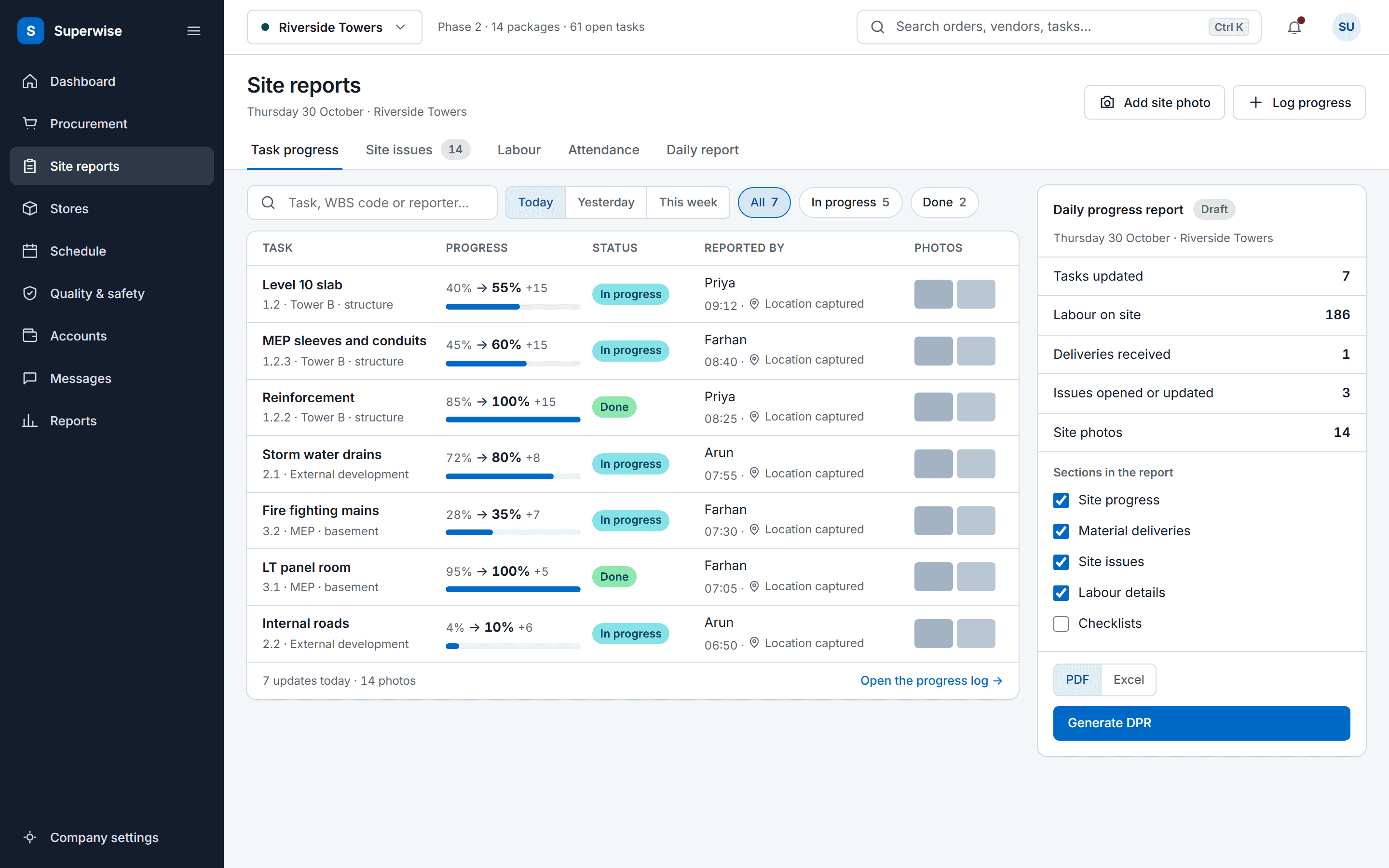
    The SuperWise site reports screen: a feed of today's task progress updates with the previous and new percentage, a status label, the person who reported it, a location marker and photo thumbnails, beside a daily progress report summary with a Generate DPR button.

    The day's report, read from the records

    The daily progress report for the date reads the day's challans, labour, progress and issues. Pick the sections, download PDF or Excel, and nobody retypes anything.

Three workflows

Three workflows a contractor lives in

01 · Material

Every delivery checked against its order

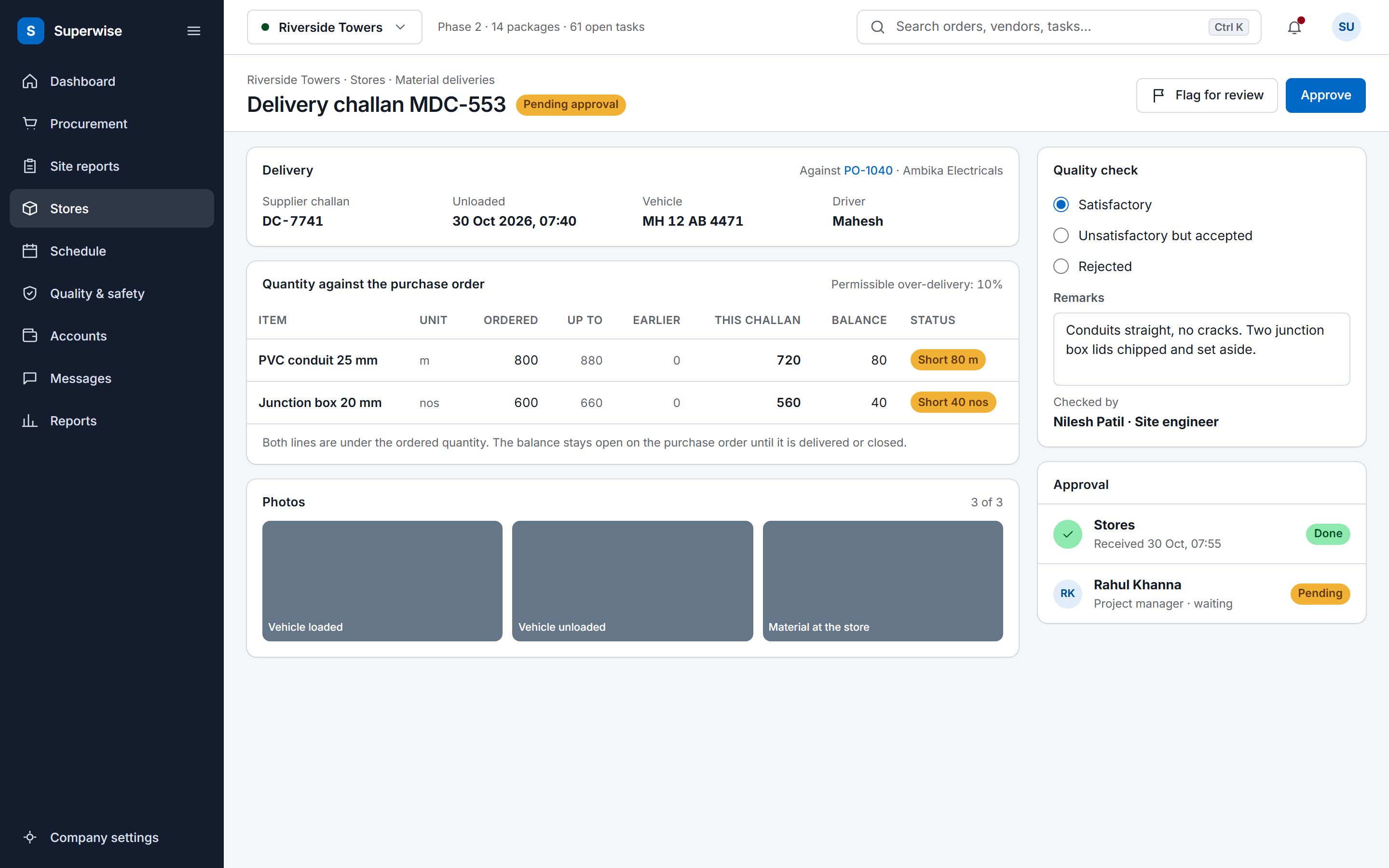
A delivery is a challan against a purchase order line, so what arrives is compared with what was ordered. Each challan keeps its vehicle, driver, photos and quality status.

  • Open the approved purchase order line
  • Record vehicle, driver and quantity received
  • Add the three photos and a quality status
See material management
A SuperWise delivery challan record against a purchase order: supplier challan, vehicle and driver, ordered and delivered quantities with the permissible variation and a Short status on two lines, three photo tiles, a quality check with remarks, and Approve and Flag for review buttons.
02 · Progress

Progress logged on the task, from the floor

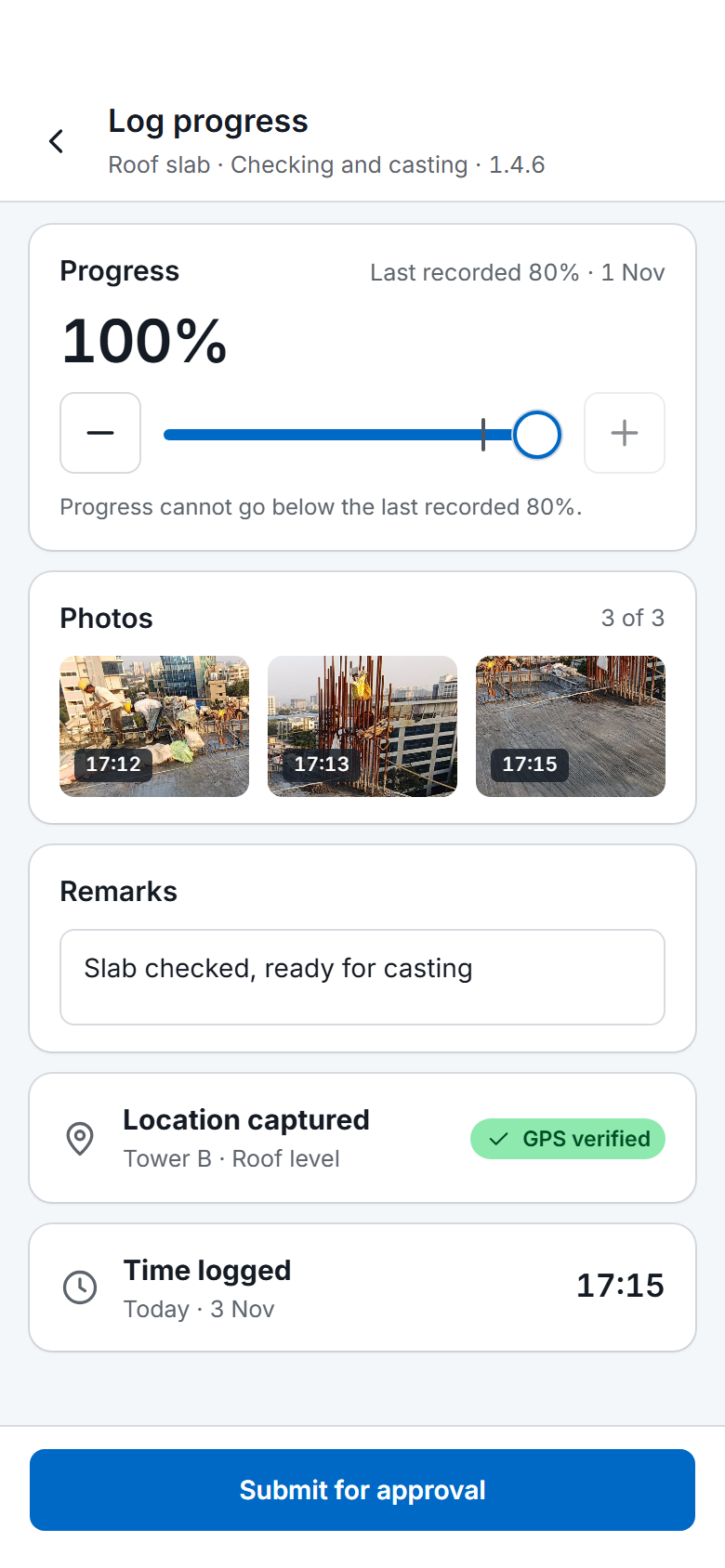
The site updates a task's percent complete with photos from the phone, and the entry keeps a location and a time. A task can require its finish checklist before it closes.

  • Update the task percent and add photos
  • Location and time are kept with the entry
  • The finish checklist gates completion when enforcement is on
See site reporting
The SuperWise phone app progress log for the task Roof slab in Checking and casting: progress at 100 percent from a last recorded 80 percent, three photos of the slab, the remark "Slab checked, ready for casting", a captured location with a GPS verified label, the time 17:15 and a Submit for approval button
03 · DPR

The daily report, built from the records

The DPR reads the day's deliveries, labour, progress and issues. Choose the sections and the date or range, then download PDF or Excel for the client.

  • Pick one date or a range
  • Select from eleven sections
  • Download PDF or Excel
See the DPR app
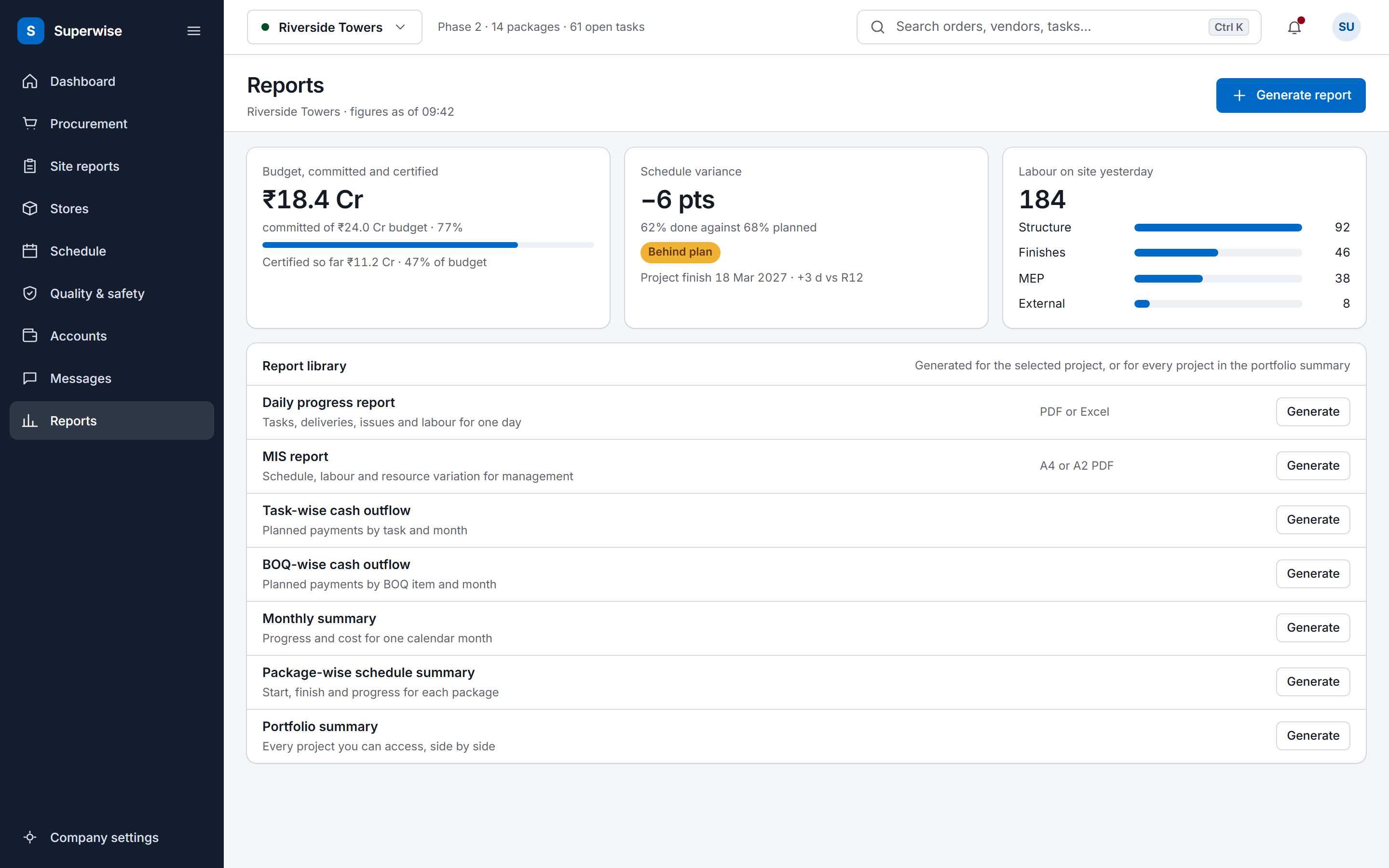
The SuperWise reports hub: a cost tile for budget, committed and certified, a schedule variance tile, labour deployment by package, and a library of the reports a project can generate.

Before and now

What changes for contractors

Modules a contractor uses

Each row comes from the product guide. The daily progress report app and site management pages describe the same records from the reporting side.

Modules a contractor uses on site, and what you do in each
ModuleWhat you do in it
Material indentsRaise an indent with the quantity, the required-by date, photos and a GPS location, and link it to a BOQ item.
Material delivery challans (MDC)Record a delivery against a PO line with the vehicle, driver, three photos and a quality status. The quantity stops at the line maximum plus the permitted variation.
Labour challansRecord the workers of one category from a contractor, with a photo and a GPS location. The entry date is the attendance date.
Task progressUpdate progress on a schedule task, singly or by bulk Excel upload, with rules against lower percentages, future dates and duplicate dates.
Checklists and quality formsFill the start or finish checklist on a task. With enforcement on, the task cannot be marked complete until the finish checklist is approved.
Issues and snagsRaise an issue with a type, a priority, a responsible person and a target closure date, and attach photos.
Daily progress report (DPR)Generate the DPR for a date or a range from the day's records, as PDF or Excel.

Records that support a claim

A claim for delay or extra work stands on dates, quantities and photos. SuperWise keeps them on the record that created them. A delivery challan stores the vehicle, the driver, a quality status and three photos of the loaded vehicle, the unloaded vehicle and the material. A labour challan stores a photo and a GPS location.

A delay such as bad weather, a pile machine breakdown or soil not disposed of is logged as an issue with an opened date and a closed date. Challans, purchase orders, work orders and bills keep who created them and when, and a company can switch on a timestamp on images uploaded through the mobile app.

Forms a site team can fill in

The site enters what it already tracks: the delivery slip, the attendance count, the percentage done on a task and the snag. Each is one form with a few fields, and a task can ask for a start or finish checklist before it moves on.

A user with the Reports view privilege can ask the help agent for a DPR for a date or range and get the download link. With the Progress Add privilege the user can log task progress, and with Issues Add raise an issue.

The company can switch on a push notification to procurement when a new delivery challan is submitted from the mobile app, and a notice to the creator when a challan is rejected.

In their words

From a civil contractor

Rohit Pandit is a director at Skylark Constructions, a civil contractor.

…We are taking up projects at locations that we wouldn’t have been able to manage without the new “SuperWiser” we hired.

Rohit Pandit Director, Skylark Constructions

Running live projects since 2015.

Frequently asked questions

How does a site team record a delivery?

The site engineer opens the purchase order line the delivery is against and records a delivery challan: supplier challan number, unloading date, vehicle, driver, quantity received, a quality status and three photos. The purchase order must be approved first, and the quantity cannot pass the line maximum plus the permitted variation. The mobile app submits challans too.

What goes into the DPR?

The DPR has eleven selectable sections: site progress, measurement sheets, material inventory, deliveries, issues, labour, tools inventory, attendance, materials supplied, indents and checklists. Options add a cover page, delivery photos, weather or a date range. It downloads as PDF or Excel, and every section reads from its own module.

Can the records support a delay claim?

Yes, as dated evidence. Issues carry a type, a priority, opened and closed dates and photos, and each day's DPR lists the deliveries, labour and progress recorded. Together they give dates and quantities to cite when you ask for more time or payment. SuperWise holds the records, and your team writes the claim.

Can I see every site without visiting?

Yes, for the projects your login is assigned to. The portfolio summary lists each accessible project with its schedule status, overall percent complete, cost to date against budget and open issues, and the project dashboard goes into one project. Roles set what each person can view, create, edit, delete and approve in every module area.

Can I certify my subcontractors' bills in SuperWise?

Yes. You issue a work order to each subcontractor, measurement sheets record the work against the BOQ item, and the RA bill claims cumulative quantity up to the work order quantity, with retention and mobilisation recovery deducted. Approvers sign the bill off in steps by role before payment is released against it.

See a delivery go from indent to DPR

Book a demo and we take one delivery from the indent to the daily progress report.