

Roles

Monitor a fund's construction portfolio from project records

SuperWise is portfolio monitoring for real estate funds and asset managers. One summary lists schedule status, percent complete, cost against budget and open issues for every project, and each project's reports sit behind it.

An asset manager holding a tablet, in a white helmet and hi-vis vest, and a site engineer in a yellow helmet pointing toward the next floor of a tower under construction, with the city skyline behind them
Portfolio summary · 09:00

Riverside Towers · Cost against budget

Mumbai58%
Baseline comparedRecords behind each figureOpen issues listed

The firm’s headache

A number reaches the quarterly pack.Nobody can open the record behind it.

Morning, site, office

A fund's day on SuperWise

  1. Morning 9:00

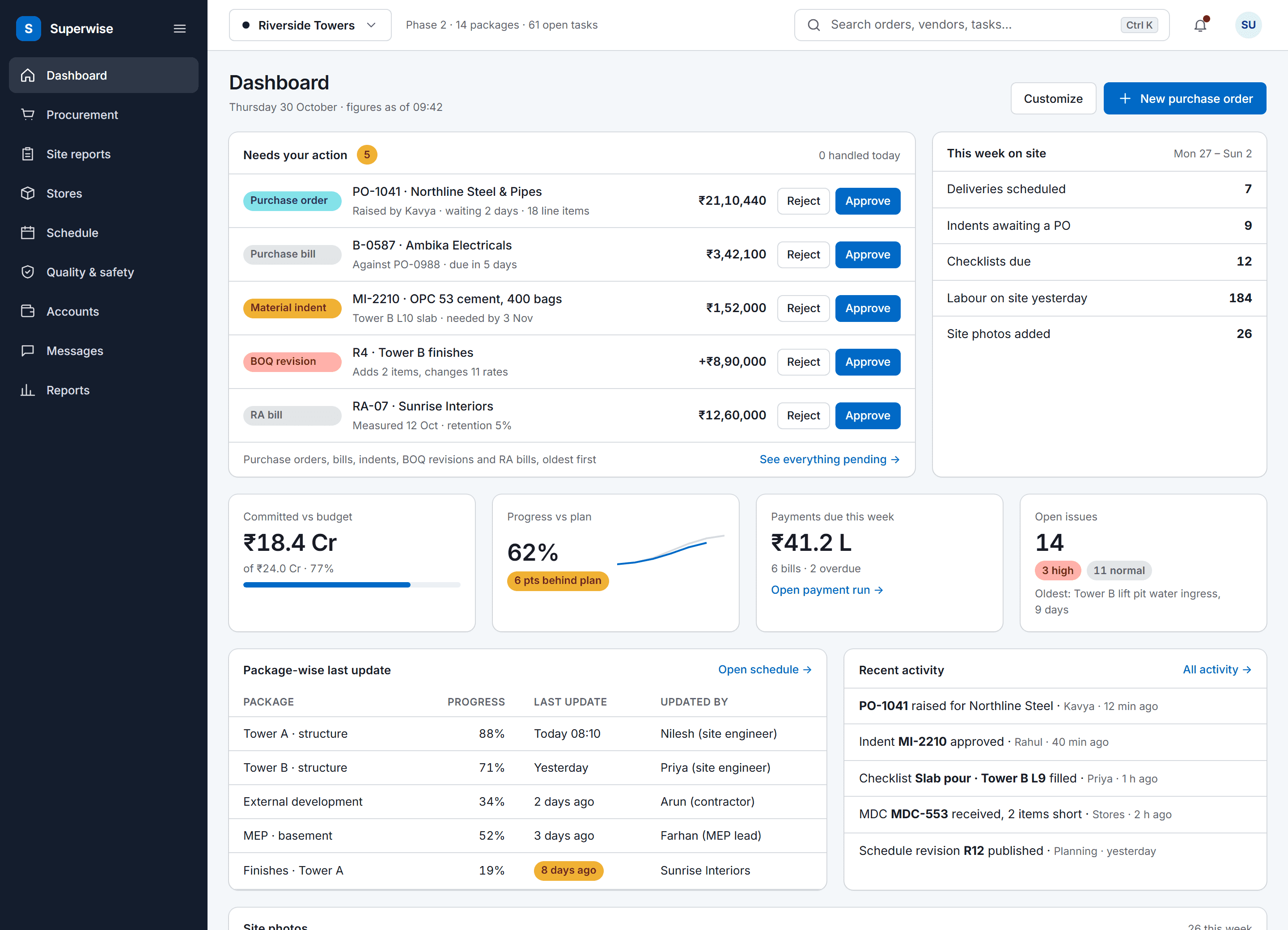
    The SuperWise portal dashboard for a project: an approval queue with five items waiting for the user, a week-on-site summary, four key figures for budget, progress, payments and open issues, package-wise last updates and recent activity.

    The portfolio read before the call

    The portfolio summary lists every project the fund can access with schedule status, percent complete, cost to date against budget and open issues, so the call starts with the right projects.

  2. On site 14:30

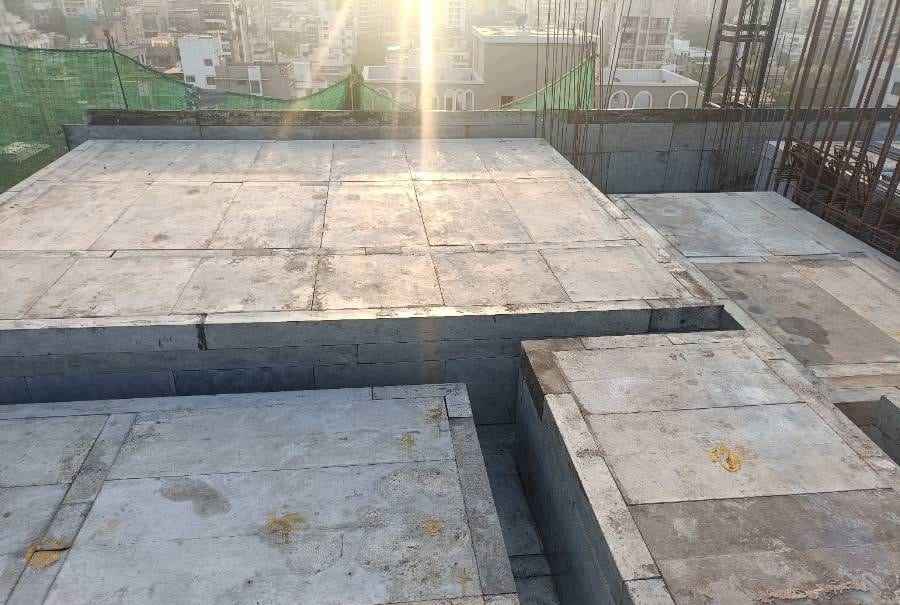
    Slab shuttering panels laid across stepped slab levels in low sunlight, a green safety net and rebar at the upper right

    A site walk with the records in hand

    On a walk, the package-wise summary and the baseline show where each package stands, and the checklists show the safety and quality forms filled on that site.

  3. In the office 17:30

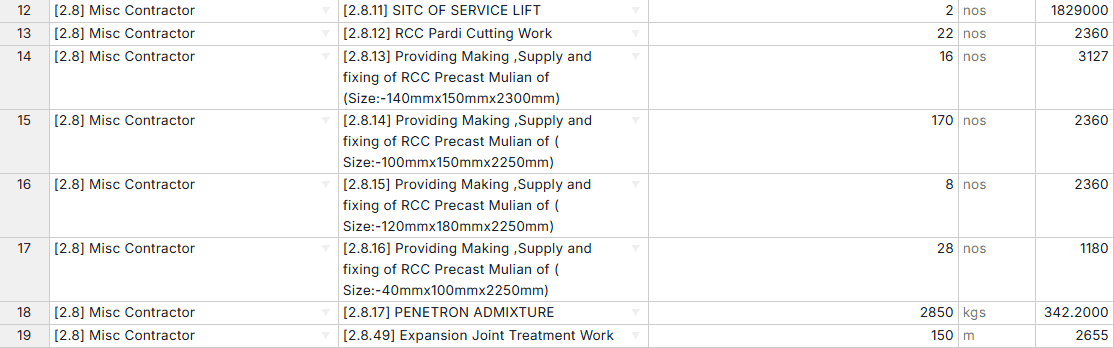
    Update Project BOQs sheet, rows 12 to 19, with work item category, work item, quantity, unit and rate for a service lift, precast mullions, an admixture and an expansion joint

    A figure traced back to its records

    Every report is computed when you generate it, so a number in the summary traces to records you can open. The A2 BOQ summary shows contracted, measured, billed and remaining quantities.

Three workflows

Three workflows behind each figure

01 · Portfolio

One summary across the portfolio

Four fields for each project: schedule status, percent complete, cost to date against budget and open issues. Each project's own reports sit behind its row.

  • Scan all projects you can access
  • Check cost against budget
  • Open the reports behind a project
See the reporting pack
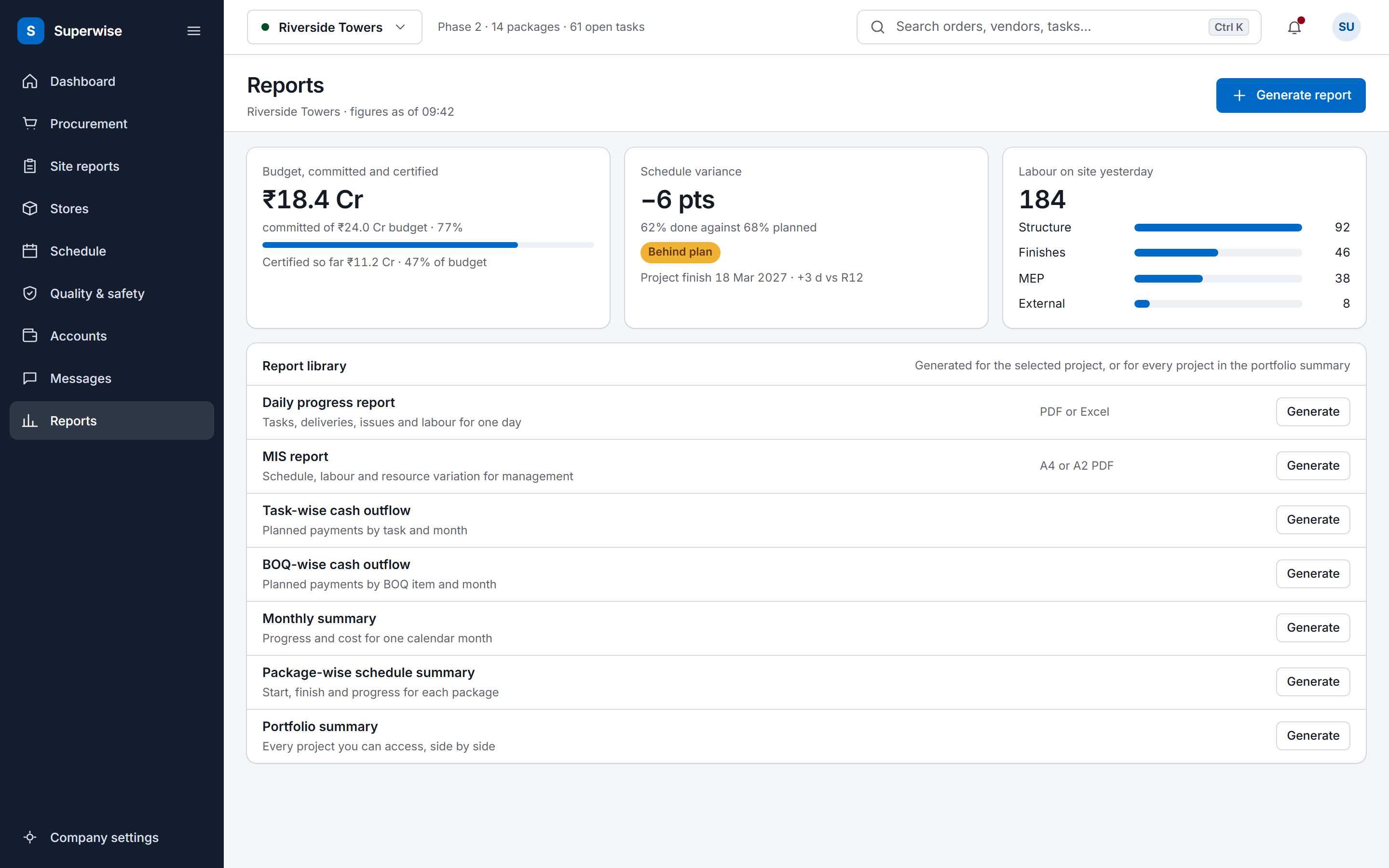
The SuperWise reports hub: a cost tile for budget, committed and certified, a schedule variance tile, labour deployment by package, and a library of the reports a project can generate.
02 · Schedule

Variance in days against the baseline

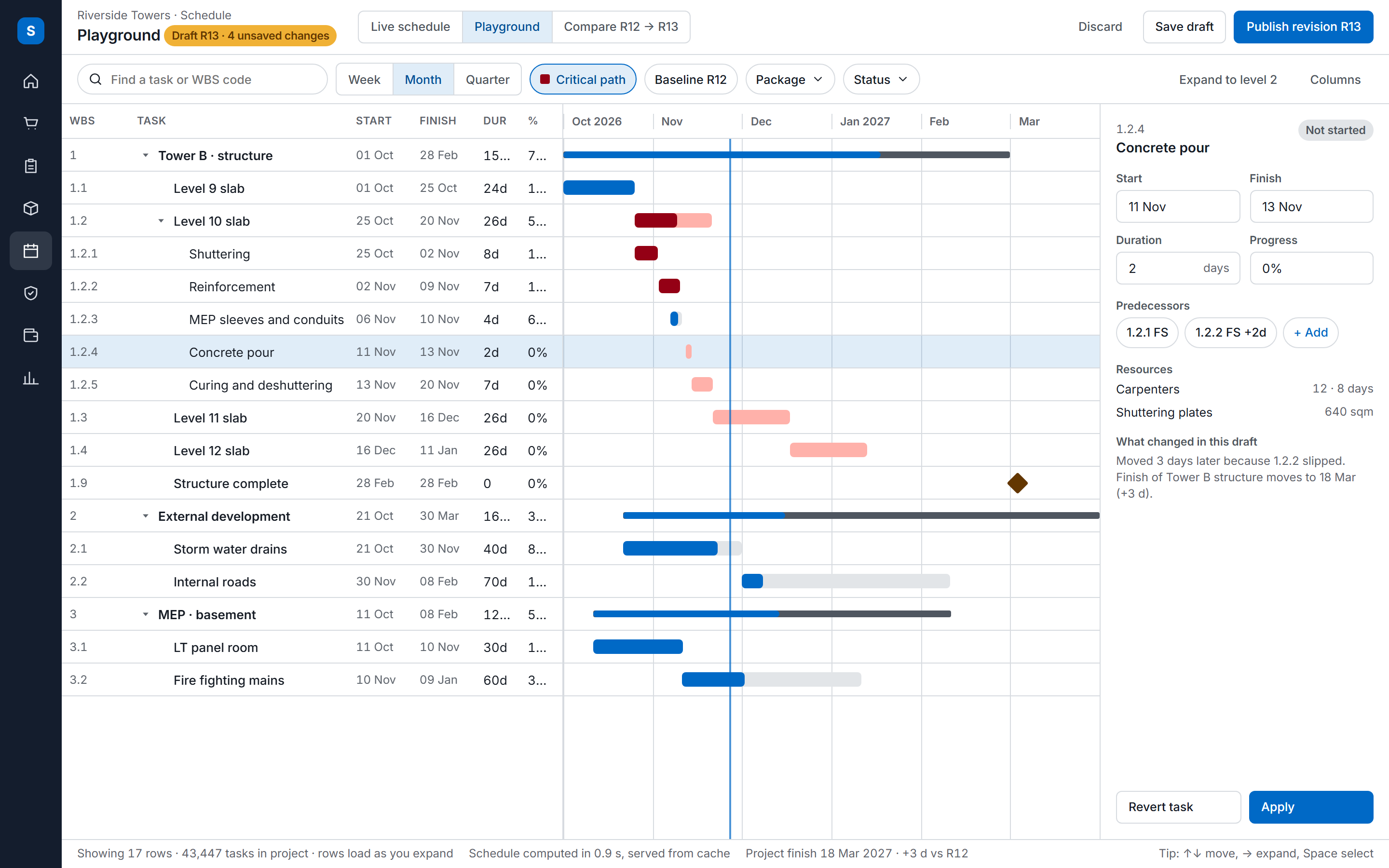
Each approval of a schedule saves a baseline, so the plan at every revision is kept. The package-wise summary shows planned and actual dates, percent complete and delay in days.

  • Open the package-wise summary
  • Check variance against the active baseline
  • Open the baseline saved at any approval
See construction scheduling
The SuperWise schedule playground: a task tree with WBS codes, dates, durations and progress beside a Gantt timeline with the critical path highlighted, and an inspector for the selected task.
03 · Compliance

Safety records as forms with approval

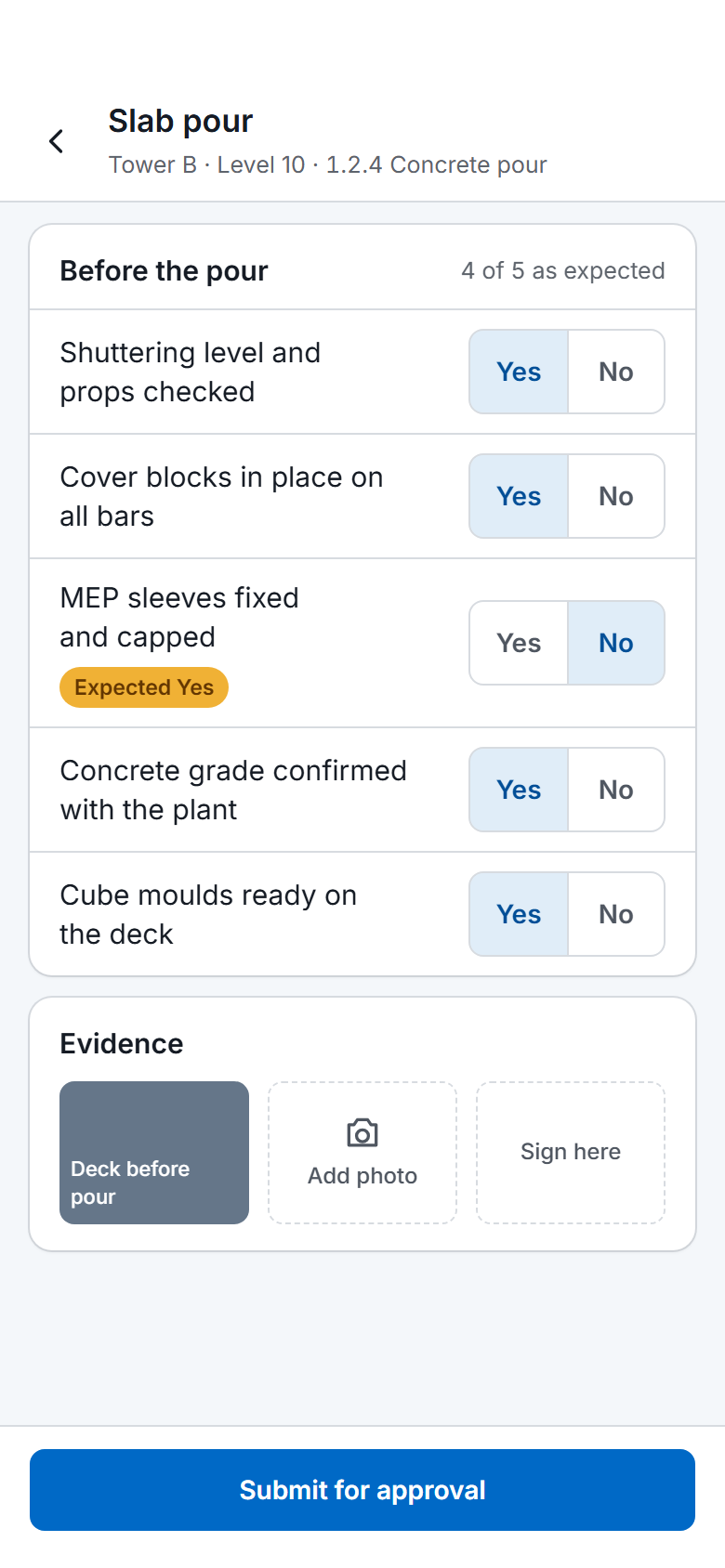
A checklist can require approval, and a filled form keeps who filled it, when, and whether it was approved or rejected. A task can stay open until its finish checklist is approved.

  • Fill the incident or site observation form
  • Approve or reject it
  • Gate the task on the finish checklist
See quality and safety
A SuperWise phone app quality checklist for a slab pour: five Yes or No answers checked against the expected response, one flagged, a photo, a signature box and a Submit for approval button.

Before and now

What changes for a fund

Modules a fund uses

The reporting pack sets out the DPR and MIS formats a fund can ask developers and PMCs to follow.

Modules a real estate fund uses to monitor projects and what you do in each
ModuleWhat you do in it
Portfolio summaryScan all projects you can access for schedule status, overall percent complete, cost to date against budget and the number of open issues.
MIS and management reportRead the A2 BOQ summary of contracted, measured, billed and remaining quantities, and the forecasts at a weekly or monthly interval.
Package-wise schedule summarySee planned and actual dates, percent complete and delay in days for each package of work.
BaselinesCheck start and finish variance in days against the active baseline, and open the baseline saved at each approval.
Organisations (vendors, clients, contractors)Record the SPV and the client as organisations next to the contractors and suppliers on a project.
Roles and privilegesGive each person a role with view, create, edit, delete and approve rights by module area, and assign users to the projects they monitor.
Checklists and quality formsRequire approval on forms such as the incident and first aid report and the fortnightly site observation report.

Figures that trace to records

A fund sees a portfolio from above and wants to know that the figures come from the project below. Every SuperWise report is computed when you generate it, from the schedule, BOQ, procurement, labour and billing records, so a number in the summary traces to records you can open.

The MIS report lists unplanned material purchases, which are delivery challans with no matching purchase order or BOQ link. The A2 BOQ summary shows contracted, measured, billed and remaining quantities for each item.

Each approval of a schedule saves a baseline, so the plan at every revision is kept, and variance in days is read against the active one.

Compliance records on site

A fund that asks for safety discipline on its projects can have it recorded as forms. A checklist can require approval, and a filled form keeps who filled it, when, and whether it was approved or rejected. The product guide gives an incident and first aid report and a fortnightly site observation report as examples.

Checklists can also gate work. A task with enforcement on cannot be marked complete until its finish checklist is approved, and a delivery challan can carry a quality checklist. The quality and safety page covers them.

Frequently asked questions

Can a fund see every project in one report?

Yes. The portfolio summary lists all projects the user can access with four fields for each: schedule status, overall percent complete, cost to date against budget and the number of open issues. It is intended for director and PMO review. The MIS report and the cash outflow reports then go into one project at a time.

Does SuperWise forecast cash outflow?

It forecasts outflow, not receipts. The A2 MIS report draws a cash S-curve against BOQ value and a task forecast at budgeted rate, from a forecast start date with a weekly or monthly interval. SuperWise has no sales or receipts module, so the gap between outflow and customer payments is not computed.

Is there an investor portal?

The product guide documents a vendor portal for quotations, proposals and bills, and no investor portal. Fund staff log in as users with a role, assigned to the projects they monitor. Privileges set what each person can view, create, edit, delete and approve, and users marked as external see only their own organisation.

How does a fund judge whether a schedule is realistic?

Each approval of the schedule raises the revision and saves a baseline, and manual baselines can be added. The active baseline is the reference, and start and finish variance is shown in days. The package-wise schedule summary shows planned and actual dates, percent complete and delay for each package.

Can a fund limit who sees which project?

Yes. Users are assigned to projects and see those projects. A role holds view, create, edit, delete and approve privileges for each module area, and a user can hold several roles. The portfolio summary covers the projects the user can access, so two people can see different portfolios from the same login screen.

See the portfolio summary live

Book a demo and we open the portfolio summary and one project behind it.