

Professions

Run indents, quotations and work orders on one trail

SuperWise gives contracts and purchase teams construction contract and purchase management from indent to work order: RFQs, quotations, purchase orders, RFPs, proposals and amendments, each with its approvals.

A purchase executive in a white shirt, helmet and hi-vis vest holding a blank clipboard and checking bundled steel bars on a truck at a site gate, a security guard standing by the open gate
Delivery matched · 10:45

Reinforcement steel · Against the PO line

Mumbai100%
Vehicle and driver notedThree photos attachedWithin the line maximum

Your headache

The site asked on Monday.The purchase order went out on Friday, and nobody knows why.

Morning, site, office

A buyer's day on SuperWise

  1. Morning 9:00

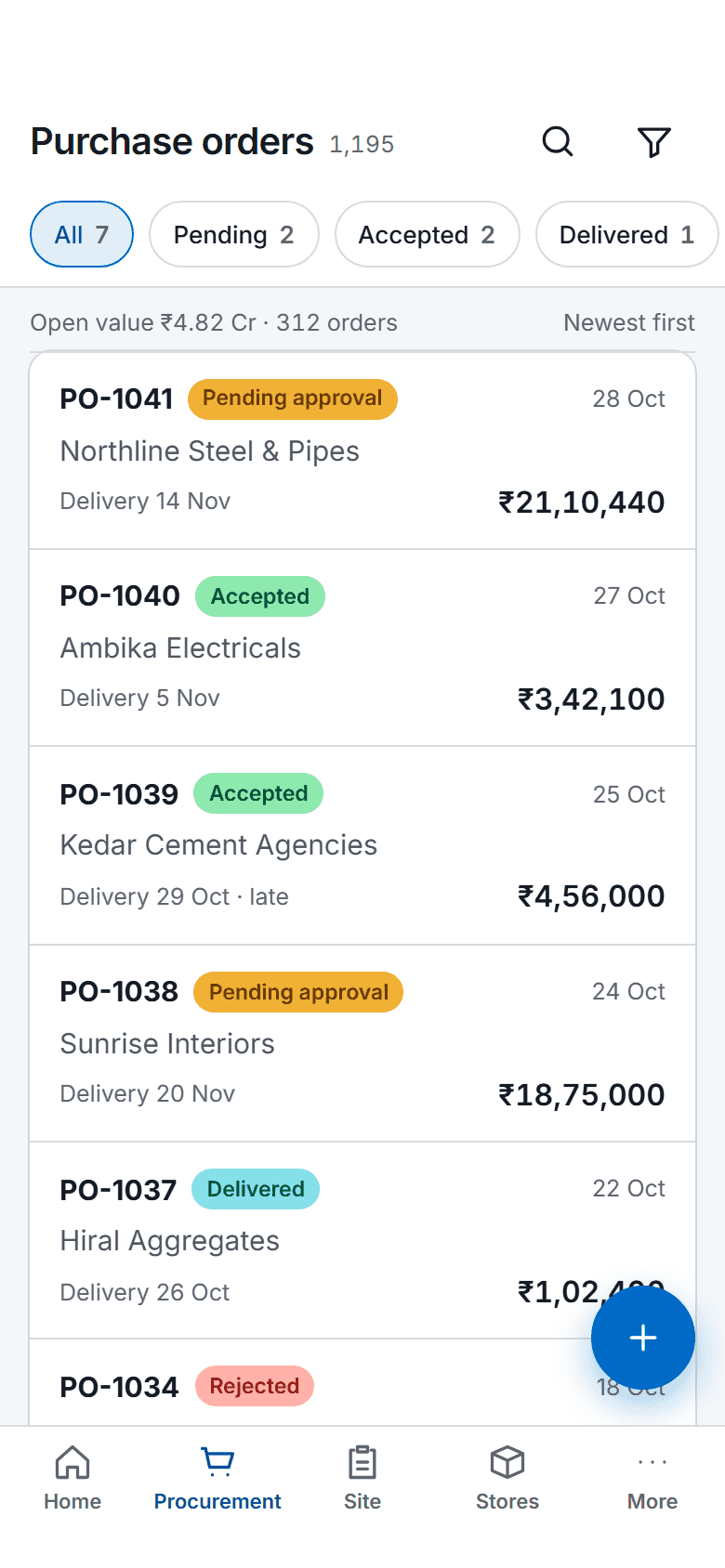
    The SuperWise phone app purchase orders list: status filter chips, order cards with supplier, delivery date, amount and a status label, a floating button for a new order and bottom tabs.

    Indents reviewed and routed

    Indents from site arrive with the quantity, the required-by date, photos and a BOQ link. Each becomes an RFQ or a purchase order, or is rejected and kept on record.

  2. On site 11:00

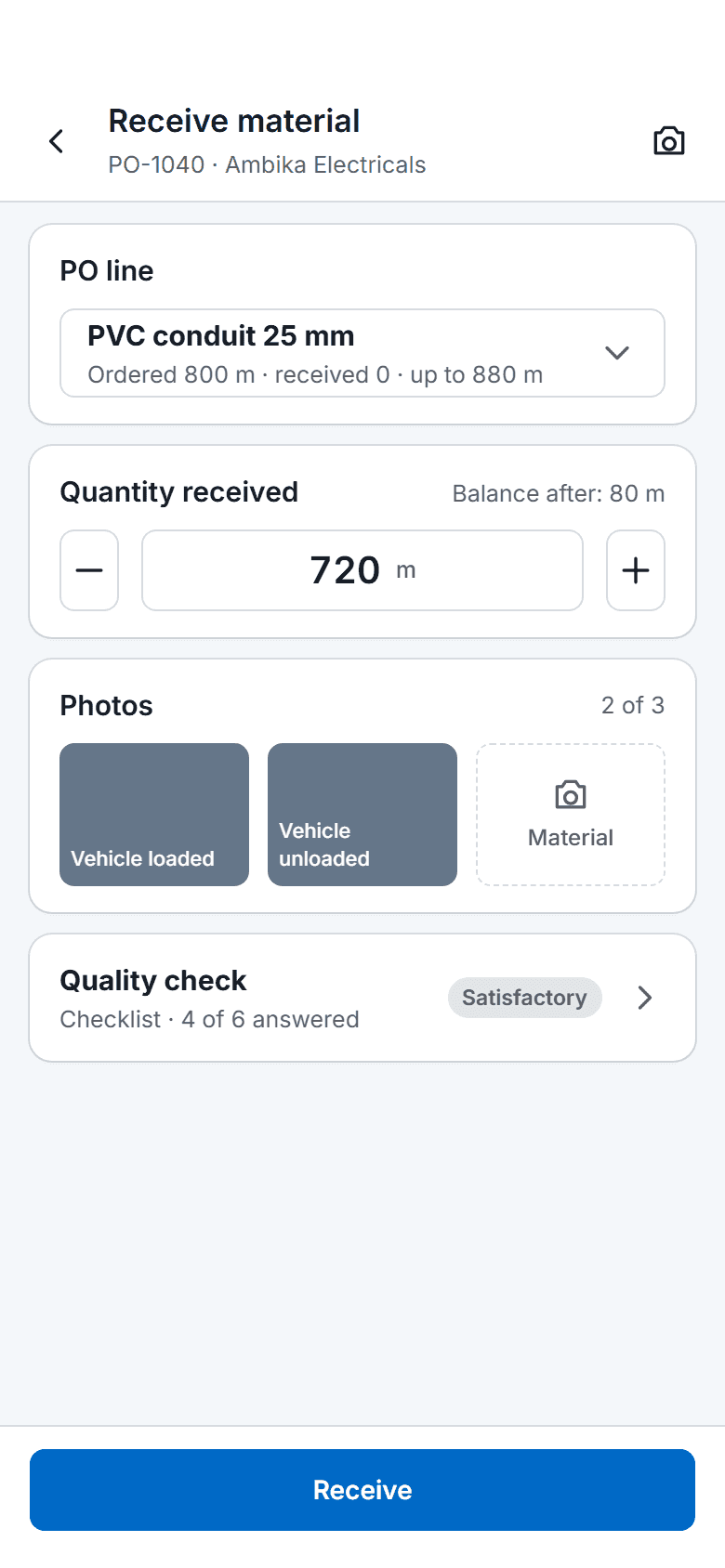
    The SuperWise phone app receiving material against a purchase order: the chosen PO line, the quantity received with a stepper, two of three photos taken, a quality check row and a Receive button.

    A delivery matched to its order

    At the gate, the delivery is received against the purchase order line, and the quantity cannot pass the line maximum plus the permitted variation.

  3. In the office 15:00

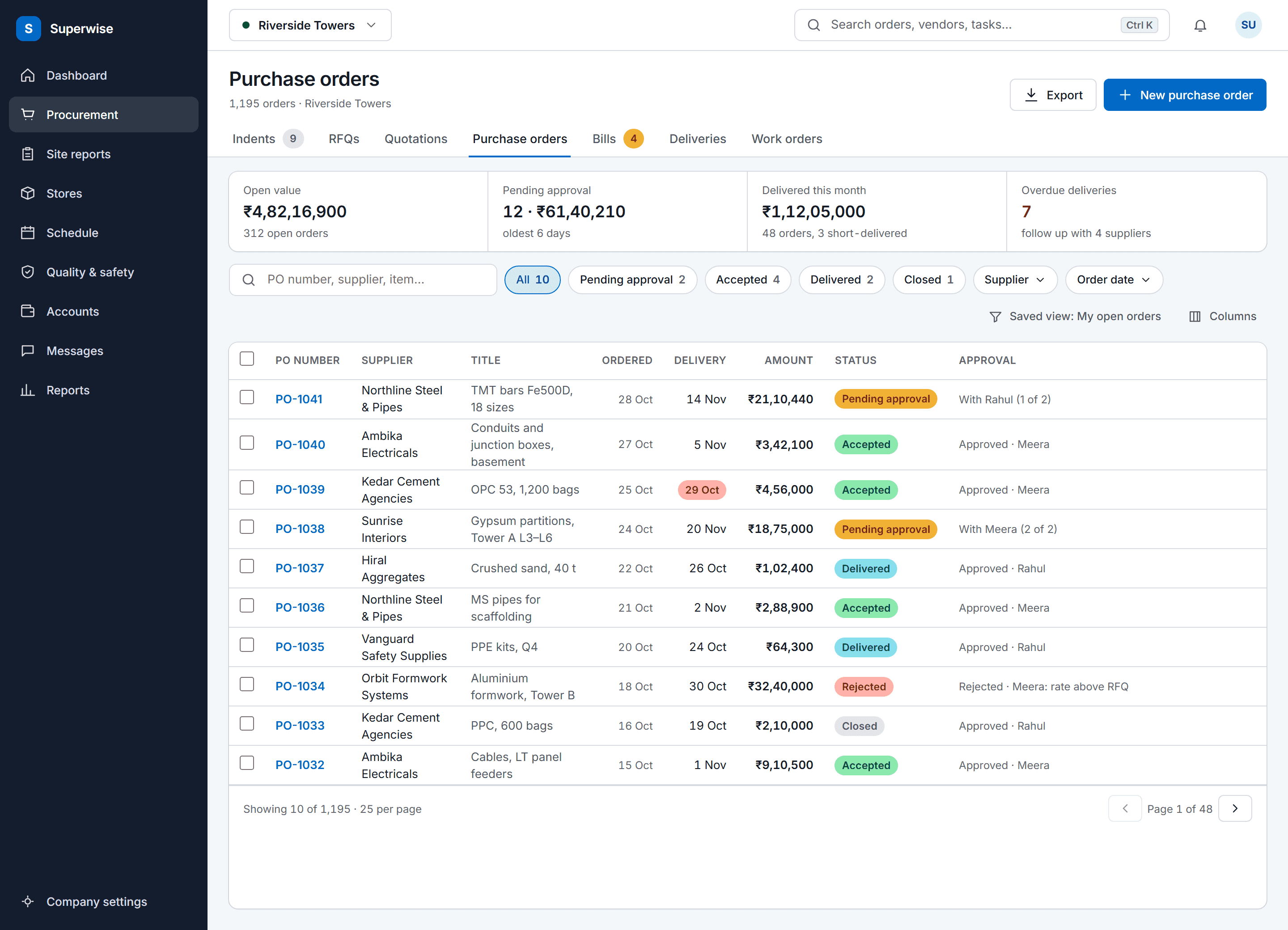
    The SuperWise purchase orders list: procurement tabs, a four-figure summary strip, search and status filters, and a full-width table of orders with supplier, delivery date, amount, a status label and the approval state.

    Awarded, then ordered

    Quotations from a call, an email or the vendor portal are compared and one is awarded. The purchase order is created from it, for approved suppliers only, and needs approval.

Three workflows

Three workflows from indent to award

01 · Procurement

From indent to purchase order

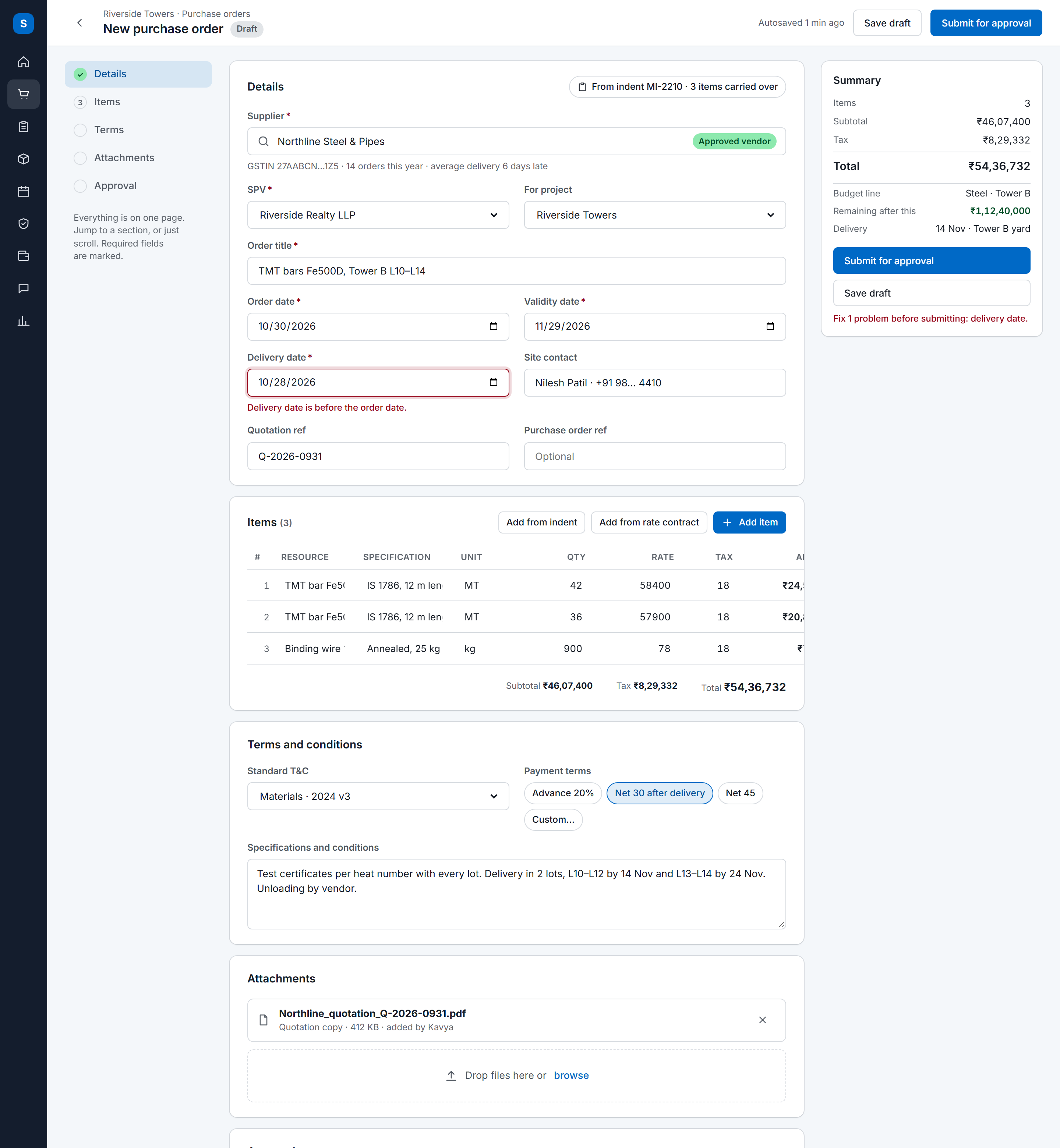
An indent becomes an RFQ or a purchase order. A purchase order is created from an awarded quotation or directly, for approved suppliers only, and needs approval before deliveries are received.

  • Review the indent
  • Send an RFQ, a sealed Tender or a Reverse auction
  • Raise the PO from the awarded quotation
See material management
The SuperWise purchase order form on one page: section navigation, supplier and order details with a validation message naming the fix, an inline item grid with totals, terms, an attachment, the approval steps and a sticky order summary.
02 · Bids

Bids compared line by line and awarded

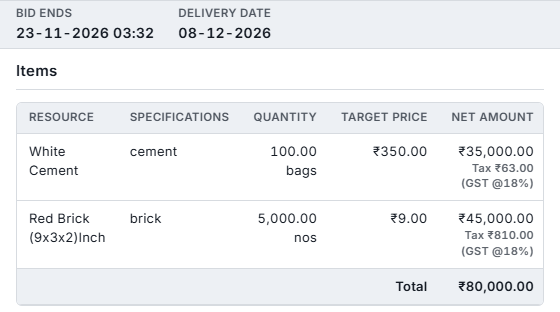
Vendors get an emailed link with a one-time access code and bid on the vendor portal. Quotations from calls and emails are entered beside them, compared, and awarded while valid.

  • Invite vendors to the RFQ
  • Enter phone and email quotations
  • Compare and award one
See trade contractors
RFQ side panel with bid end and delivery dates and an items table: 100 bags of white cement and 5,000 red bricks with target prices, net amounts and a total of 80,000 rupees
03 · Contracts

Contracts from proposal to work order

A works contract starts from BOQ items. Proposals are compared per line, one is awarded, and the work order carries BOQ rates, retention and mobilisation. An amendment keeps the earlier version and the reason.

  • Publish the scope as an RFP
  • Compare proposals and award one
  • Issue and amend the work order
See RA bill certification
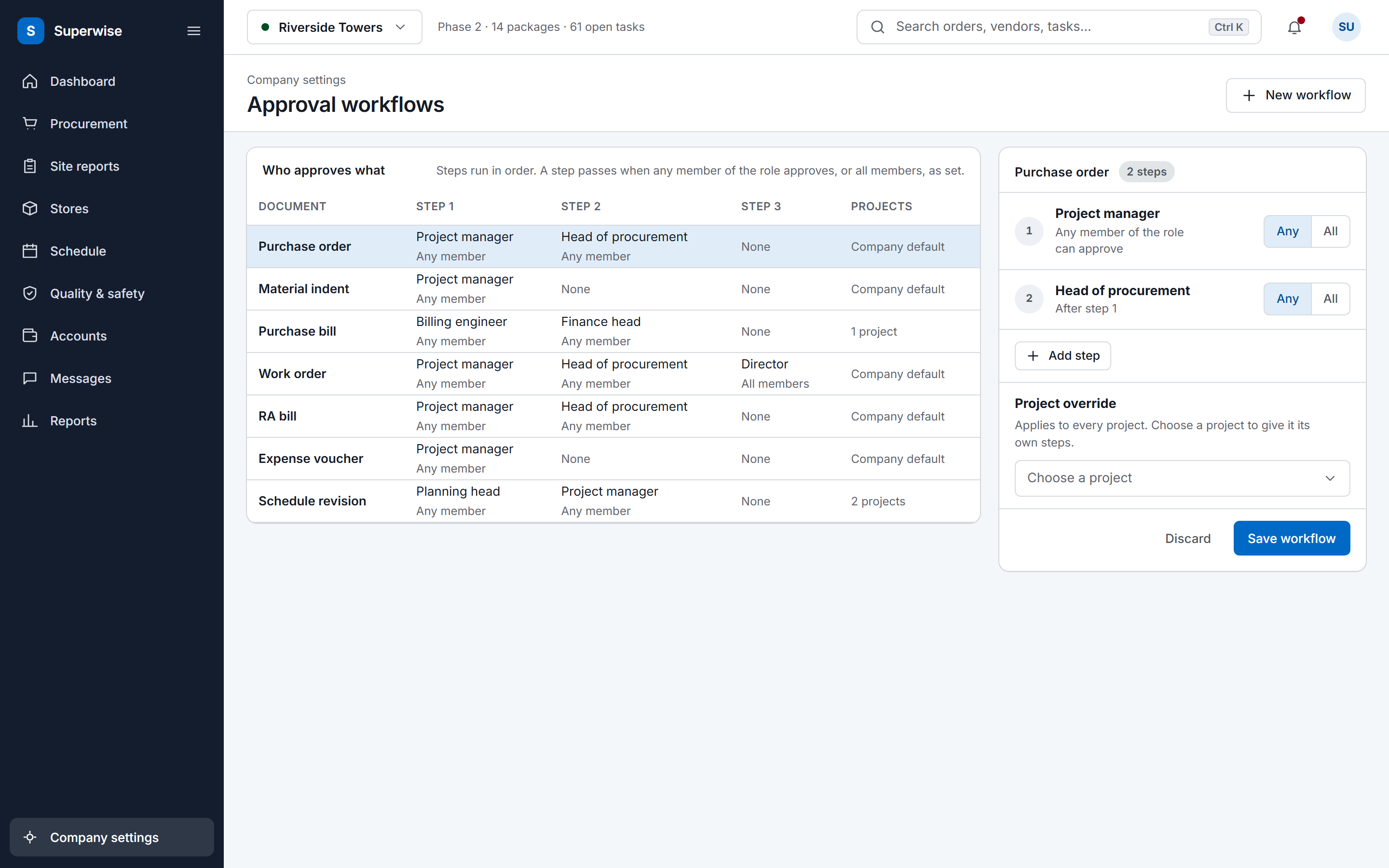
The SuperWise approval workflows settings: a matrix of document types by approval steps with the role and whether any or all members must approve, and an editor for the purchase order workflow with a project override and a Save workflow button.

Before and now

What changes for purchase teams

Modules contracts and purchase use

The first four rows are the material chain and the last three are the works contract chain. Each comes from the product guide, and the material management feature covers the material side.

Modules a contracts and purchase team uses and what you do in each
ModuleWhat you do in it
Material indentsReview indents from site with quantity, required-by date, photos and BOQ link. Each becomes an RFQ or a PO, or is rejected and kept.
Requests for quotation (RFQ)Send an RFQ, a sealed Tender or a Reverse auction to vendors, who get an emailed link with a one-time access code.
QuotationsEnter quotations from a call, an email or the vendor portal, compare them and award one while it is valid.
Purchase orders (PO)Create a PO from an awarded quotation or directly, for approved suppliers only. It needs approval before deliveries are received.
Requests for proposal (RFP)Publish a scope taken from BOQ items to contractors, with a submission deadline.
ProposalsCompare each contractor's rate for every scope line and award the best bid, which creates the work order.
Work orders (WO)Issue a work order from an awarded proposal or directly, with BOQ rates, retention and mobilisation, and amend it with a reason.

From indent to purchase order

An indent is the site's request: a resource, a quantity, a required-by date, photos, a GPS location and an optional BOQ link. Its status moves through pending, accepted, RFQ, purchase order or rejected, and only a pending indent can be edited. A rejected indent stays on record for audit.

An RFQ takes one of three bid types: RFQ, Tender (sealed) or Reverse auction. Vendors get an emailed link with a one-time access code and submit on the vendor portal. Quotations can also be entered from a phone call or an email, then compared and awarded while valid.

A purchase order is created from an awarded quotation or directly, for approved suppliers only. It needs approval before deliveries are received. Each line has a maximum quantity, and a delivery cannot exceed it beyond the resource's permissible variation.

Contracts from proposal to work order

A works contract starts from a scope taken from BOQ items. The RFP goes to contractors, who respond with proposals priced for each line. Proposals are compared, one is awarded and the work order is created from it. A work order can also be created directly.

A work order carries BOQ rates, a retention percentage and a mobilisation amount, and it can carry billing milestones. An amendment raises the revision, snapshots the earlier version and records the reason, and RA bills then use the amended lines. In contract terms such a change is often a variation order, and SuperWise records it as an amendment.

Issues raised on site can name the responsible organisation, and an issue can carry a vendor ledger penalty, so a vendor's problems are recorded against them.

Frequently asked questions

How are bids compared and awarded?

Quotations or proposals from every invited party sit in a comparison view. You award one while it is valid, and the others are marked as awarded to another. An awarded quotation can become a purchase order and an awarded proposal a work order. Vendors cannot see other vendors' quotations.

What is the Tender bid type?

Tender is a bid type on an RFQ for sealed bids. The other two are RFQ and Reverse auction, where vendors bid downward in real time. Vendors receive an emailed link with a one-time access code and submit through the vendor portal. They cannot see one another's quotations.

Does a delivery have to match the purchase order?

Yes. A purchase order must be approved before deliveries are received, and each line has a maximum quantity. A delivery cannot exceed that maximum beyond the permissible variation set on the resource. The delivery challan records the quantity against the line, so the balance on each line is visible before the next delivery.

How are amendments to a purchase order or work order recorded?

An amendment raises the revision number, keeps a snapshot of the earlier version with its lines and records who made it and the reason. A purchase order also records when a user acknowledged a budget overrun. Later bills use the amended lines, and a bill inward uses the rate of the revision in force for the period.

Where does the scope of an RFP come from?

From the project BOQ. You choose the BOQ items in scope, and each becomes an RFP scope line with a quantity. Contractors price every line, so proposals compare line by line. The RFP has a submission deadline and goes live on the vendor portal when you publish it.

See an RFQ become a purchase order

Book a demo and we take one indent through quotations to an approved purchase order.