


Roles

Know where each project stands before the next review

SuperWise is construction project monitoring for real estate developers and owners. A portfolio summary, approval trails and cash outflow reports read from the records each project keeps.

A developer's project head in a white helmet and orange hi-vis vest holds rolled drawings on an unfinished floor of a tower, with a second tower and a crane rising in warm afternoon light
Review ready · 08:30

Riverside Towers · Schedule status

Mumbai62%
Baseline comparedApprovals on recordOpen issues listed

The firm’s headache

Every project head tells it differently.The review starts by arguing which version is right.

Morning, site, office

A developer's day on SuperWise

  1. Morning 8:30

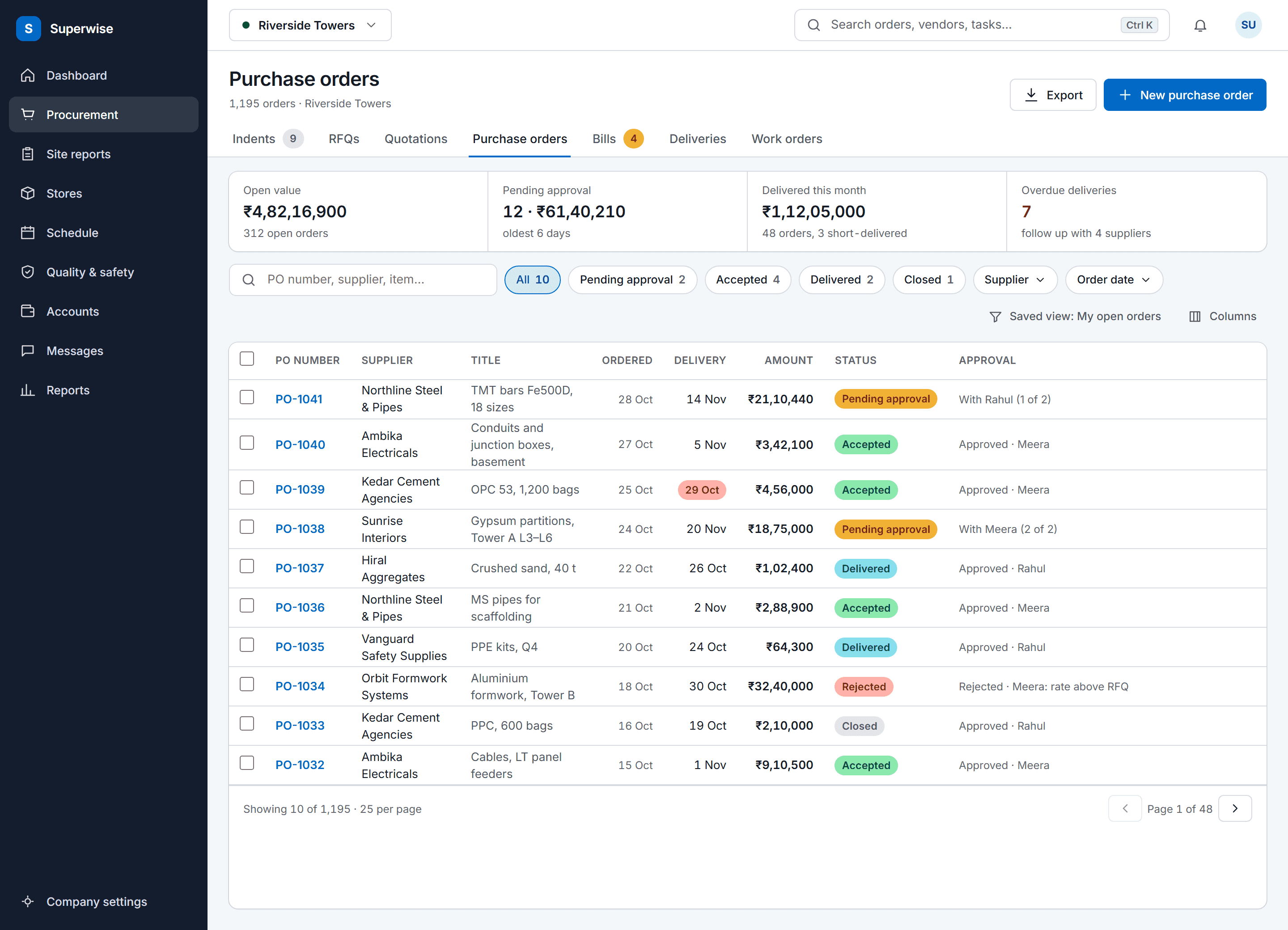
    The SuperWise purchase orders list: procurement tabs, a four-figure summary strip, search and status filters, and a full-width table of orders with supplier, delivery date, amount, a status label and the approval state.

    Approvals cleared before the review

    Purchase orders, work orders and RA bills waiting for sign-off sit in one list. Approvers act in steps by role, and each step records who acted, when, and the comment.

  2. On site 12:30

    Slab reinforcement in progress with workers among starter bars, a yellow tower crane at the right and a hazy Mumbai skyline

    A site visit that starts from the record

    On a visit, open the project to see its open issues, who owns them and the photos attached, so the walk begins from what is already known.

  3. In the office 16:00

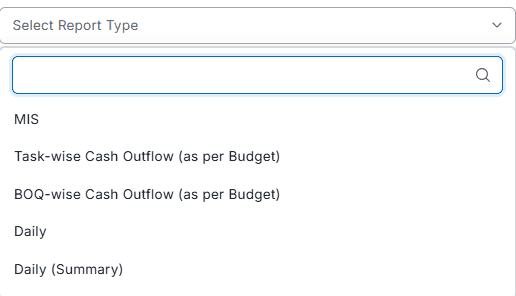
    Report type picker opened to list MIS, task-wise and BOQ-wise cash outflow as per budget, Daily and Daily (Summary)

    Cash outflow read against the plan

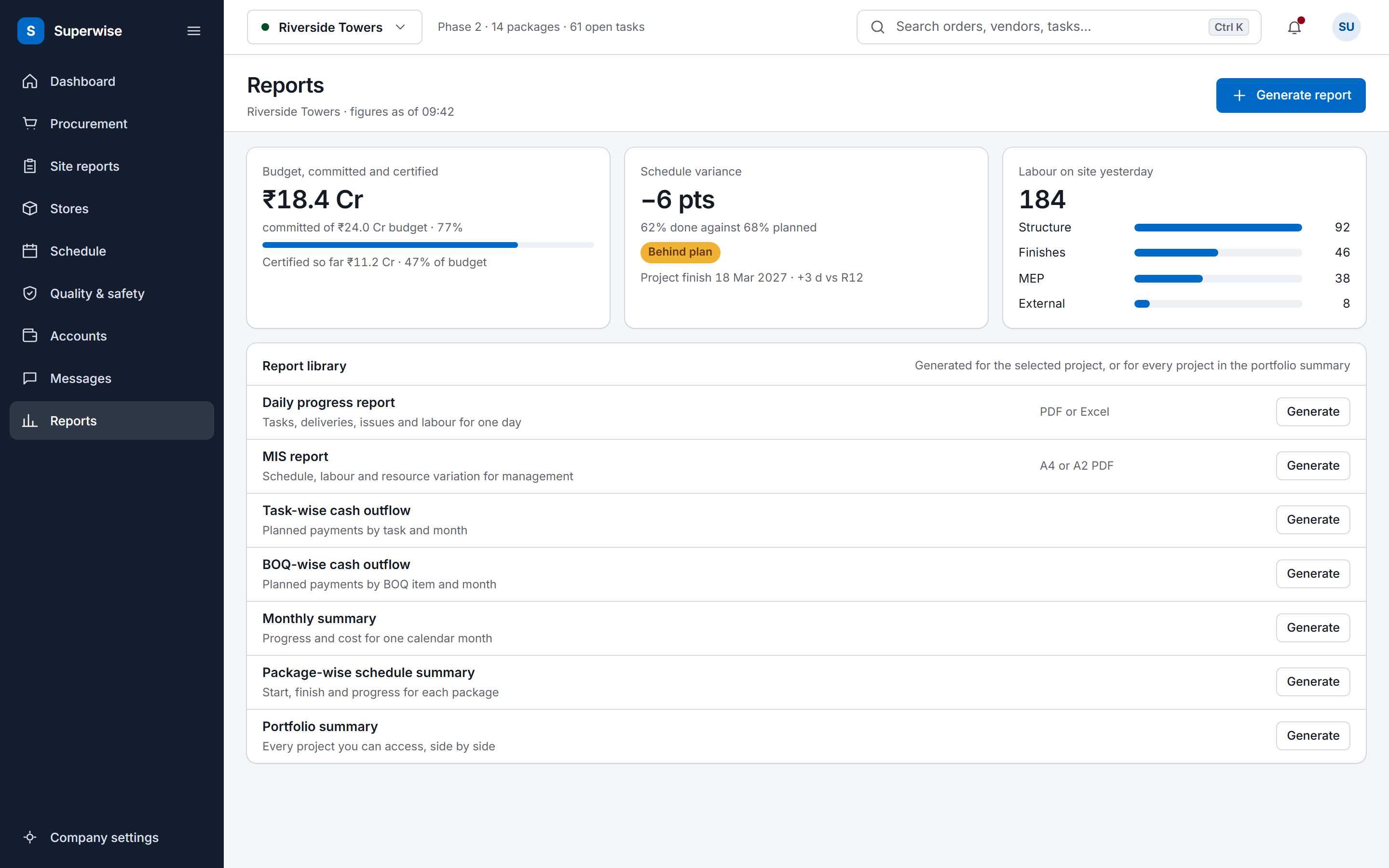
    The task-wise report compares planned spending with actual spending, and the BOQ-wise report compares what orders committed with what bills certified, by WBS level and period.

Three workflows

Three workflows behind every review

01 · Portfolio

Every project, in one summary

The portfolio summary lists each project you can access with its schedule status, overall percent complete, cost to date against budget and open issues. The project dashboard goes one level down.

  • Open the portfolio summary
  • Spot the project that is behind or over
  • Open its dashboard for the detail
See construction management software
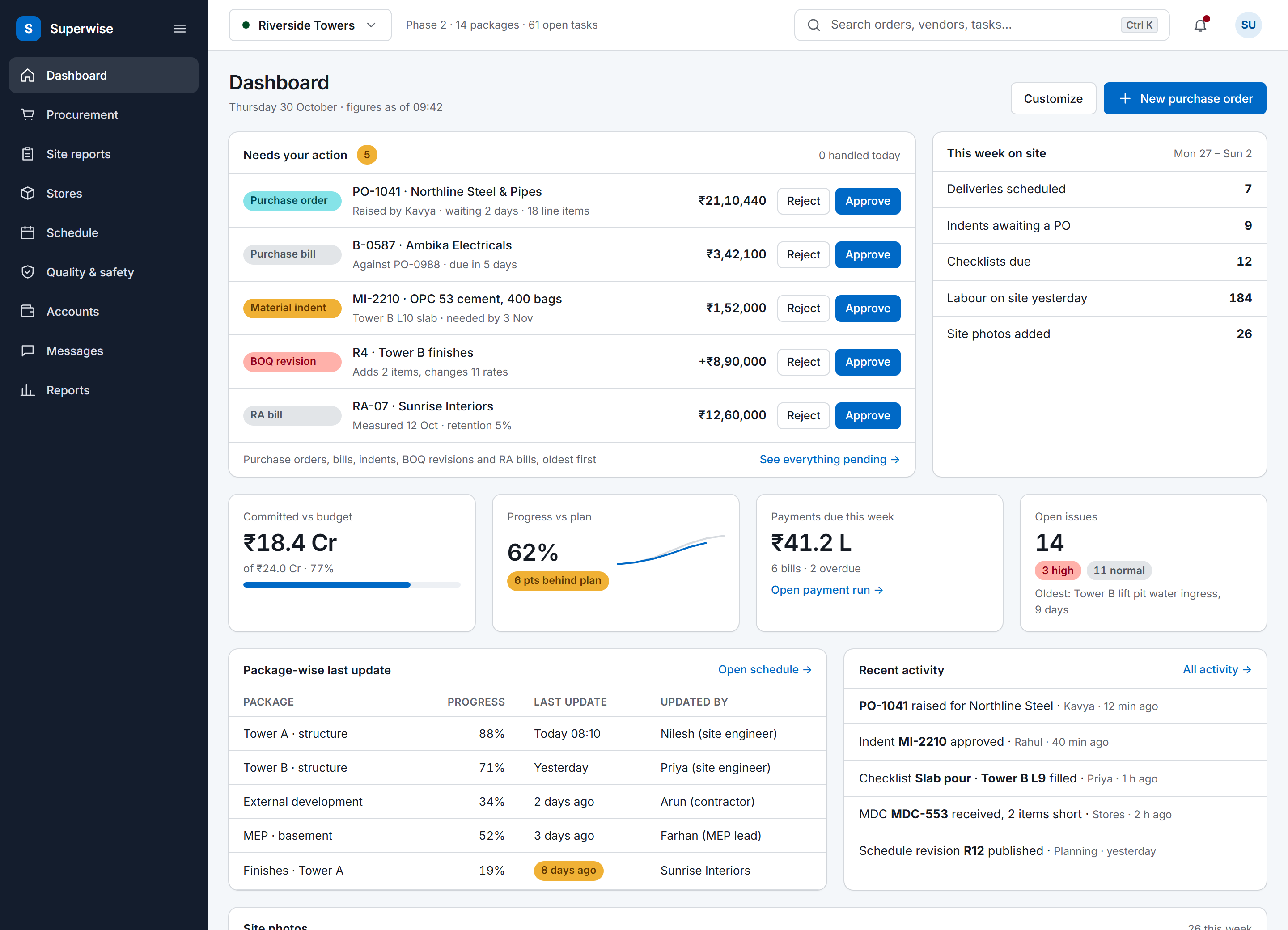
The SuperWise portal dashboard for a project: an approval queue with five items waiting for the user, a week-on-site summary, four key figures for budget, progress, payments and open issues, package-wise last updates and recent activity.
02 · Approvals

Approvals set by role and kept on record

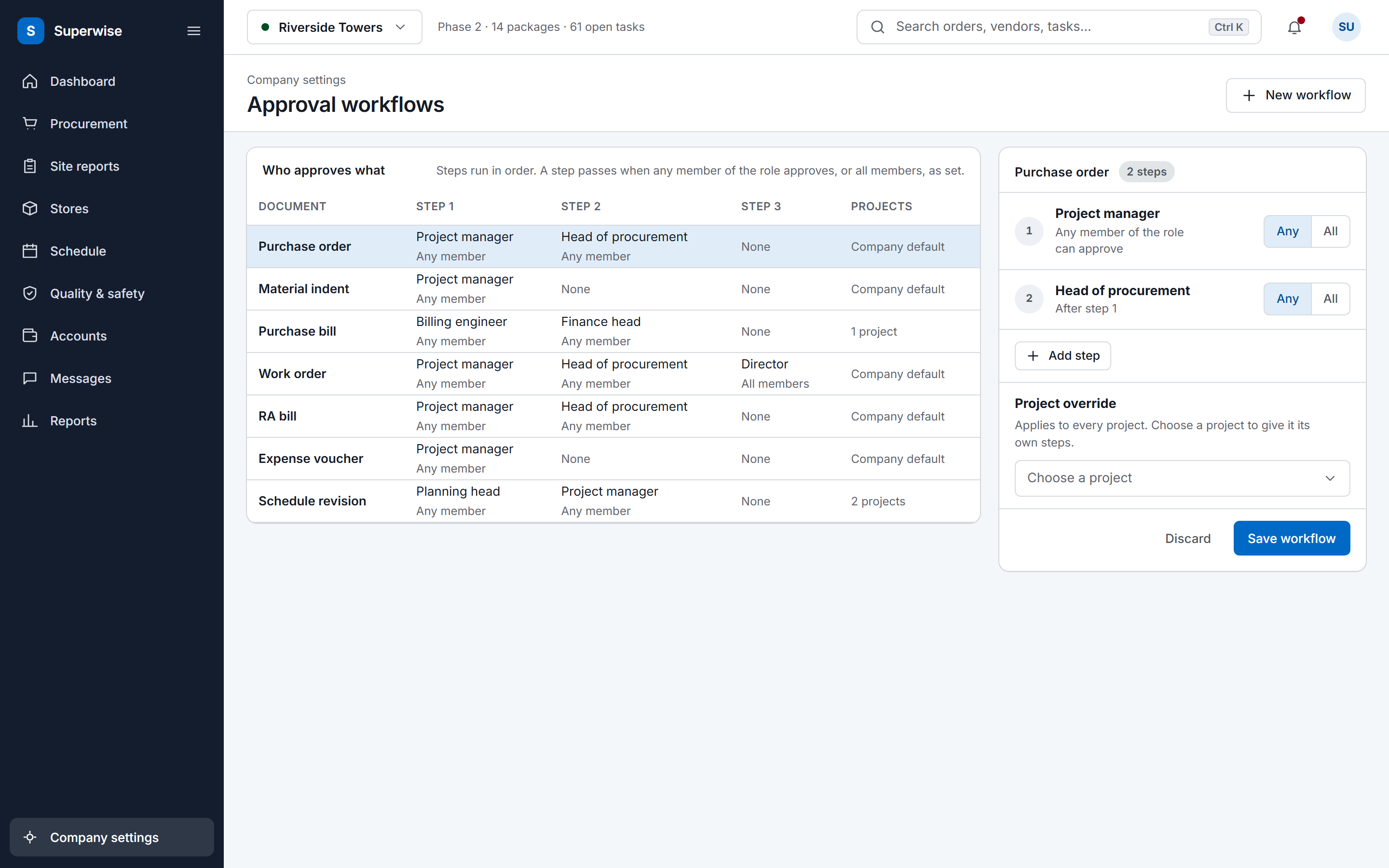
Approval steps are set by role for purchase orders, work orders, RA bills, expense vouchers and schedule changes. A project can override the company workflow, and a rejected document returns to its submitter.

  • Set the steps and who must approve
  • Require any member or all members
  • Read the trail of approver, date and comment
See the document trail
The SuperWise approval workflows settings: a matrix of document types by approval steps with the role and whether any or all members must approve, and an editor for the purchase order workflow with a project override and a Save workflow button.
03 · Cash outflow

Spend compared with the plan

Planned spending comes from the budget and actual spending from bills and challans. The BOQ-wise view sets what purchase orders and work orders committed against what RA bills certified.

  • Pick task-wise or BOQ-wise
  • Choose the WBS level and period
  • Read committed against certified
See estimation and earned value
The SuperWise reports hub: a cost tile for budget, committed and certified, a schedule variance tile, labour deployment by package, and a library of the reports a project can generate.

Before and now

What changes for developers

Modules a developer uses

The construction management software India page covers the whole product, and the PMC software page covers the consultant side.

Modules a developer uses for governance and what you do in each
ModuleWhat you do in it
Portfolio summaryReview every project you can access by schedule status, overall percent complete, cost to date against budget and open issues.
Approval workflowsSet approval steps by role for POs, work orders, RA bills, expense vouchers and schedule changes, with a project override.
Task-wise cash outflowCompare planned spending from the budget with actual spending from bills and challans, by WBS level and period.
BOQ-wise cash outflowCompare what POs and work orders committed with what RA bills and bill inwards certified.
Project BOQ and BOQ playgroundHold the contracted quantity, rate and amount of each item, and compare planned with measured quantity.
Purchase orders (PO)Approve orders whose lines have a maximum quantity, and see the revision, author and reason of every amendment.
Organisations (vendors, clients, contractors)Keep suppliers, contractors, consultants, SPVs and clients on one list, with external users limited to their own organisation.

One source for status and forecast

Owners often get status from the head of each department, and each head sees the project from their own desk. SuperWise reads status from the records instead. The schedule shows planned and actual dates with variance against the active baseline, and the cost reports compare the budget with committed and certified values.

The A2 MIS report adds a rolling task forecast, a forecast at budgeted rate, a percentage-completion S-curve and a cash S-curve against BOQ value. You pick a weekly or monthly interval and the date the forecast starts from.

Governance on purchases and contracts

A purchase order needs approval before deliveries are received, and each line has a maximum quantity. An amendment raises the revision number, keeps a snapshot of the earlier version and records the reason, and the purchase order records when a user acknowledged a budget overrun. Work orders amend the same way.

Purchase orders and work orders keep who created them, who last changed them and who changed their status. Approvers act in steps by role, any member or all members, and a project can override the company workflow.

Contractors, consultants and suppliers sit on the same organisation list. A vendor logs in to the vendor portal for quotations, proposals and bills, and sees only their own organisation.

In their words

From a developer's projects head

Sundar Rajan is Head of Projects Development at Shree Naman Group, a real estate developer.

Our data was spread across construction ERP, Excel files, MS Project and Whatsapp Chats. With SuperWise, now we are able to achieve smart field-office co-ordination and align the planning, contracts & execution teams with to detect any deviations early on!

Sundar Rajan Head of Projects Development, Shree Naman Group

Running live projects since 2015.

Frequently asked questions

What does a developer see across projects?

The portfolio summary lists every project the user can access with its schedule status, overall percent complete, cost to date against budget and the number of open issues. It is meant for director and PMO review. From there the project dashboard, the MIS report and the cash outflow reports go into one project.

Can we set several review levels for work orders?

Yes. An approval workflow has numbered steps, each owned by a role, and a step can need any member of the role or all of them. Workflows exist for purchase orders, work orders, RA bills, expense vouchers and schedule changes. Set them for the company and override them per project. Each step records the approver, the date and a comment.

Does SuperWise handle accounts or sales?

No. SuperWise covers the construction side of a project: schedule, BOQ, procurement, site records, measurement and billing. It has no general ledger and no sales module. Bill inward and payments record what is payable to vendors, and a bill inward can be marked as passed to Tally. Keep your accounting and sales tools alongside it.

How do amendments to a purchase order or work order show?

An amendment raises the revision number, keeps a snapshot of the earlier version with its lines and records who made it and the reason. A purchase order also records when a user acknowledged a budget overrun. Later bills use the amended lines, and a bill inward uses the rate of the revision in force for the billing period.

Can our PMC and contractors work in the same project?

Contractors, consultants and suppliers are organisations on the project. Their staff are users with a role, and users marked as external see only their own organisation. Vendors reach a vendor portal for quotations, proposals and bills. The product guide documents no other external portal, so raise any specific arrangement in a demo.

See your portfolio on one screen

Book a demo and we show the portfolio summary and an approval trail on a sample portfolio.