

Roles

One format for every trade package on every project

SuperWise is project management for trade contractors who run many sites at once: the same work orders, measurement sheets, RA bills and labour records on each project, in one place.

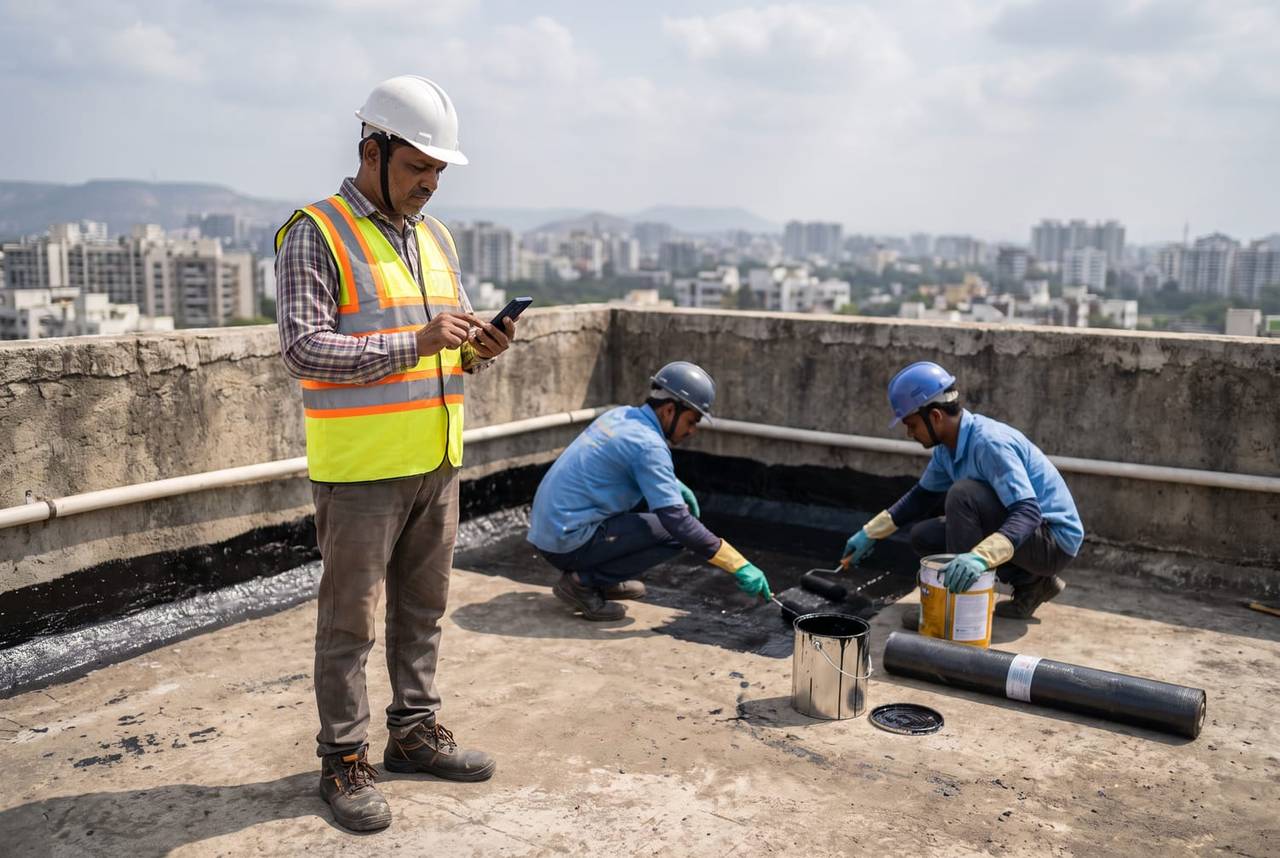
A trade contractor's crew lead in a white helmet and hi-vis vest checks his phone on a terrace slab while two workers kneel behind him applying a black waterproofing coat
Progress logged · 11:20

Terrace waterproofing · Second coat

Pune60%
Photo attachedGPS verifiedLabour recorded

The firm’s headache

Every site keeps its own register.The head office reads each one differently.

Morning, site, office

A trade crew's day on SuperWise

  1. Morning 8:00

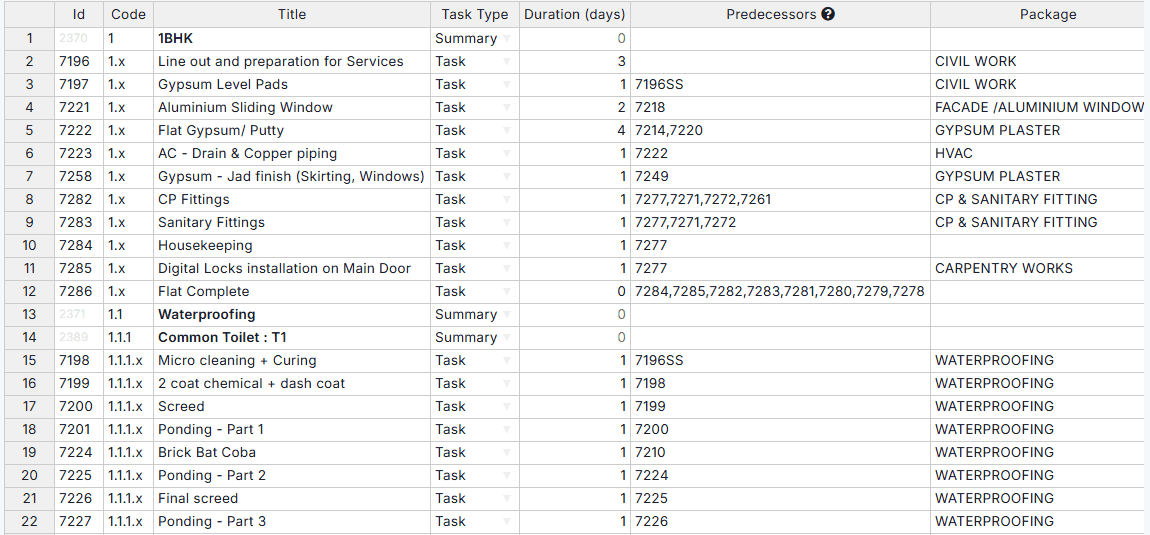
    Schedule task sheet with id, code, title, task type, duration, predecessors and package columns for flat finishing and waterproofing tasks

    The package arrives with its tasks

    A schedule template carries the package's tasks, durations and predecessors into the new project, so the crew lead starts from the same structure as every other site.

  2. On site 11:20

    A worker in a yellow helmet and striped shirt at a shuttering box among rebar on an upper floor, a blue sky and the city skyline behind

    Labour and delays recorded where they happen

    Labour challans record workers by category, with a photo and a GPS location. If the work front is not ready, the crew lead logs an issue with its type, priority and the organisation responsible.

  3. In the office 17:30

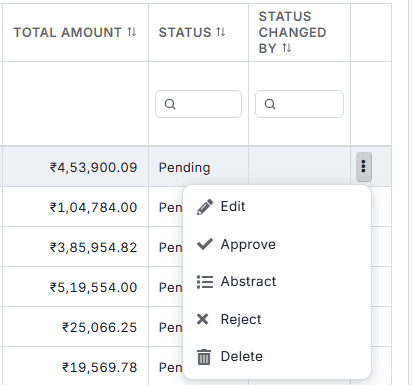
    RA bills list showing total amounts and Pending status, with the row menu open: Edit, Approve, Abstract, Reject and Delete

    The running bill, from measurements

    Measurement sheets record the work against the BOQ item and the work order. The RA bill for the period reads the approved quantities and stops at the work order quantity.

Three workflows

Three workflows for every package

01 · Awards

One award trail from RFP to work order

An RFP lists the scope from BOQ items. Proposals are compared, one is awarded, and the award creates the work order, with the approval steps kept at each stage.

  • Publish the scope to the contractors you invite
  • Compare each proposal line by line
  • Award one, and the work order is created
See contracts and purchase
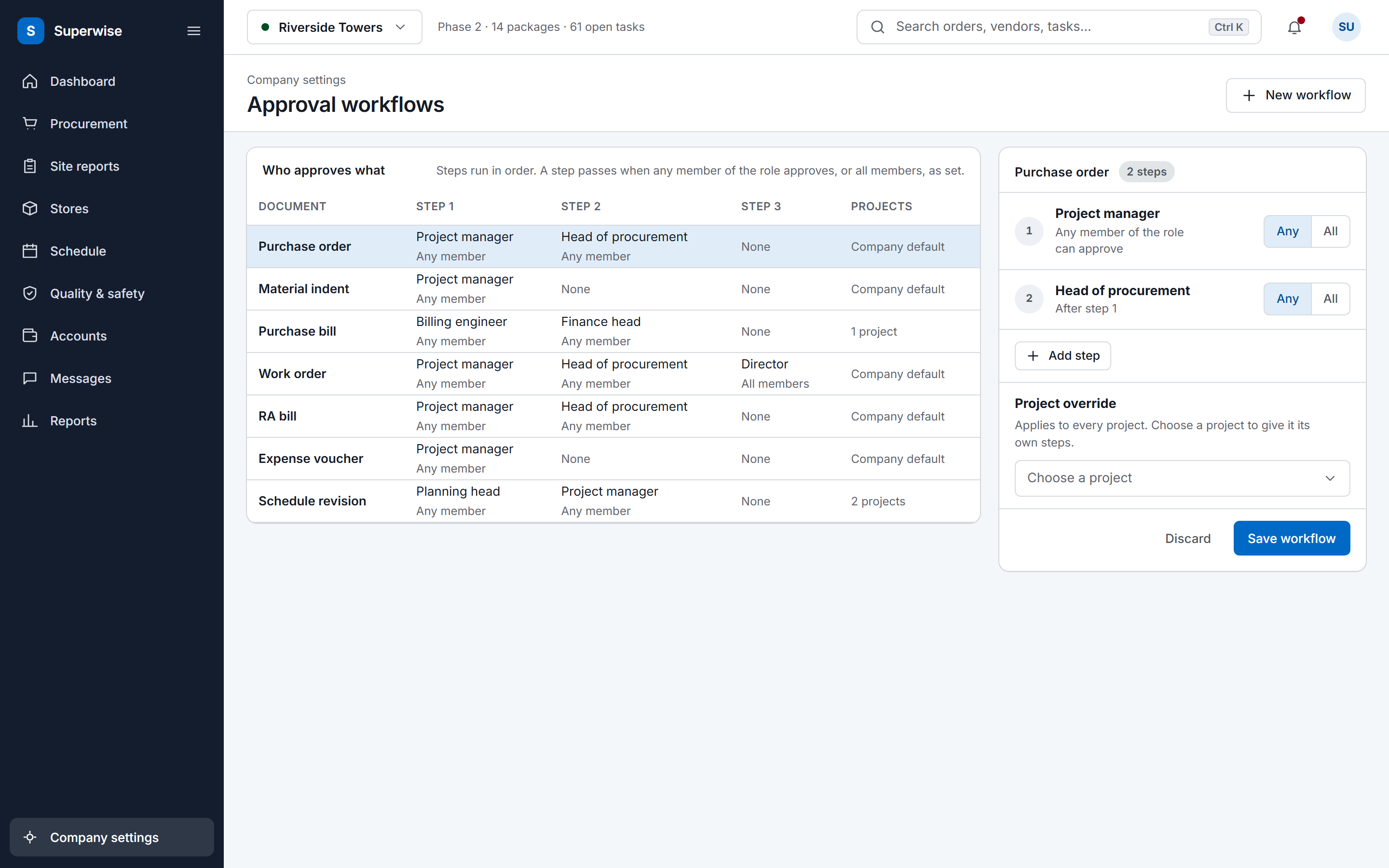
The SuperWise approval workflows settings: a matrix of document types by approval steps with the role and whether any or all members must approve, and an editor for the purchase order workflow with a project override and a Save workflow button.
02 · Reports

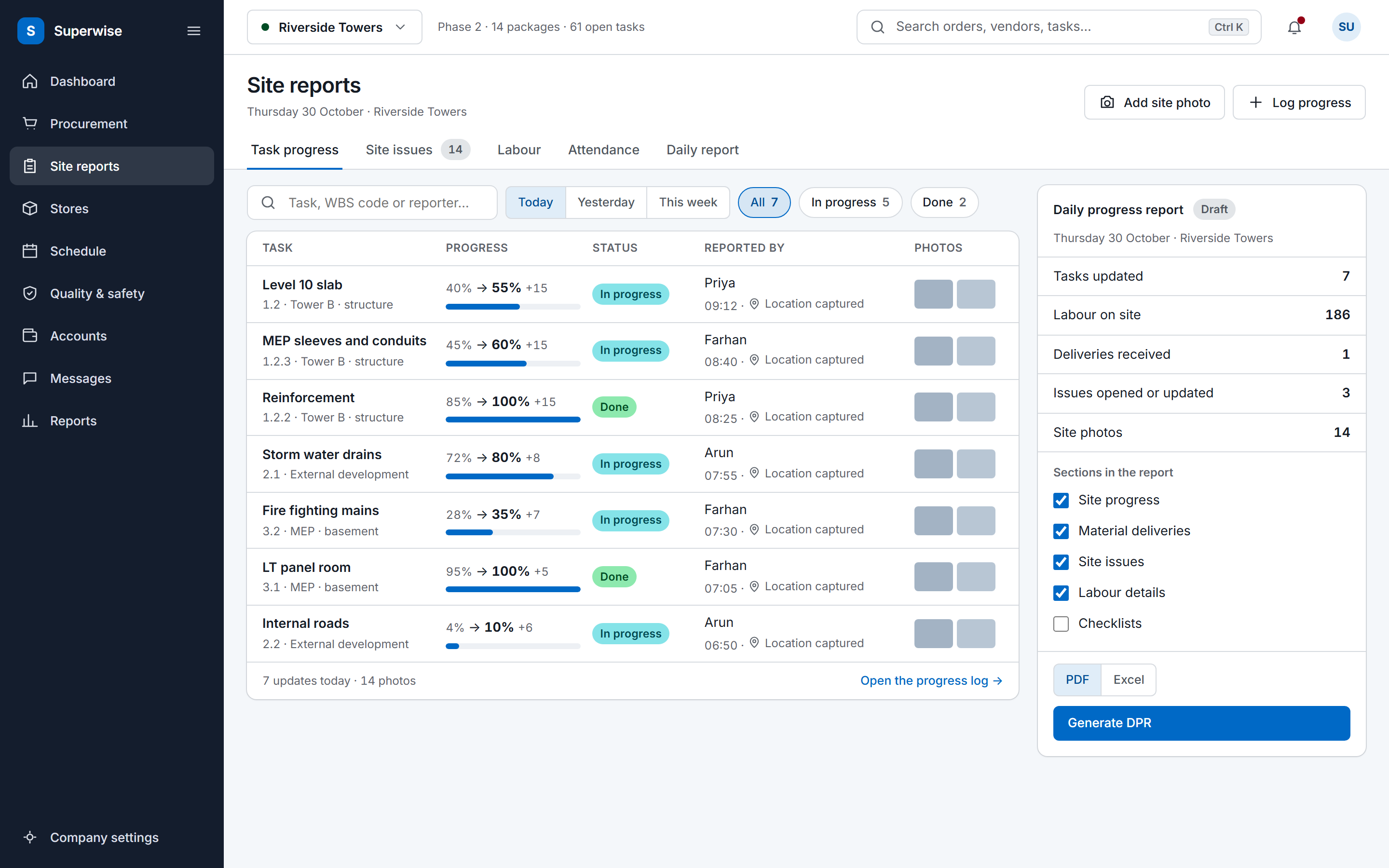
The same daily record on every site

Every site reads its records into the same DPR sections, so the head office compares sites without translating formats. It downloads as PDF or Excel.

  • One task structure from the template
  • One set of DPR sections on each site
  • Compare sites in a single format
See the DPR app
The SuperWise site reports screen: a feed of today's task progress updates with the previous and new percentage, a status label, the person who reported it, a location marker and photo thumbnails, beside a daily progress report summary with a Generate DPR button.
03 · Billing

Bills raised from approved measurements

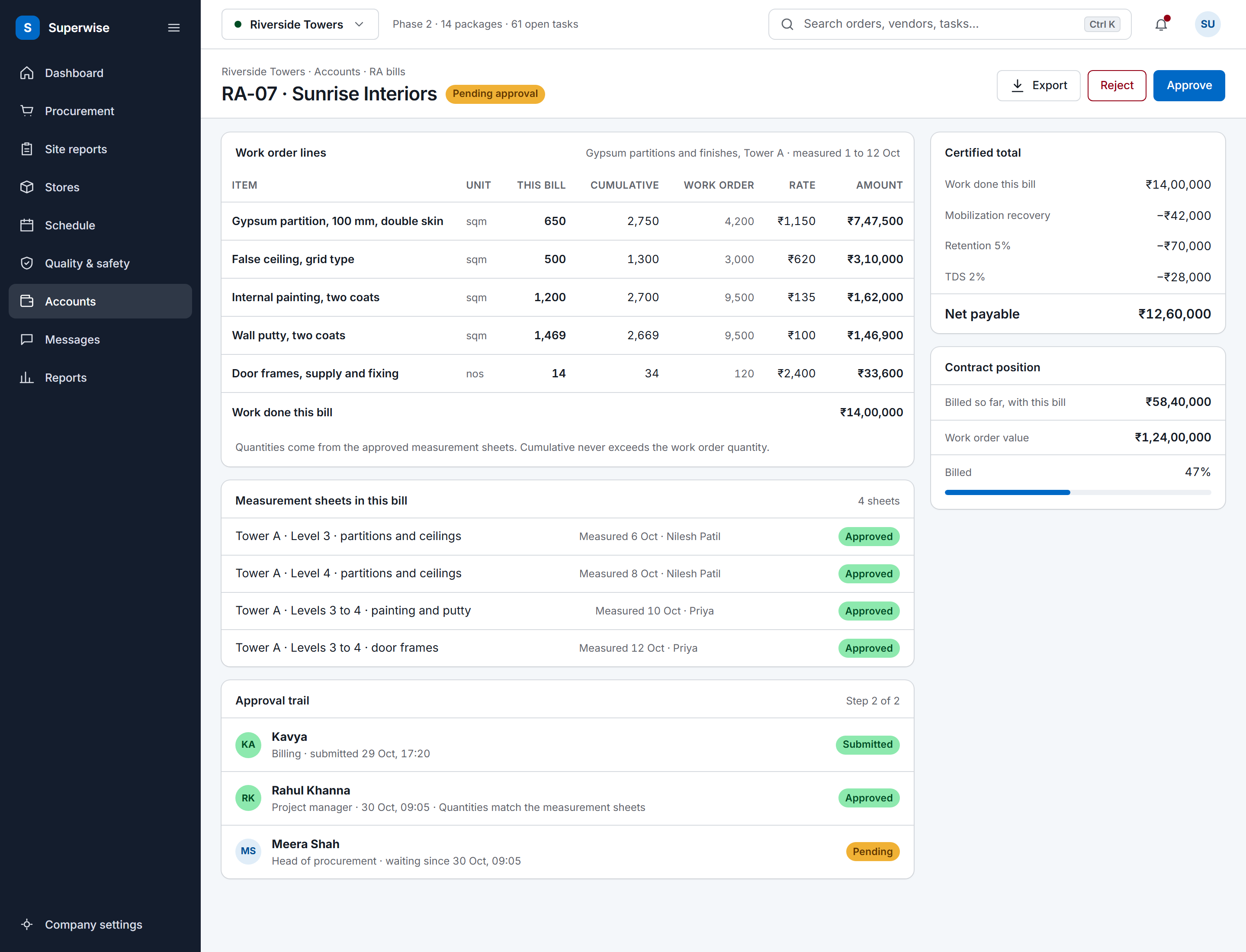
Measurement sheets use the measurement book format against a BOQ item and a work order. The RA bill claims the cumulative quantity, capped at the work order, with retention and mobilisation recovery deducted.

  • Record the measurement against the BOQ item
  • Approve the sheet
  • Raise the RA bill for the execution period
See RA bill certification
A SuperWise running account bill for a contractor: work order lines with this bill, cumulative and work order quantities, rate and amount, the certified total with mobilization recovery, retention and TDS deducted to a net payable, the approval trail and the contract position.

Before and now

What changes for trade contractors

Modules a trade contractor uses

Package contracts run through work orders and RA bills, while purchase orders cover material, labour and equipment. The RA bill feature shows the billing rows in detail.

Modules a trade contractor uses and what you do in each
ModuleWhat you do in it
Requests for proposal (RFP)Publish a scope taken from BOQ items to the contractors you invite, with a submission deadline.
ProposalsEnter or receive each contractor's rate for every scope line, compare the bids and award one, which creates the work order.
Work orders (WO)Issue the contract at BOQ rates with a retention percentage and a mobilisation amount, and amend it with a recorded reason.
Construction packagesTag schedule tasks with a package, so that progress, delay and cost read package by package.
Measurement sheetsRecord the work done in measurement book format against a BOQ item and a work order.
Running account bills (RA bills)Raise the running bill for an execution period, with the cumulative quantity capped at the work order quantity.
Labour challansRecord workers by category and contractor, with a photo and a GPS location.

One way of working on every site

A trade contractor's projects drift apart when each site lead keeps records their own way. A schedule template holds a WBS, tasks, durations, predecessors and milestones, and each task carries a package, a department, resources and BOQ links. A project built from the template starts with one structure.

The daily progress report (DPR) reads each site's records in the same eleven sections, so the head office compares sites without translating formats. It downloads as PDF or Excel.

Evidence when another trade holds you up

Trade contractors depend on other trades for the work front. Labour challans record who worked, in which category, with a photo and a GPS location. Delivery challans record the material received, and equipment logs record machinery.

When the front is not ready, the issue is logged with its type, priority and opened date. Issues link to a responsible organisation, department or schedule task, so the log shows who held the work up.

Frequently asked questions

How does an RFP become a work order?

You build the RFP from BOQ items and publish it to the contractors you invite, and they respond with proposals priced per scope line. You compare the proposals and award one, which creates the work order, and the others are marked as awarded to another contractor. Work contracts bill through work orders and RA bills, not purchase orders.

Can an invited contractor log in to SuperWise?

An invited contractor reaches the vendor portal with an access code and sees only their own organisation. The product guide documents three portal actions: quotations for an RFQ, proposals for an RFP and a bill inward. Your own team enters the rest of the project records, such as measurement sheets and RA bills.

How can a trade contractor show another contractor caused a delay?

With the dated records the site kept. Labour challans, delivery challans and equipment logs show what was on site each day, and an issue records the type, the responsible organisation and the opened and closed dates. A DPR for the period collects them. SuperWise holds the evidence and your team presents it.

How are retention and mobilisation advance handled?

A work order holds a retention percentage and a mobilisation amount. Each RA bill deducts retention as the bill amount times that percentage, and recovers the mobilisation advance pro rata across bills or as a lump sum, as the contract states. The bill shows both deductions, so the net payable can be checked by hand.

Can we try SuperWise before we subscribe?

Yes. Start a free trial from the sign-up page and try the records on this page on a live project. If you run many projects at once and want to talk through plans for them, book a demo and ask us. The trial and the demo cover the same modules.

See one format run on two projects

Book a demo and we set the same package up on two sample projects.