

Roles

Monthly MIS for a PMC, built from the project records

SuperWise is PMC MIS reporting software. A project management consultant (PMC) generates the MIS report, the monthly summary and the cash outflow report from the project's own records, as PDF or Excel.

A woman consultant in a white helmet and yellow hi-vis vest crouching beside a column reinforcement cage, holding a steel tape against the bars and a blank clipboard in her other hand
Checklist filed · 10:20

Column cage · Bar spacing checked

Pune100%
Photo attachedChecklist approvedTask can close

The firm’s headache

The client found two reports that disagreed.Nobody could say which one was right.

Morning, site, office

A PMC's day on SuperWise

  1. Morning 8:30

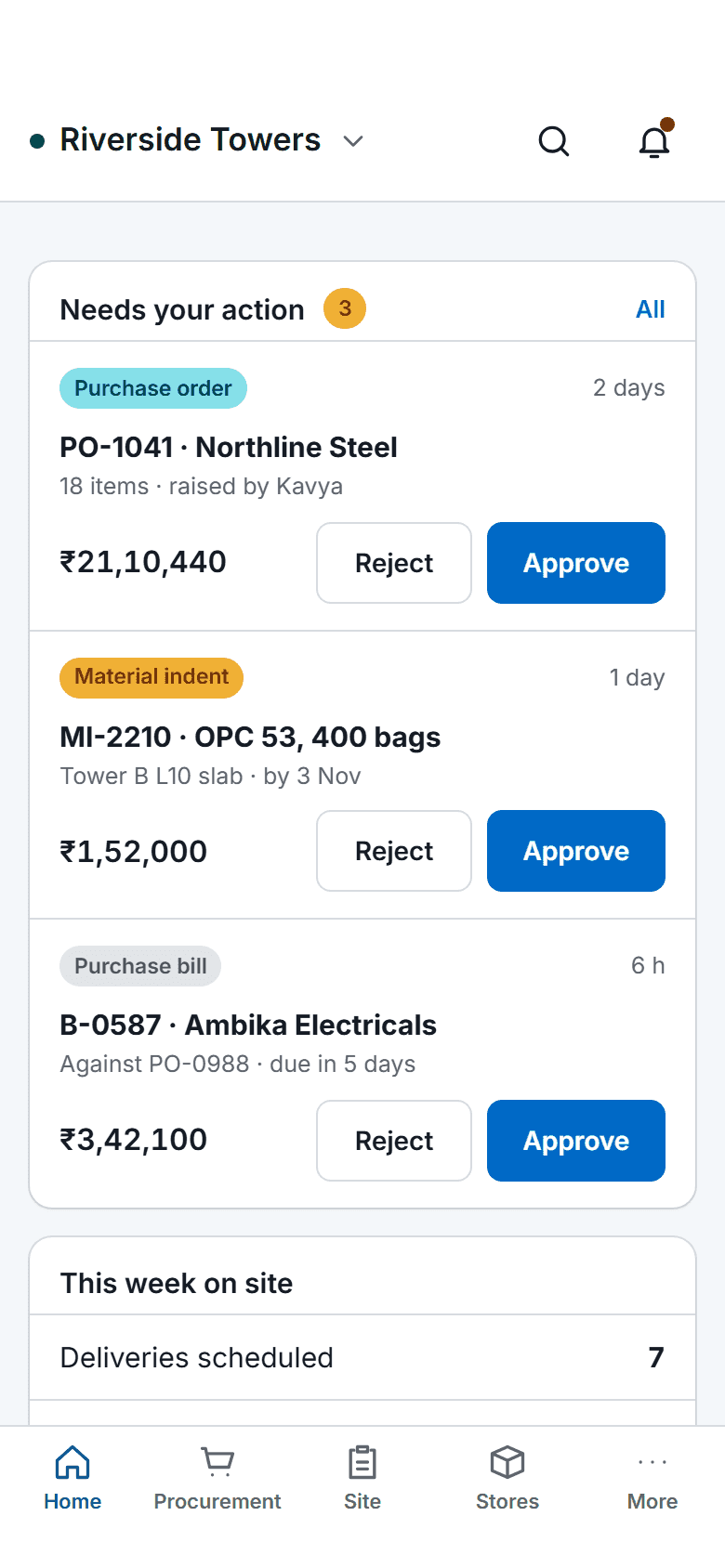
    The SuperWise phone app home screen: key figures, three items waiting for approval with Approve and Reject buttons, a week-on-site summary, quick actions for checklists, photos, progress and material receipt, and bottom tabs.

    Approvals cleared before the site meeting

    The pending approvals list shows the purchase orders, work orders, RA bills and schedule changes waiting for you. Approve or reject each with a comment, and the step is recorded.

  2. On site 10:20

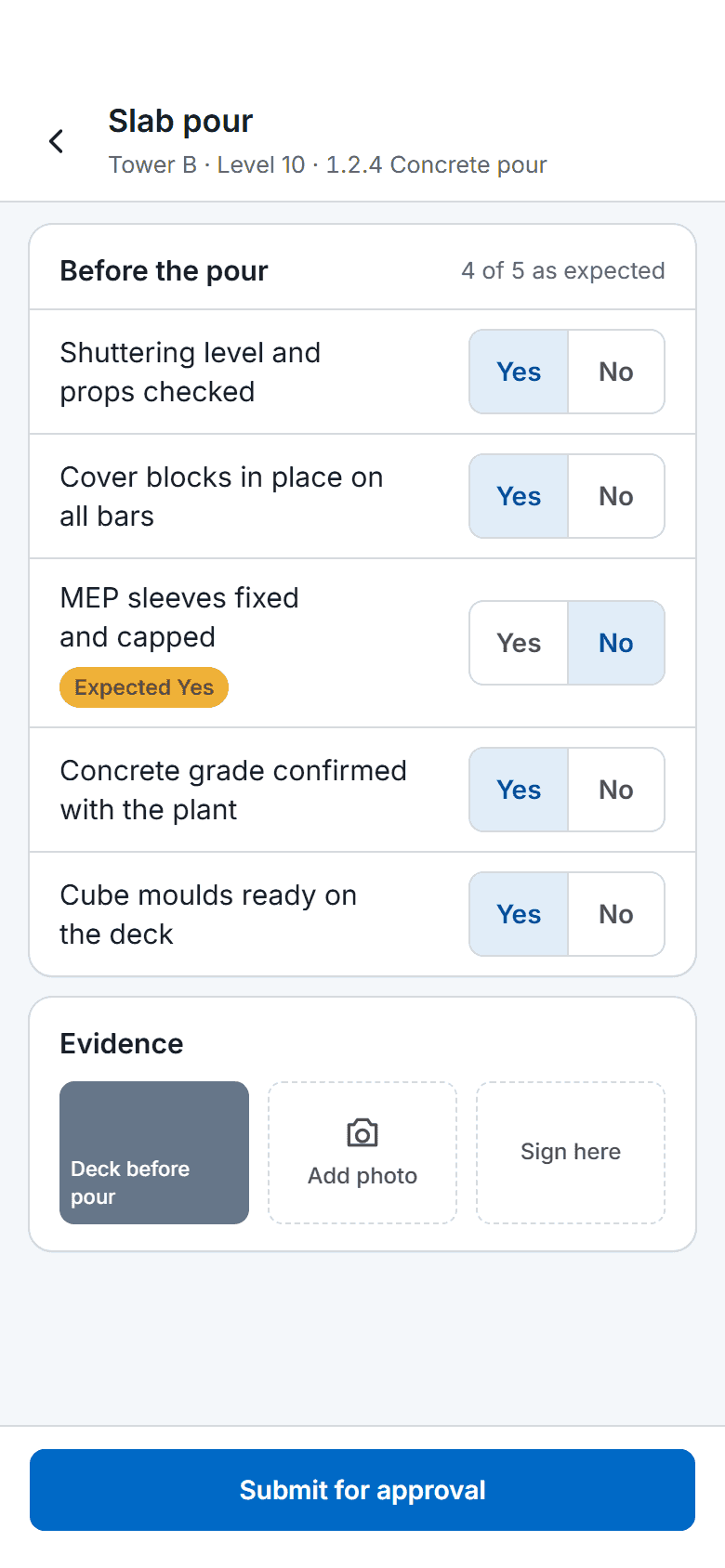
    A SuperWise phone app quality checklist for a slab pour: five Yes or No answers checked against the expected response, one flagged, a photo, a signature box and a Submit for approval button.

    An inspection filed with its checklist

    On a pour or a rebar check the PMC fills the checklist with its yes or no, photo and signature fields. A filled form keeps who filled it, when, and whether it was approved.

  3. In the office 17:00

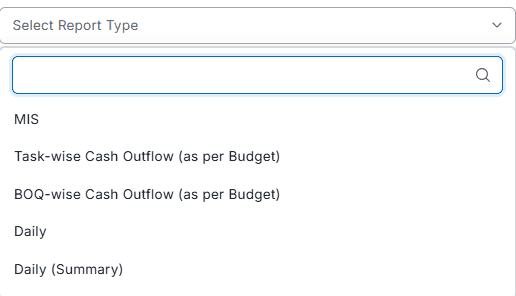
    Report type picker opened to list MIS, task-wise and BOQ-wise cash outflow as per budget, Daily and Daily (Summary)

    The month's report, generated

    The MIS report builds from the schedule, BOQ, procurement, labour and billing records, as A4 or A2, with a WBS level and an optional cover page. Download PDF or Excel.

Three workflows

Three workflows a PMC runs on

01 · MIS report

The monthly MIS, generated from the records

The MIS report carries cost-wise and schedule-wise summaries, a baseline Gantt, labour by contractor and a procurement schedule. Two reports for the same period differ only if the records changed.

  • Choose A4 or A2 and the WBS level
  • Pick weekly or monthly forecasts
  • Download PDF or Excel for the client
See PMC software
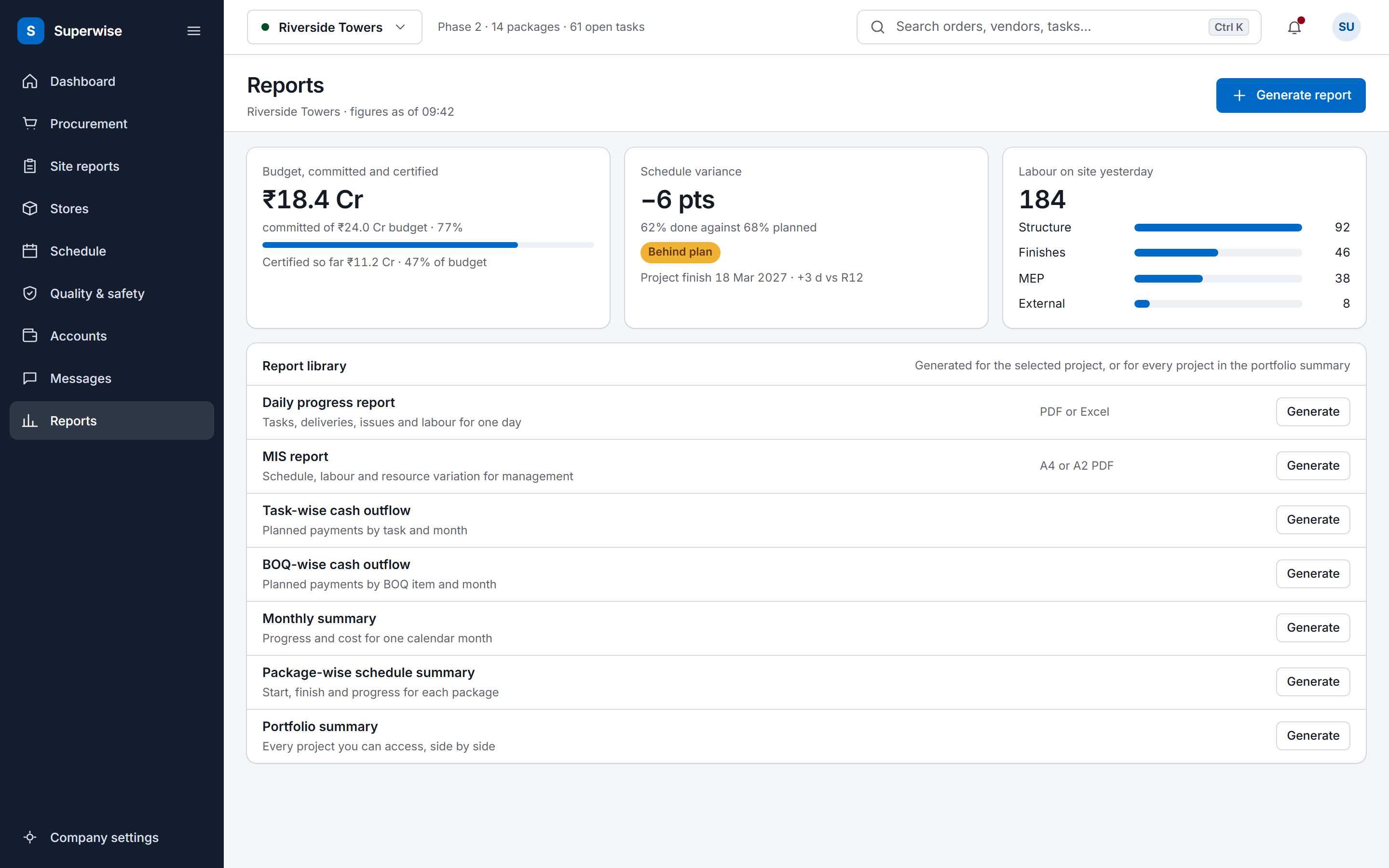
The SuperWise reports hub: a cost tile for budget, committed and certified, a schedule variance tile, labour deployment by package, and a library of the reports a project can generate.
02 · Baseline

Delay measured against the active baseline

Each approval of the schedule saves a baseline. The package-wise summary shows planned and actual dates, percent complete and delay in days against the active one.

  • Approve the schedule to save a baseline
  • Open the package-wise summary
  • Read start and finish variance in days
See construction scheduling
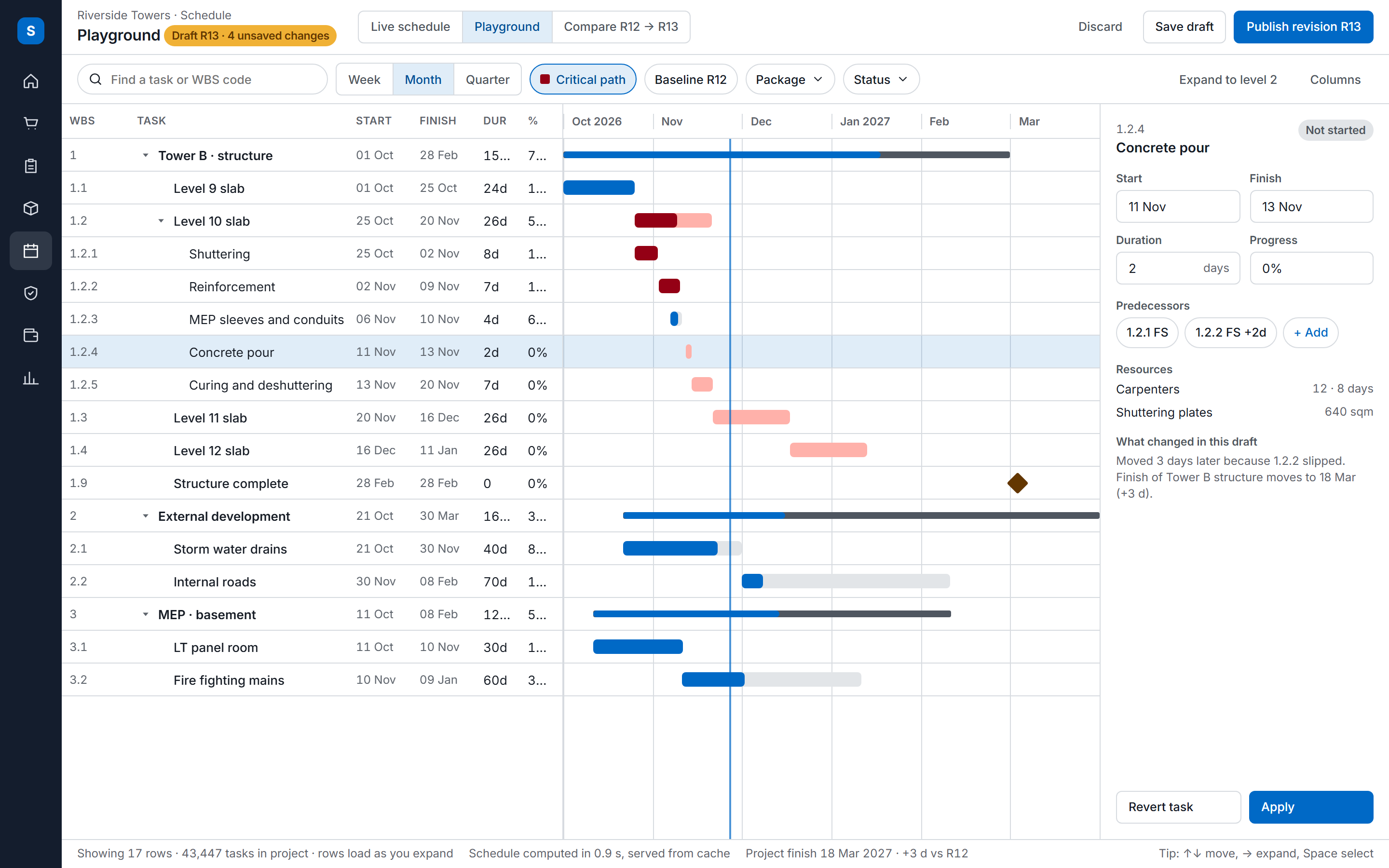
The SuperWise schedule playground: a task tree with WBS codes, dates, durations and progress beside a Gantt timeline with the critical path highlighted, and an inspector for the selected task.
03 · Evidence

Evidence on the record when parties disagree

Issues, deliveries and approvals keep who acted and when, with photos and comments. A disagreement between client, contractor and supplier starts from the same facts.

  • Log the delay as an issue with its owner and target date
  • Keep photos and a quality status on the challan
  • Read the approver, date and comment at each approval step
See the hindrance and delay log
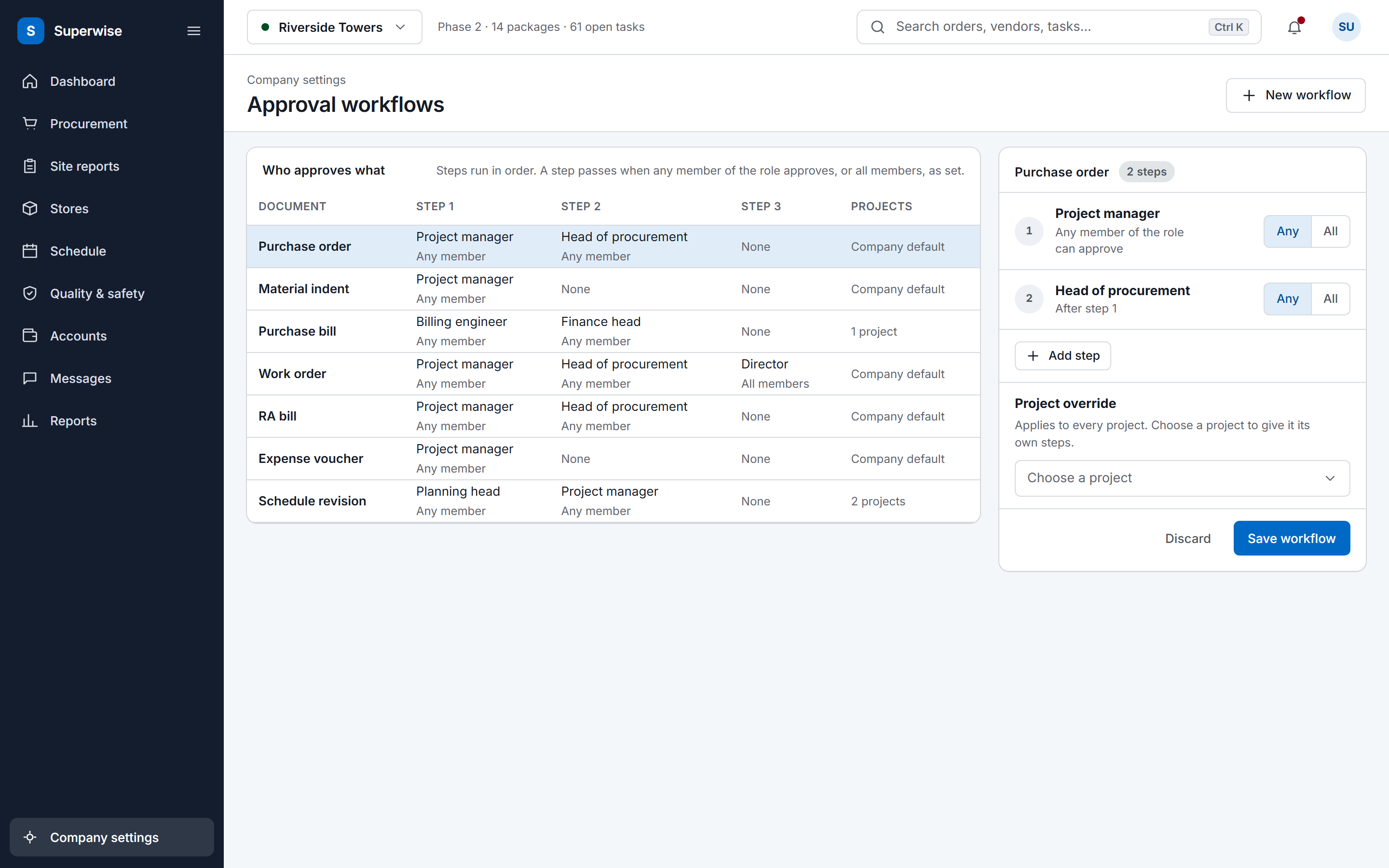
The SuperWise approval workflows settings: a matrix of document types by approval steps with the role and whether any or all members must approve, and an editor for the purchase order workflow with a project override and a Save workflow button.

Before and now

What changes for a PMC

Modules a PMC uses

The PMC software page describes the same reports from the buyer side.

Modules a PMC uses for the monthly report and what you do in each
ModuleWhat you do in it
MIS and management reportGenerate the MIS report as A4 or A2 with a WBS level, a weekly or monthly forecast and an optional cover page.
Monthly summarySummarise progress and cost for one calendar month from a month start date.
BaselinesCompare current dates with the active baseline and read start and finish variance in days.
Package-wise schedule summaryRead planned and actual dates, percent complete and delay in days for each schedule node.
BOQ-wise cash outflowSet what purchase orders and work orders committed against what RA bills and bill inwards certified, by BOQ level.
Issues and snagsLog delays and non-conformances with a type, a priority, a responsible party and a target closure date, with photos.
Project documentsKeep drawings and submittals in role-controlled folders, with revisions that record number, author and date.

Reports that agree month to month

Clients find anomalies when two consecutive reports disagree. Every SuperWise report is computed when you generate it, from the schedule, BOQ, procurement, labour and billing records, so two reports for the same period differ only if the records changed.

The A4 MIS report carries a cost-wise and a schedule-wise task summary with planned and actual dates, SPI and variance, a baseline Gantt, labour by contractor, a material consumption forecast, a procurement schedule, a material variation report and a list of unplanned purchases. Those are delivery challans with no matching purchase order or BOQ link. The A2 format adds task forecasts, percentage-completion and cash S-curves and a BOQ summary.

Time, cost and quality are read from one project. The schedule variance shows the delay, the cash outflow report shows committed against certified cost, and the checklists show the quality checks that gated each task.

Evidence when parties disagree

A PMC sits between the client, the contractors and the suppliers. When they disagree, the question is what happened and when. Issues keep who opened, resolved and closed them, with photos and comments. Delivery challans keep photos and a quality status. Each approval step records the approver, the date and a comment.

Project documents sit in folders with role access, and each revision keeps its number, who revised it and when. The hindrance and delay log template sets out a format for recording a delay and agreeing it with a contractor.

Frequently asked questions

What does the MIS report contain?

It contains a cost-wise and a schedule-wise task summary, a baseline schedule, a labour report, a material consumption forecast, a procurement schedule, a material variation report and unplanned material purchases in the A4 format. The A2 format has task forecasts, percentage-completion and cash S-curves and a BOQ summary. You choose the sections, the WBS level and the format.

Can a PMC produce an A2 sheet for the site office?

Yes. The MIS report comes as A2 or A4. The A2 task summary is a large-format period summary suited to a site board, and the A2 report adds rolling task forecasts, percentage-completion and cash S-curves, and a BOQ summary of contracted, measured, billed and remaining quantities. You pick a weekly or monthly forecast interval and a forecast start date.

How are committed and certified cost compared?

The BOQ-wise cash outflow report sets what purchase orders and work orders committed against what RA bills and bill inwards certified, by BOQ level, in quantities or amounts. The task-wise cash outflow report compares planned spending from the budget with actual spending from bills and challans, by WBS level and period.

Can a PMC start from an existing MS Project schedule?

Yes. Schedule templates import from Microsoft Project (MPP or XML) or Excel as a background job that creates the template, the WBS, the tasks and the predecessors. The playground then assembles the schedule, verification computes the critical path, and approval saves a baseline automatically, so the first MIS report has one to compare against.

Can the client's staff log in?

Yes. Add the client's staff as users with a role, and privileges set what they can view, create, edit, delete and approve in each module area. They see the projects they are assigned to. Users marked as external see only their own organisation. The product guide documents a vendor portal for quotations, proposals and bills, and no separate client portal.

See the monthly pack generated

Book a demo and we generate an MIS report and a monthly summary for a sample project.