
Purchase order PDF
Each PO prints with its lines, specifications and terms. RFQs and quotations print as documents too.
Features
Construction material management controls material from the site's request to the supplier's bill. SuperWise links the indent, purchase order, delivery challan and bill, so a short delivery shows at the gate, not at payment.
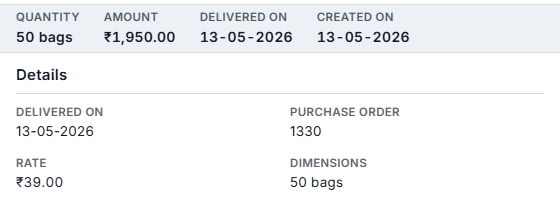
Mix metal, 50 bags
The problem
SuperWise checks the delivery where it happens: against the purchase order line, with photos and a quality status, before any bill can use it.
A site raises an indent with photos, a location, a required-by date and a BOQ item for each line. Procurement accepts it, rejects it, or turns it into an RFQ or a purchase order.
Each PO line carries a maximum quantity, a stop quantity and a rate. Deliveries cannot pass the maximum, apart from the permissible variation set on the resource.
A delivery challan records the vehicle, the driver, three photos, a quality status and an optional checklist, and it can be flagged for review.
A supplier bill reconciles accepted challans only, at the PO rate. A challan can sit in one bill at a time.
Four records carry material from a site request to the supplier’s bill.
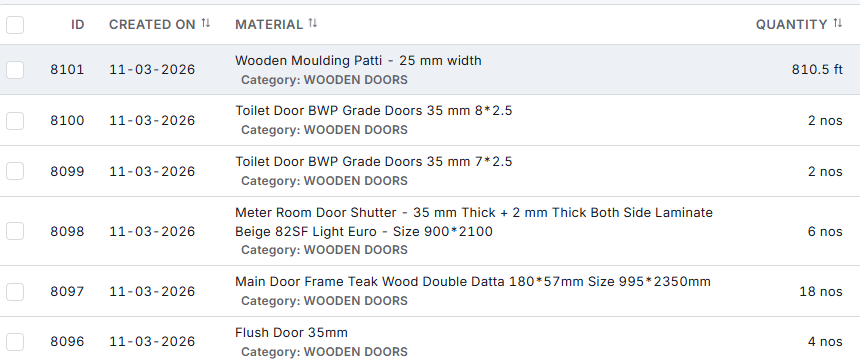
The site engineer raises an indent for the material, with photos, the place it is needed, a required-by date and a BOQ item on each line. Procurement accepts it, rejects it, or turns it into an RFQ or a purchase order. A rejected indent stays on record.
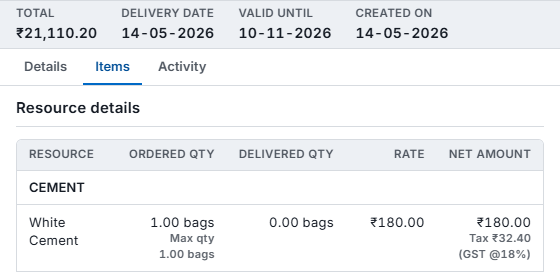
Each PO line carries a rate, a maximum quantity and a stop quantity, and the order goes through its approval workflow before any delivery can be received against it. Deliveries then count against the line until it is fulfilled.
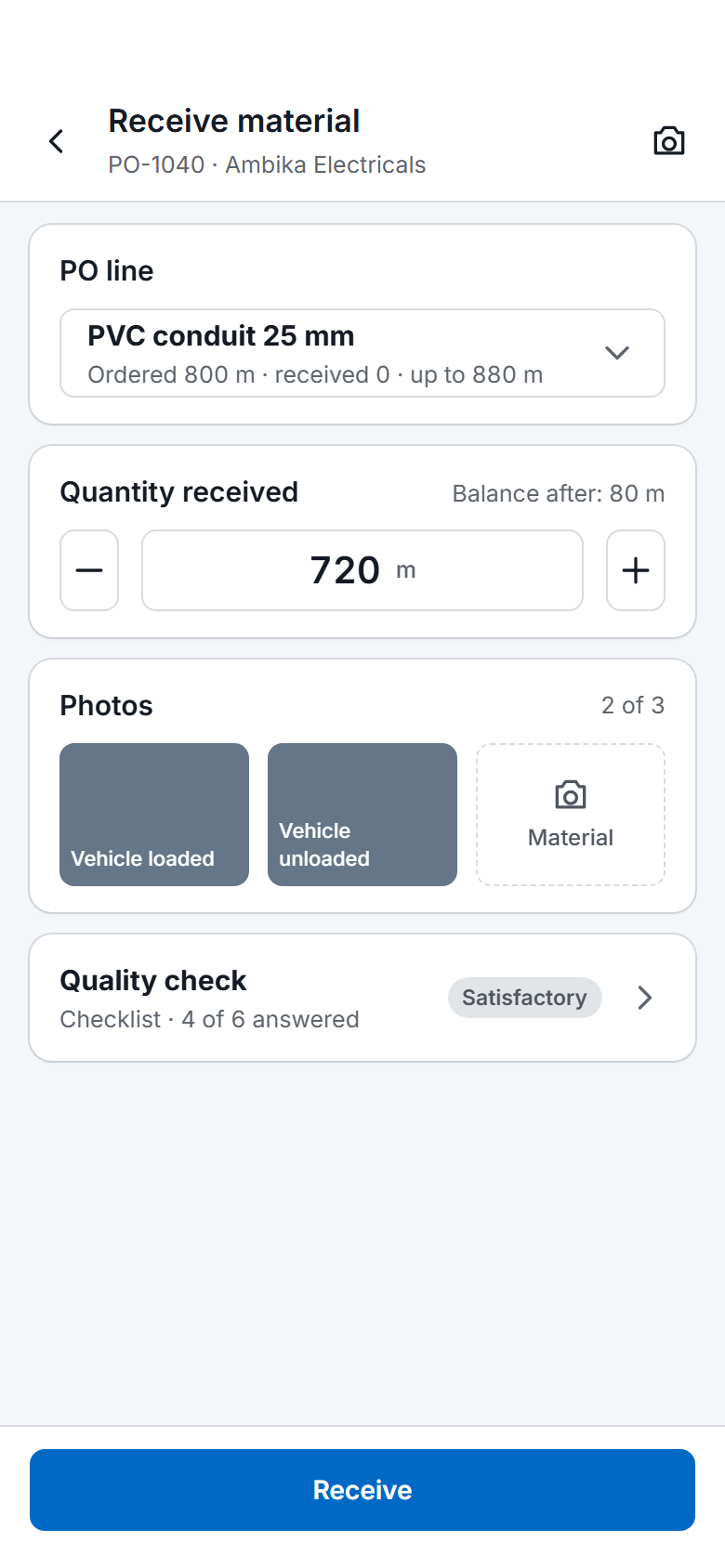
The storekeeper creates the delivery challan against a PO line: the supplier’s challan number, the vehicle, the driver, three photos and a quality status. The challan is the goods receipt, and it can be submitted from the phone. It cannot take the line past its maximum.
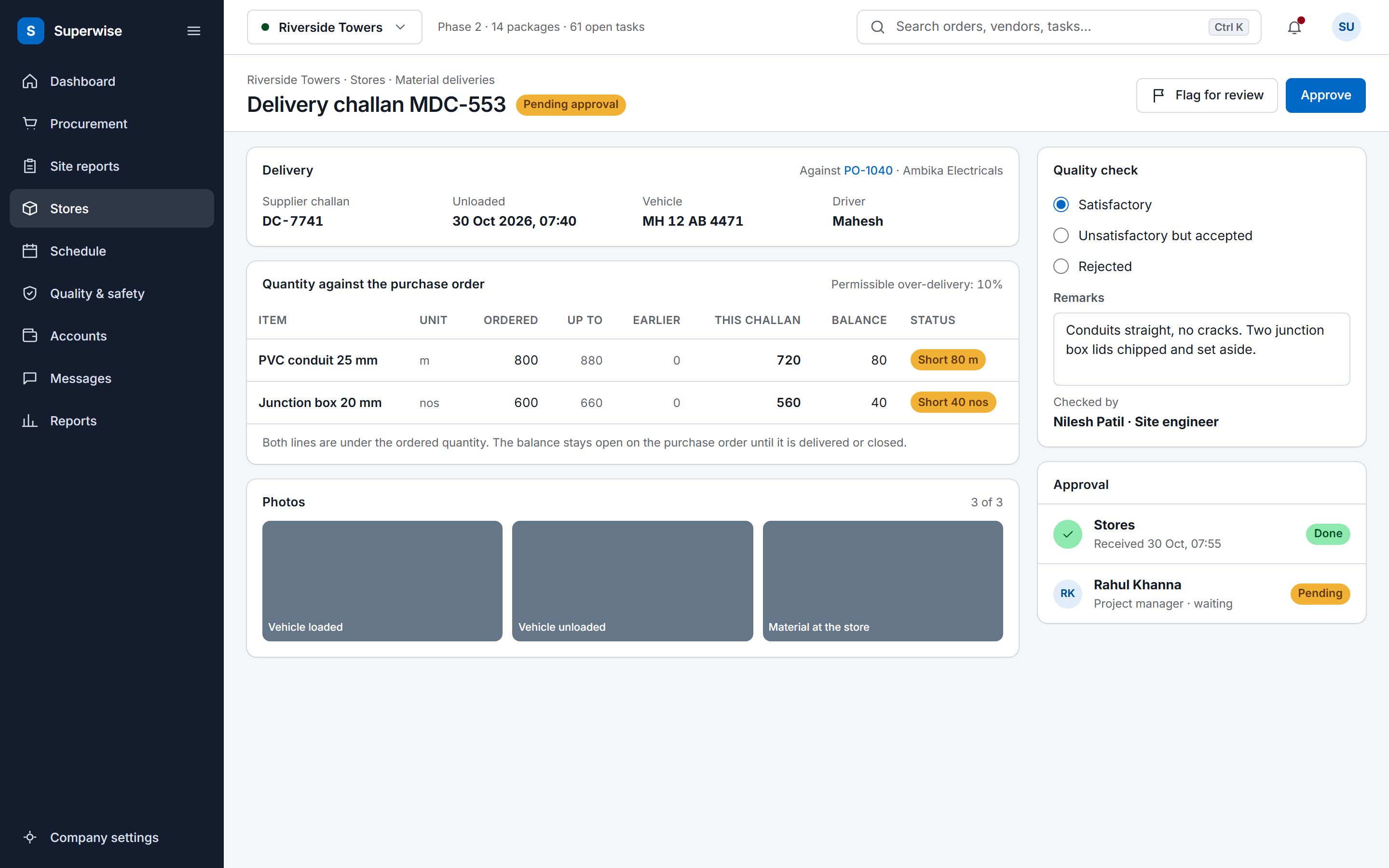
A reviewer approves or rejects the challan. Bill inward then offers accepted challans only, at the PO rate, and creating the bill locks them so none is billed twice. The certification slip prints quantities, rates, deductions and the payable amount.
Six linked records carry material from the site to the supplier's bill, and the RFQ step is optional.
Material starts as a material indent, the internal requisition from the site to procurement. An indent names the resource, the quantity and the date the material is needed on site. It can carry photos and a location, and each line of a multi-line indent can point at a BOQ item, with no more than the quantity still unordered on it.
Procurement accepts the indent, rejects it, or moves it on. The status runs from Pending to Accepted, then to RFQ, or straight to Purchase Order when the supplier and rate are already known. Only a pending indent can be edited, and a rejected indent stays in the system for audit.
An RFQ can be issued as an RFQ, a tender with sealed bids or a reverse auction. Each supplier receives an emailed link with a one-time access code and submits a quotation on the vendor portal, and staff can also enter a quotation that arrived by phone or email. The comparison view sets the rates side by side for each resource. A quotation can be awarded only while its validity date has not passed, and awarding one marks the others as awarded to another supplier.
On site
The load is checked at the gate, and the challan records it with three photos.

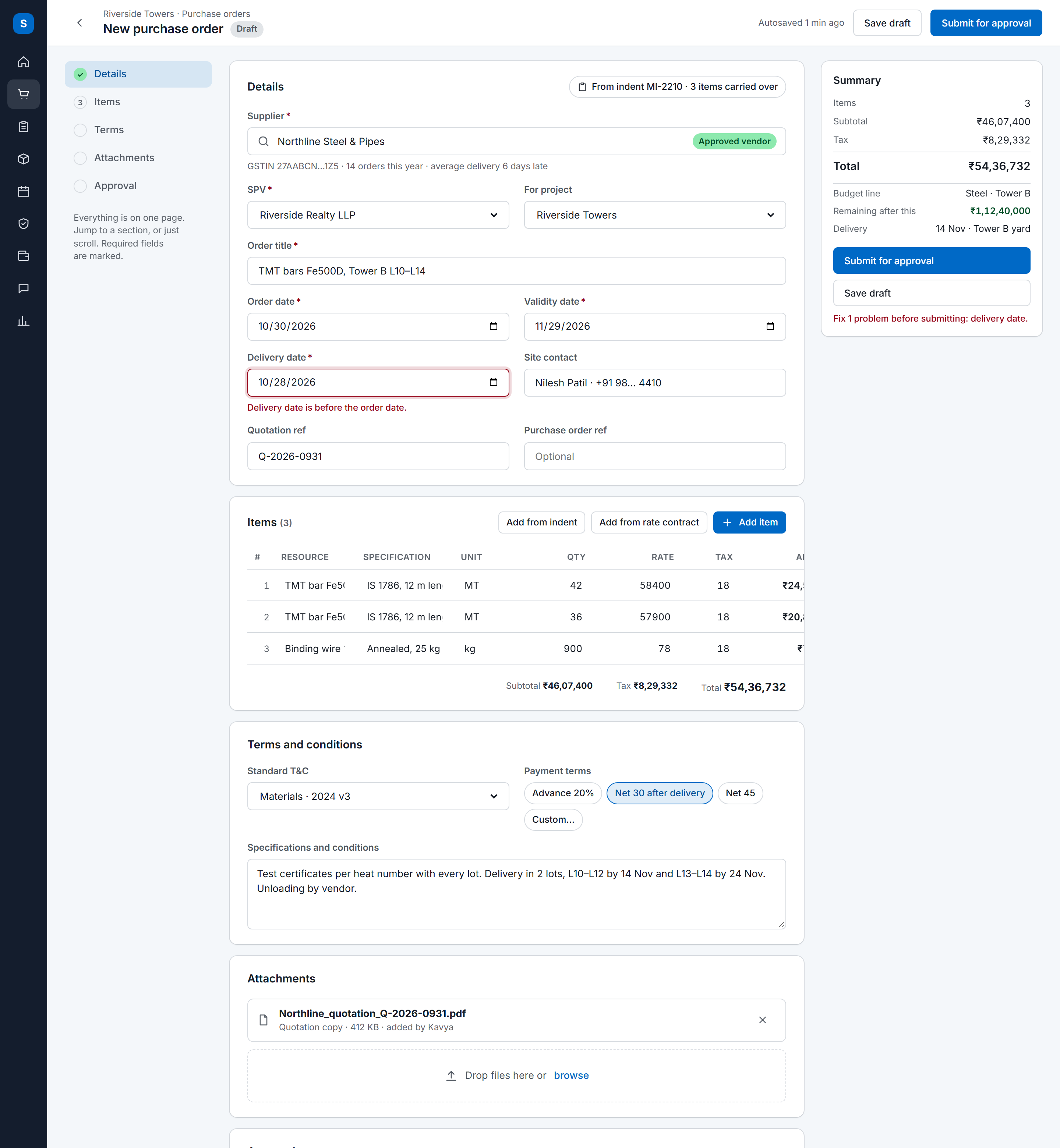
A purchase order comes from an awarded quotation, which fills its lines with the winning rates, or is raised directly. It cannot be raised for a supplier who is not approved. The PO stays a draft until it is submitted, and it goes through an approval workflow before any delivery can be received against it.
Each line holds a rate after discount, a maximum quantity and a stop quantity. The maximum is the most that can be delivered against the line. The stop quantity is the point at which the line counts as fulfilled, which closes it early. A line can also require a delivery schedule. Over-delivery is allowed only within the permissible variation set on the resource, a percentage above the maximum such as 10 percent.
After approval the PO is locked. A change to quantity or rate is an amendment: it raises the revision number, saves a snapshot and records the reason, and the supplier bill reads each rate from the revision in force.
Work contract billing runs on work orders and RA bills instead of POs and bill inward. A PO covers material, labour supply and equipment rental.
The delivery challan is the goods receipt, the record many sites call a GRN. The storekeeper creates a material delivery challan (MDC) against a PO line with the supplier's challan number, the unloading date, the vehicle registration and the driver. For items such as rods and pipes the quantity is computed from length, breadth and height.
Three photo fields hold the loaded vehicle, the empty vehicle and the material. The quality status is satisfactory, rejected, or unsatisfactory but accepted, with remarks and the name of the person who checked. A challan can be flagged for review, and a filled checklist can be attached to it.
Each resource sets how strict receiving is. Flags on the resource say whether a PO must exist first and whether delivery details, a quality check, a photo of the material or a photo of the supplier's challan are required. A resource can also name the checklist to fill at delivery, and that form is built in the quality and safety checklists module.
Challans can be submitted from the mobile app, and tenant settings, off until an administrator turns them on, can notify procurement when one arrives.
Labour follows the same pattern: a labour challan records how many workers of one category a contractor put on site, with a photo and a GPS location.
A reviewer approves or rejects the challan, and only an approved challan counts. Stock on site, in inventory management terms, is accepted challans less consumption, and the DPR prints it as its material inventory section. Consumption is recorded against a task or a BOQ item, and a consumption line can point back to the delivery batch it came from.
The resource holds a minimum stock level for reorder alerts, an indent lead time in days and a procurement lead time from PO to delivery. Material can also move between projects in a resource transfer, which records both projects, the date and, where a PO is involved, the PO.
The supplier's bill is reconciled against challans. Bill inward offers only accepted challans, for an accepted PO of that supplier, inside the billing period. Creating the bill locks those challans to it, so none can be billed twice, and approving it marks them billed. The rate always comes from the PO line, and labour and equipment challans reconcile the same way.
The certification slip prints each resource with its quantity, rate and challan references, the deductions and the payable amount, stamped by creator and approver. The MIS report reads the same records over a longer period, beside progress, labour and issues in site management software.
Yes. The material delivery challan is the goods receipt in SuperWise, so a site keeps one record for each delivery. It holds the supplier's challan number, vehicle, driver, three photos, a quality status and an optional checklist against a PO line. Accepting the challan makes it billable, and bill inward reconciles accepted challans only.
Yes, unless the material requires one. The PO link on a delivery challan is optional, and each resource has a PO required flag that makes it mandatory for that material. Deliveries with no matching PO appear in the MIS report's unplanned material purchases section, so the office can review them.
The maximum quantity on the PO line. A delivery challan cannot take the line past it, apart from the permissible variation set on the resource, for example 10 percent. A stop quantity closes a line early once it counts as fulfilled. To buy more, amend the PO, which raises the revision number and records the reason.
Bill inward lists accepted challans only, for an accepted PO of that supplier inside the billing period. Once a bill is created, its challans are locked to it and no other bill can take them. Approval marks them billed, while a rejected or deleted bill releases them. The rate comes from the PO line.
It tracks stock as accepted delivery challans less consumption, and the DPR prints the balance as its material inventory section. Each resource holds a minimum stock level for reorder alerts, an indent lead time and a procurement lead time, and inventory tracking can be switched on per resource.
Yes, through a resource transfer. A transfer records the source project, the destination project, the date and, where the transfer runs through a PO, the PO. Material sent out of a project appears in the DPR's materials supplied section, so the site office sees it leave.
Yes. When an RFQ goes live, each invited supplier gets an emailed link with a one-time access code and submits a quotation on the vendor portal, without seeing other suppliers' quotes. External vendor users also see only their own bills and can submit an invoice.
Book a demo and we follow a single PO line through its challans to the supplier bill in a project of yours.