
Construction reporting pack for India
The DPR, RA bill and hindrance log templates with a one-page SOP.
Template
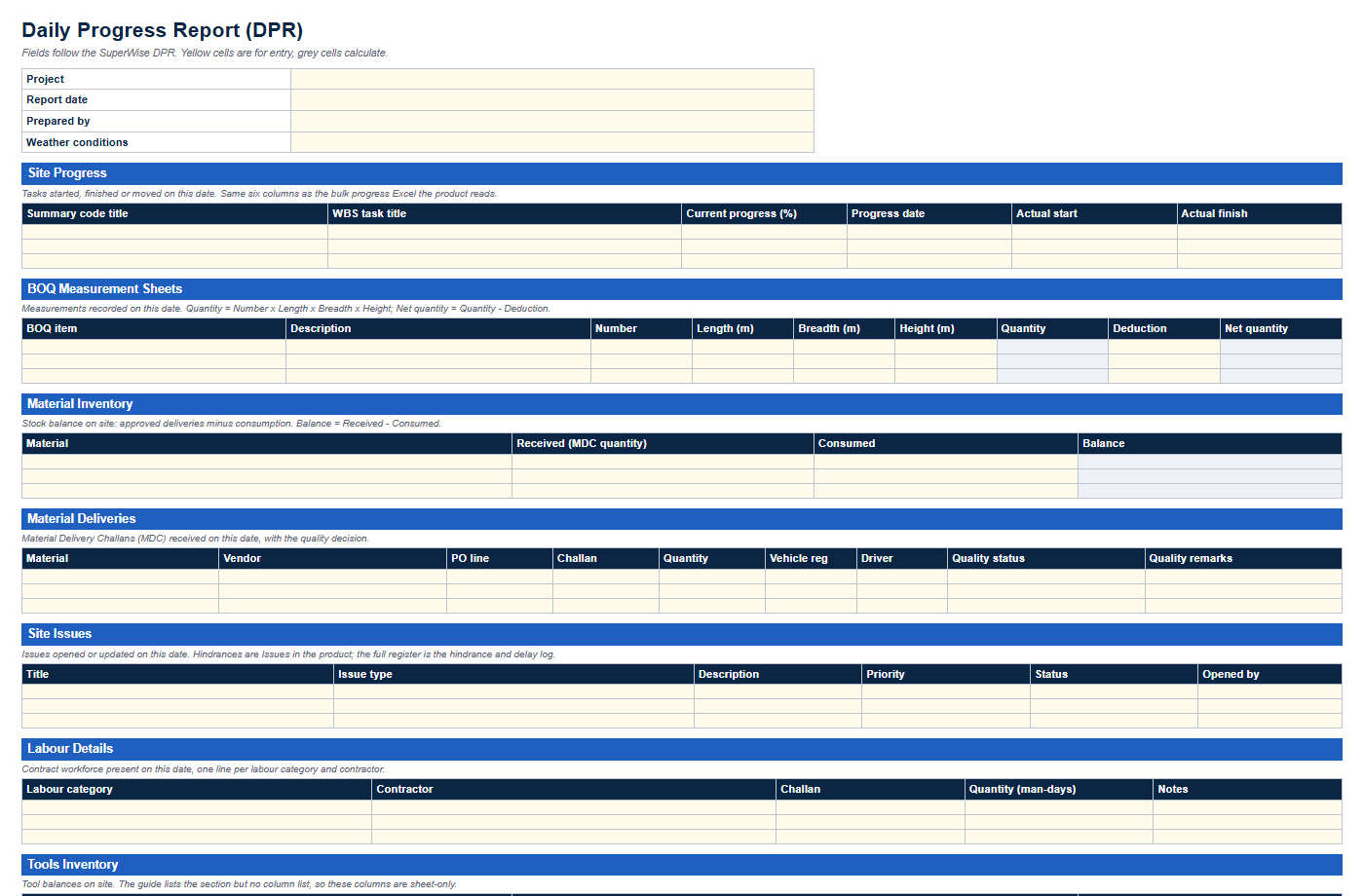
An Excel workbook with the eleven sections of the SuperWise DPR, dropdowns that use the product's own status values and formulas for quantity and stock balance.
Enter your name, work email and mobile number. The link to the Excel file appears as soon as the form is sent.
We could not confirm your request.
This download is sent on request. Email info@superwise.site and we reply with the file.
The workbook has two sheets. The DPR sheet holds a header with the project, the report date, weather conditions and who prepared the report, then eleven sections in the order SuperWise prints them: Site Progress, BOQ Measurement Sheets, Material Inventory, Material Deliveries, Site Issues, Labour Details, Tools Inventory, Site Attendance, Materials Supplied, Material Indents and Checklists. The Instructions sheet says how to fill each one.
Column names are the product's field names wherever the SuperWise guide documents them, such as QualityStatus, Priority and ProgressDate. Quantity, Net quantity and Balance are formulas. A column the guide does not document is marked sheet-only in the tables below. That covers the Tools Inventory and Site Attendance columns and the prepared-by line.
| Column | Product field | Documented in |
|---|---|---|
| Project | ProjectId | reports/reports.md |
| Report date | ReportDate | reports/reports.md |
| Prepared by | PreparedBy sheet-only | reports/reports.md (the cover page lists signatories; no column is documented) |
| Weather conditions | DailyWeather | reports/reports.md |
| Column | Product field | Documented in |
|---|---|---|
| Summary code title | SummaryCodeTitle | schedule/schedule.md |
| WBS task title | WBSTaskTitle | schedule/schedule.md |
| Current progress (%) | CurrentProgress | schedule/schedule.md |
| Progress date | ProgressDate | schedule/schedule.md |
| Actual start | ActualStart | schedule/schedule.md |
| Actual finish | ActualFinish | schedule/schedule.md |
| Column | Product field | Documented in |
|---|---|---|
| BOQ item | ProjectBOQId | billing/measurement-sheets.md |
| Description | Description | billing/measurement-sheets.md |
| Number | Number | billing/measurement-sheets.md |
| Length (m) | Length | billing/measurement-sheets.md |
| Breadth (m) | Breadth | billing/measurement-sheets.md |
| Height (m) | Height | billing/measurement-sheets.md |
| Quantity | Quantity | billing/measurement-sheets.md |
| Deduction | Deduction | billing/measurement-sheets.md |
| Net quantity | NetQuantity | billing/measurement-sheets.md |
| Column | Product field | Documented in |
|---|---|---|
| Material | ResourceId | procurement/material-delivery.md |
| Received (MDC quantity) | Received | procurement/material-delivery.md |
| Consumed | Consumed | procurement/material-delivery.md |
| Balance | Balance | reports/reports.md |
| Column | Product field | Documented in |
|---|---|---|
| Material | ResourceId | procurement/material-delivery.md |
| Vendor | VendorId | procurement/material-delivery.md |
| PO line | PurchaseOrderDetailId | procurement/material-delivery.md |
| Challan | Challan | procurement/material-delivery.md |
| Quantity | Quantity | procurement/material-delivery.md |
| Vehicle reg | VehicleReg | procurement/material-delivery.md |
| Driver | Driver | procurement/material-delivery.md |
| Quality status | QualityStatus | procurement/material-delivery.md |
| Quality remarks | QualityRemarks | procurement/material-delivery.md |
| Column | Product field | Documented in |
|---|---|---|
| Title | Title | site-monitoring/issues.md |
| Issue type | IssueTypeId | site-monitoring/issues.md |
| Description | Description | site-monitoring/issues.md |
| Priority | Priority | site-monitoring/issues.md |
| Status | Status | site-monitoring/issues.md |
| Opened by | OpenedBy | site-monitoring/issues.md |
| Column | Product field | Documented in |
|---|---|---|
| Labour category | ResourceId | procurement/labour-challans.md |
| Contractor | VendorId | procurement/labour-challans.md |
| Challan | Challan | procurement/labour-challans.md |
| Quantity (man-days) | Quantity | procurement/labour-challans.md |
| Notes | Notes | procurement/labour-challans.md |
| Column | Product field | Documented in |
|---|---|---|
| Tool | ResourceId sheet-only | reports/reports.md (section listed, columns not documented) |
| Quantity on site | Quantity sheet-only | reports/reports.md (section listed, columns not documented) |
| Remarks | Remarks sheet-only | reports/reports.md (section listed, columns not documented) |
| Column | Product field | Documented in |
|---|---|---|
| Staff member | StaffName sheet-only | reports/reports.md (section listed, columns not documented) |
| Present | Present sheet-only | reports/reports.md (section listed, columns not documented) |
| Remarks | Remarks sheet-only | reports/reports.md (section listed, columns not documented) |
| Column | Product field | Documented in |
|---|---|---|
| Material | ResourceId | procurement/material-delivery.md |
| To project | ToProjectId | procurement/material-delivery.md |
| Quantity | Quantity sheet-only | procurement/material-delivery.md (transfer lines not documented) |
| Column | Product field | Documented in |
|---|---|---|
| Material | ResourceId | procurement/material-indents.md |
| Quantity | Quantity | procurement/material-indents.md |
| Required by date | RequiredByDate | procurement/material-indents.md |
| Description | Description | procurement/material-indents.md |
| Column | Product field | Documented in |
|---|---|---|
| Checklist | ChecklistId | site-monitoring/checklists.md |
| Reference number | ReferenceNumber | site-monitoring/checklists.md |
| Filled by | FilledBy | site-monitoring/checklists.md |
| Filled on | FilledOn | site-monitoring/checklists.md |
| Status | Status | site-monitoring/checklists.md |
| WBS task | WBSTaskId | site-monitoring/checklists.md |
Save one workbook per project per day, named with the project code and the date, for example PCM-01-DPR-2026-03-14.xlsx. Fill the header, then work down the sections. Leave a section empty when nothing happened that day, so every report has the same shape.
Four habits make a DPR hard to rely on later, when it supports a bill or a claim.
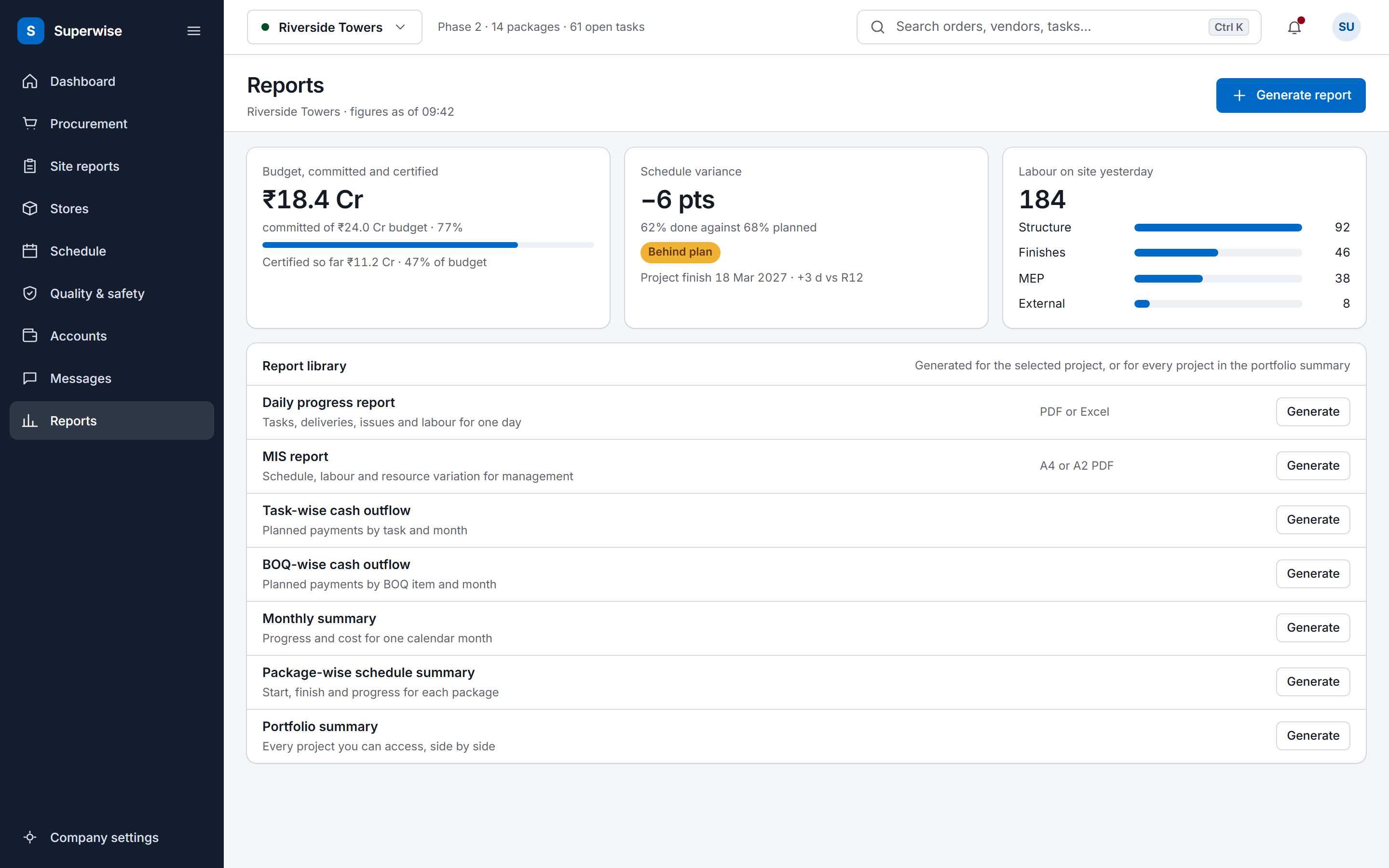
The workbook is the paper-first version. In SuperWise the same facts are entered once, on the phone, and the DPR is generated from those records for the date you pick. You choose the sections to include. A cover page with logo and signatories, delivery photos, weather and filled checklists are options, and a DPR can cover a date range instead of one day.
Measurements, deliveries, labour and issues come from the records site staff already entered, so nothing is typed twice. The report downloads as PDF or Excel.
Yes. Enter your name, work email and mobile number, and the link to the Excel file appears. The PDF preview needs no details at all. The form sends your details to the SuperWise team, which may contact you about the template.
No. Leave a section empty on a day with nothing to report, but keep it in the file so every day has the same shape. The SuperWise DPR works the same way: you select or deselect sections when you generate it.
Yes, wherever the product guide documents the field. QualityStatus, Priority, ProgressDate and the six progress columns of the bulk progress Excel are the product's own names. The Tools Inventory and Site Attendance columns are not documented in the guide, so the tables mark them sheet-only.
No. SuperWise generates the DPR from records entered in the product and does not read a DPR workbook back. For schedule progress, the field update guide describes the bulk progress Excel that the product does read.
Yes, it is your file. Keep the section order and the dropdown values if you plan to move to SuperWise later, because both match the product.
Book a demo and we generate a DPR for a date you choose from the demo project's site records.