Comparison

FalconBrick and SuperWise for quality, snagging and billing

FalconBrick's own pages describe a mobile-first platform for site quality, snagging and contractor billing. This page compares it with SuperWise and says where each is the better fit.

At a glance

Three rows of the comparison: SuperWise and FalconBrick
Topic SuperWise FalconBrick
Quality checklists Yes Yes
Contractor billing Yes Partly
Measurement book Yes Not found

FalconBrick statements read on . Not found means the pages we read do not mention it.

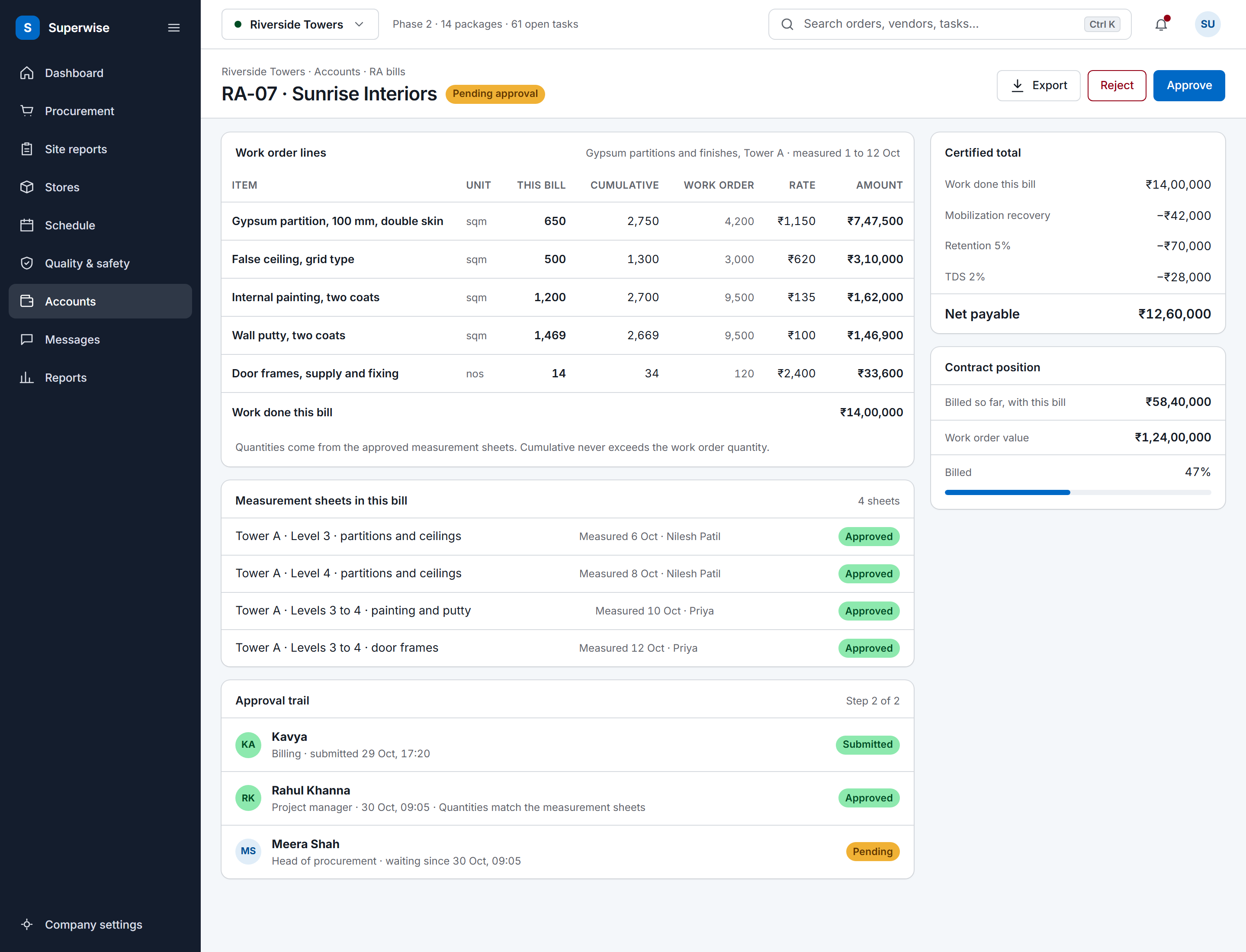
A SuperWise running account bill for a contractor: work order lines with this bill, cumulative and work order quantities, rate and amount, the certified total with mobilization recovery, retention and TDS deducted to a net payable, the approval trail and the contract position.

Where FalconBrick fits well

FalconBrick's project management page describes a platform that keeps you updated on project progress against schedule. It lists customised digital checklists on the app for inspections, defects raised, rectified and closed via the app, contractor billing managed on the system, and work in offline, non-internet mode.

Its home page says it is different from ERPs, which focus mainly on transactional activities such as PR or PO and billing. If your first need is site quality and snagging on phones, including at sites with poor connectivity, FalconBrick's pages describe that focus.

Sources: FalconBrick construction project management page, FalconBrick home page

Module by module

The SuperWise cell is what the product guide documents. The FalconBrick cell is what its own pages say, with the source beside it.

Read on . Yes Partly Not found on its public pages

Modules in FalconBrick and SuperWise, with the source of each FalconBrick cell
Module SuperWise FalconBrick
Progress against schedule Yes CPM schedule with WBS tasks and baselines. Progress is recorded per task or uploaded in Excel. Yes Lists project progress against schedule. Source: FalconBrick construction project management page
Quality checklists Yes Checklists filled on site. They can gate the start or finish of a task and attach to a delivery challan. Yes Lists customised digital checklists on the app for inspections. Source: FalconBrick construction project management page
Snags and issues Yes Issues with type, priority, status, owner, target closure date and attachments, linked to a WBS task. Yes Lists defects raised, rectified and closed via the app. Source: FalconBrick construction project management page
Contractor billing Yes RA bills against work orders, with retention and mobilization deductions. Status runs Draft, Submitted, Approved, Paid. Partly Lists contractor billing and bill verification on the system. The pages we read do not mention RA bills. Source: FalconBrick construction project management page
Measurement book Yes Measurement sheets in measurement book format (number x length x breadth x height, less deductions) feed RA bill quantities. Not found on its public pages The pages we read do not mention a measurement book. Source: FalconBrick construction project management page
Approvals Yes Approval steps by role, Any or All approvers, with approver, date and comments recorded. Partly Lists digital checklists and maker-checker workflows for inspections. Source: FalconBrick solutions page
Mobile and offline Partly Mobile app for site entries such as delivery challans. A tenant setting notifies procurement when one is submitted. Yes Lists work in offline, non-internet mode. Source: FalconBrick construction project management page
Dashboards and reports Yes DPR generated from the day's site records, in sections you select, as PDF or Excel. Yes Lists dashboards exported to Excel, PPT or PDF and auto-generated project health reports. Source: FalconBrick construction project management page

A cell that says the page does not mention a topic describes that page only. It does not say the product lacks the feature.

Fit, side by side

Who should choose which

Pick on the work you need done first. Each side rests on something the product states or documents.

Choose SuperWise if

  • You bill by work order and need RA bills, measurement sheets, and retention and mobilisation recovery.
  • You plan with CPM dates and baselines, and import from Microsoft Project files or Excel.
  • You want the DPR, deliveries with photos and approvals by role on the same project record.

Where SuperWise differs

SuperWise adds the planning and contract layers around site records: a CPM schedule with baselines that imports from MPP, XML and Excel, measurement sheets in the measurement book format, and RA bills against work orders with retention and mobilization deductions.

FalconBrick lists contractor billing and bill verification. The pages we read do not mention RA bills, retention or a measurement book, so compare how quantities and deductions reach a bill.

Sources: FalconBrick construction project management page, FalconBrick solutions page

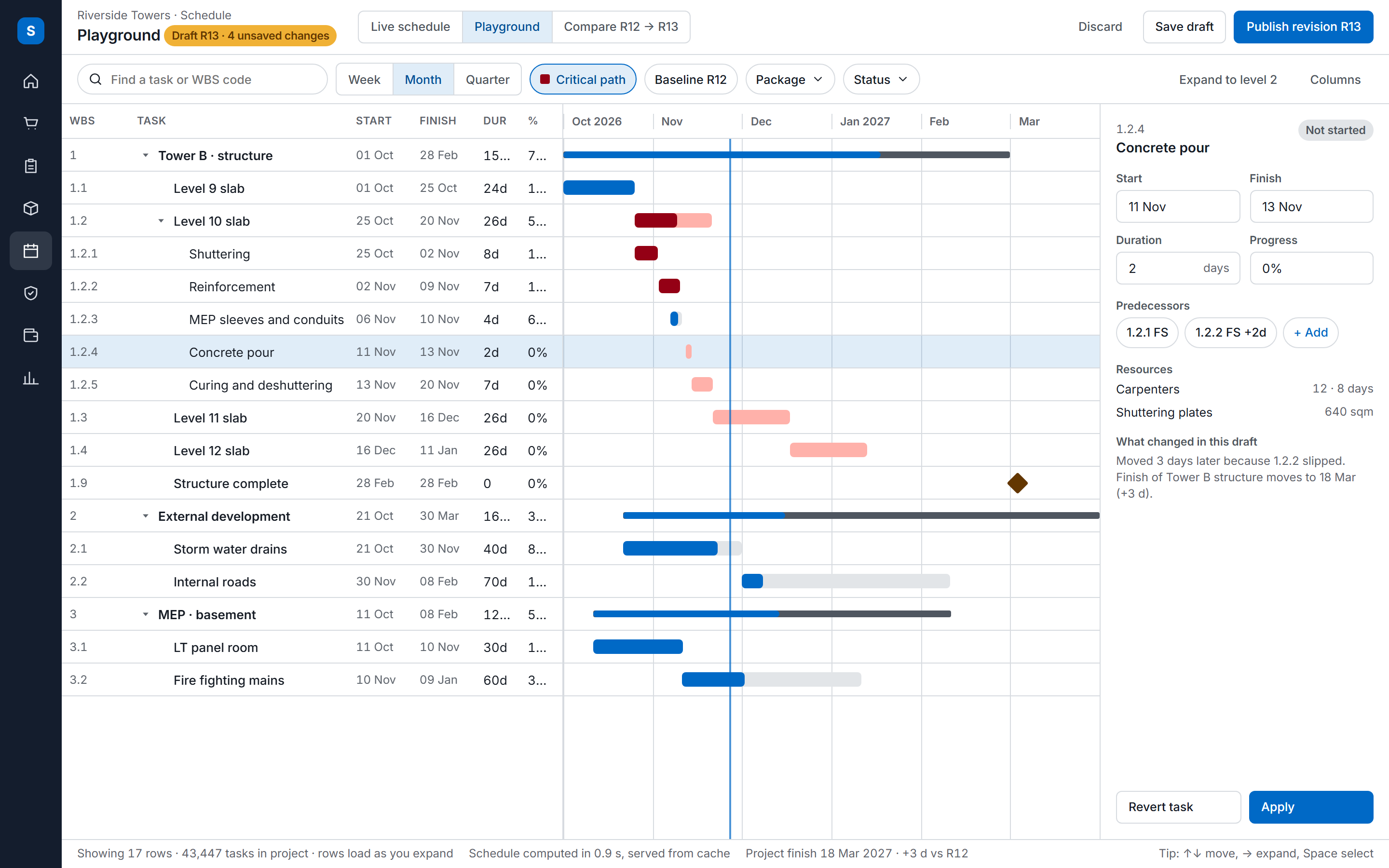
The SuperWise schedule playground: a task tree with WBS codes, dates, durations and progress beside a Gantt timeline with the critical path highlighted, and an inspector for the selected task.

Audit and evidence

In SuperWise, checklists can gate the start or finish of a task and attach to a delivery challan. Every approval step stores the approver, the date and comments, and issues carry attachments.

FalconBrick lists digital checklists and maker-checker workflows for inspections, and snags captured by engineers and supervisors. Both products keep inspection evidence on the record.

Sources: FalconBrick solutions page

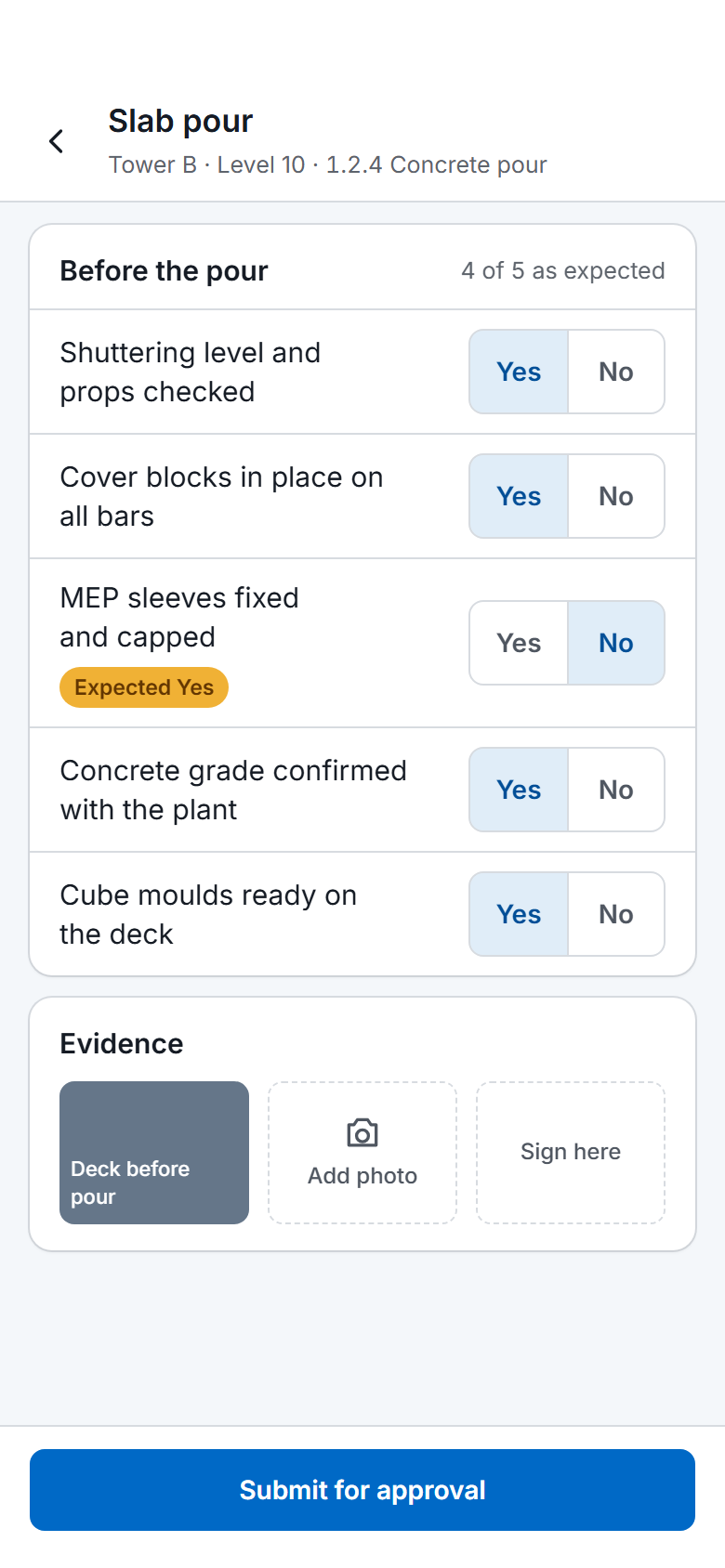
A SuperWise phone app quality checklist for a slab pour: five Yes or No answers checked against the expected response, one flagged, a photo, a signature box and a Submit for approval button.

Integrations with other tools

SuperWise imports MPP, XML and Excel schedules, has Zapier triggers and actions, and exports reports as Excel and PDF.

FalconBrick's project management page lists dashboards exported to Excel, PPT or PDF at every level. The pages we read do not mention Primavera, Microsoft Project, Tally or an API.

Sources: FalconBrick construction project management page

How a rollout runs

A quality app can start on one tower or one floor. SuperWise can start on one project with the DPR and checklists, and bring in the schedule and the BOQ before billing.

Test connectivity on your worst site first. The product guide does not document offline use in SuperWise, so do not assume it.

Migration and onboarding

SuperWise documents no importer for another app's snag or checklist records. Resources import from Excel and the schedule from an MPP, XML or Excel file. Checklists are built in the product.

Keep closed snag lists from FalconBrick as exports. The pages we read do not describe an export, so ask FalconBrick what it provides.

Sources: FalconBrick construction project management page

Frequently asked questions

Is FalconBrick or SuperWise better for snagging?

Both keep inspection evidence on the record. FalconBrick's pages put snagging and quality checklists first, on the mobile app. SuperWise has checklists and issues too, and adds the schedule, measurement sheets and RA bills around them.

Does SuperWise work without internet on site?

The product guide does not document offline use, so we do not claim it. FalconBrick's pages list work in offline, non-internet mode. Test connectivity on your weakest site before you decide.

Which product handles RA bills?

SuperWise runs RA bills against work orders, with retention and mobilization deductions and quantities from measurement sheets. FalconBrick lists contractor billing and bill verification; the pages we read do not mention RA bills.

Can SuperWise import a Primavera or Microsoft Project plan?

From Microsoft Project files (MPP or XML), Primavera XER files and Excel templates. SuperWise writes no XER or MPP file back. The FalconBrick pages we read do not mention either tool.

How do I check the FalconBrick statements?

Each statement is quoted in the Sources list with the day we read the page. Open the link and search for the phrase, and read the current page before you decide.

Sources

Each statement about another product links to that product's own site. A table cell that says the page does not mention a topic describes that page only; it does not say the product lacks the feature.

  1. FalconBrick construction project management page (read )

    • Keeps you constantly updated on Project progress vs Schedule
    • Customized digital checklists are available on the app, using which your teams can perform inspections for all site-works in double-quick time.
    • Defects identified can be easily raised, rectified & closed, all via the app.
    • Manage contractor billing, right here on the system.
    • Contractor bills can be verified using the system.
    • Easily allocate daily tasks to your contractors via the mobile app.
    • Work seamlessly in offline, non-internet mode
    • Our dashboards are tailor-made for your project, can be drilled down from macro level to individual units, and can easily be exported to Excel/ppt/pdf, at all levels.
    • Inbuilt Analytics engine auto-generates project health monitoring reports.
  2. FalconBrick home page (read )

    • Thus it’s different from ERPs, which focus mainly on transactional activities such as PR / PO, billing, etc
    • Update site progress with live photos
    • Perform quality inspections
    • FalconBrick is a first-of-its-kind, cohesive, mobile-first platform to help you manage the end-to-end lifecycle of your construction projects.
  3. FalconBrick solutions page (read )

    • Bill verification of multiple contractors is done easily on the system.
    • Digital checklists and maker-checker workflows for conducting inspections.
    • Document tracking throughout project lifecycle, till handover to operations.

See the comparison on your own site data

Book a demo and we walk through a DPR, a measurement sheet and an RA bill with your project data.