Comparison

Powerplay and SuperWise side by side for site teams

Powerplay's own site lists a mobile and desktop app for progress, material and procurement. This page sets that against what SuperWise covers, module by module, and says where each fits.

At a glance

Three rows of the comparison: SuperWise and Powerplay
Topic SuperWise Powerplay
Daily progress and proof Yes Yes
Schedule Yes Yes
RA bills and measurement Yes Not found

Powerplay statements read on . Not found means the pages we read do not mention it.

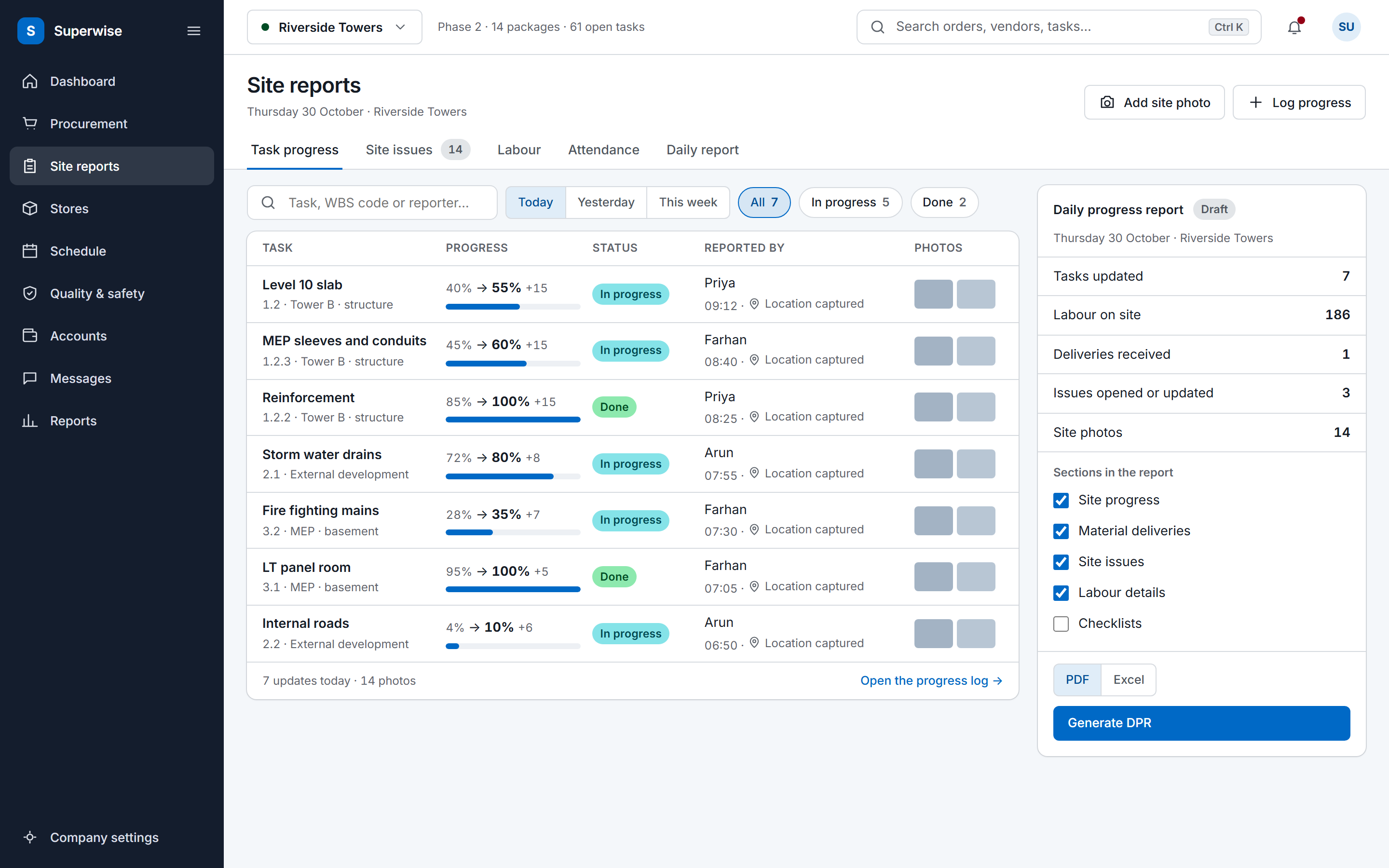
The SuperWise site reports screen: a feed of today's task progress updates with the previous and new percentage, a status label, the person who reported it, a location marker and photo thumbnails, beside a daily progress report summary with a Generate DPR button.

Where Powerplay fits well

Powerplay's site presents one mobile and desktop app for running projects. It lists real-time progress updates on your schedule, work shown with proofs, use of material, machinery and labour on every task, and a checklist for quality work.

It also lists procurement and says it works with Tally and SAP, so you do not switch data. If your priority is one app that gathers site progress and material movement and hands figures to an accounts system you already run, Powerplay's own description matches that need.

Sources: Powerplay home page

Module by module

Each row names a module. The SuperWise cell is what the product guide documents. The Powerplay cell is what its own site says, with the source beside it.

Read on . Yes Partly Not found on its public pages

Modules in Powerplay and SuperWise, with the source of each Powerplay cell
Module SuperWise Powerplay
Daily progress and proof Yes DPR generated from the day's site records, in sections you select, as PDF or Excel. Yes Lists real-time progress updates on your schedule, with proofs, use of material, machinery and labour on every task. Source: Powerplay home page
Material Yes Delivery challans with quality status, vehicle, driver and photos. Stock is approved deliveries less consumption. Yes Lists end-to-end procurement: know what to procure and get materials delivered in time, within budget. Source: Powerplay home page
Quality Yes Checklists filled on site. They can gate the start or finish of a task and attach to a delivery challan. Yes Lists a checklist for quality work. Source: Powerplay home page
Schedule Yes CPM schedule with WBS tasks and baselines. Progress is recorded per task or uploaded in Excel. Yes Lists a planner AI that creates a schedule from the BOQ. Source: Powerplay home page
RA bills and measurement Yes RA bills against work orders, with retention and mobilization deductions. Status runs Draft, Submitted, Approved, Paid. Not found on its public pages The page we read does not mention RA bills or a measurement book. Source: Powerplay home page
Approvals Yes Approval steps by role, Any or All approvers, with approver, date and comments recorded. Yes Lists roles and permissions combined with approvals. Source: Powerplay home page
Integrations Partly Zapier with six triggers and three actions. Bills inward carry a passed-to-Tally marker. Reports download as Excel and PDF. Yes Says it works with Tally and SAP, so you do not switch data. Source: Powerplay home page

A cell that says the page does not mention a topic describes that page only. It does not say the product lacks the feature.

Fit, side by side

Who should choose which

Pick on the work you need done first. Each side rests on something the product states or documents.

Choose SuperWise if

  • You bill by work order: RA bills with retention and mobilisation recovery, fed by measurement sheets.
  • You want to import a schedule built elsewhere, as Microsoft Project files or Excel, and keep CPM dates and baselines.
  • You want the approver, the date and the comment of every step on record, with steps set by role.

Where SuperWise differs

SuperWise covers the billing side of a works contract in the same system. An RA bill runs against a work order, with retention and mobilization deductions, and its quantities come from measurement sheets kept in the measurement book format. Approval steps by role record who approved and when.

The Powerplay page we read does not mention RA bills or a measurement book. That describes the page, not the product, so ask Powerplay how it handles contractor billing before you shortlist on that point.

Sources: Powerplay home page

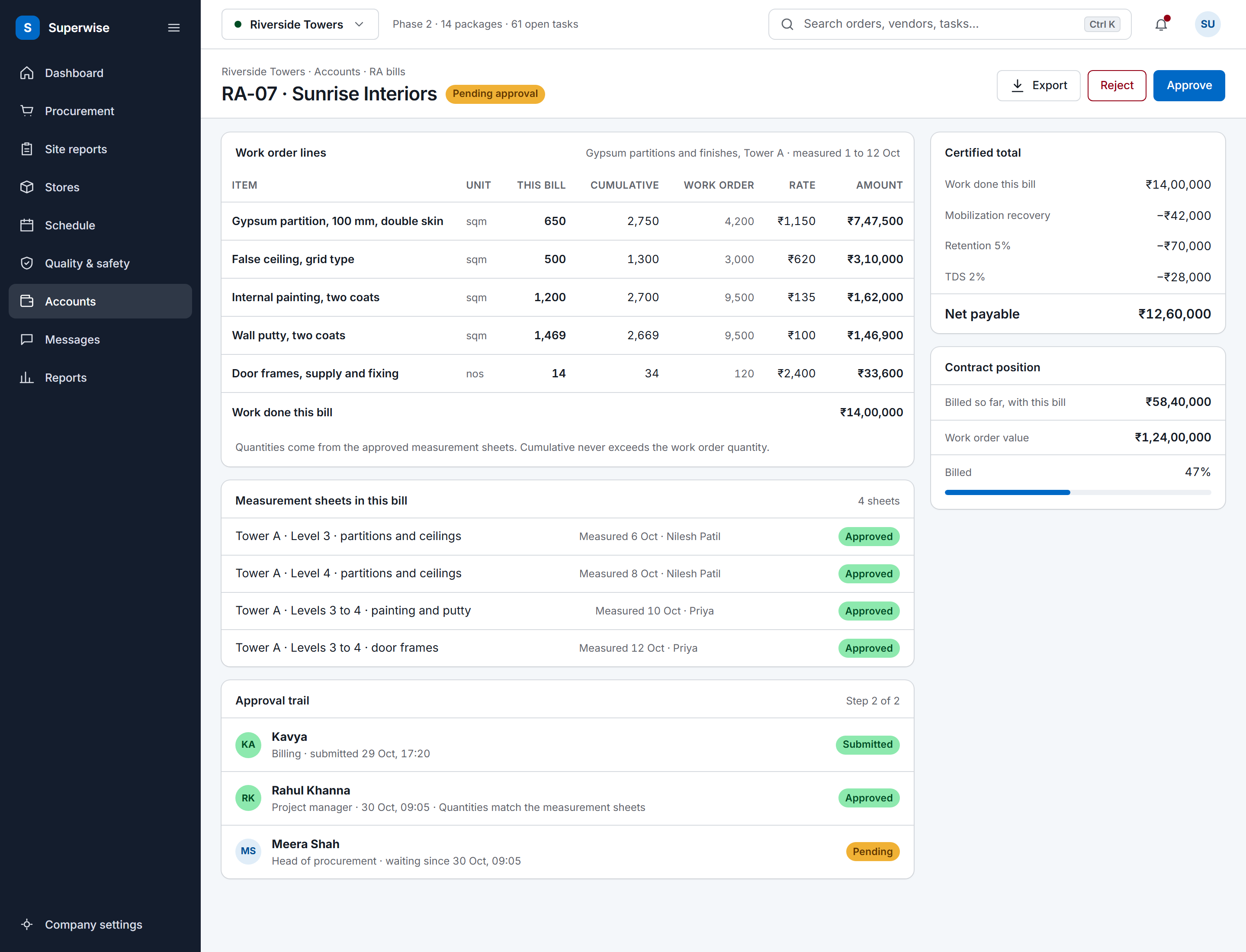
A SuperWise running account bill for a contractor: work order lines with this bill, cumulative and work order quantities, rate and amount, the certified total with mobilization recovery, retention and TDS deducted to a net payable, the approval trail and the contract position.

Audit and evidence

In SuperWise a delivery challan carries a quality status, the vehicle and driver, and photos of the loaded vehicle, the unloaded vehicle and the material. Each approval step records the approver, the date and comments, and a tenant setting can stamp the time on photos taken in the app.

Powerplay lists proofs on tasks, and roles and permissions combined with approvals. What an approval step records is not on the page we read.

Sources: Powerplay home page

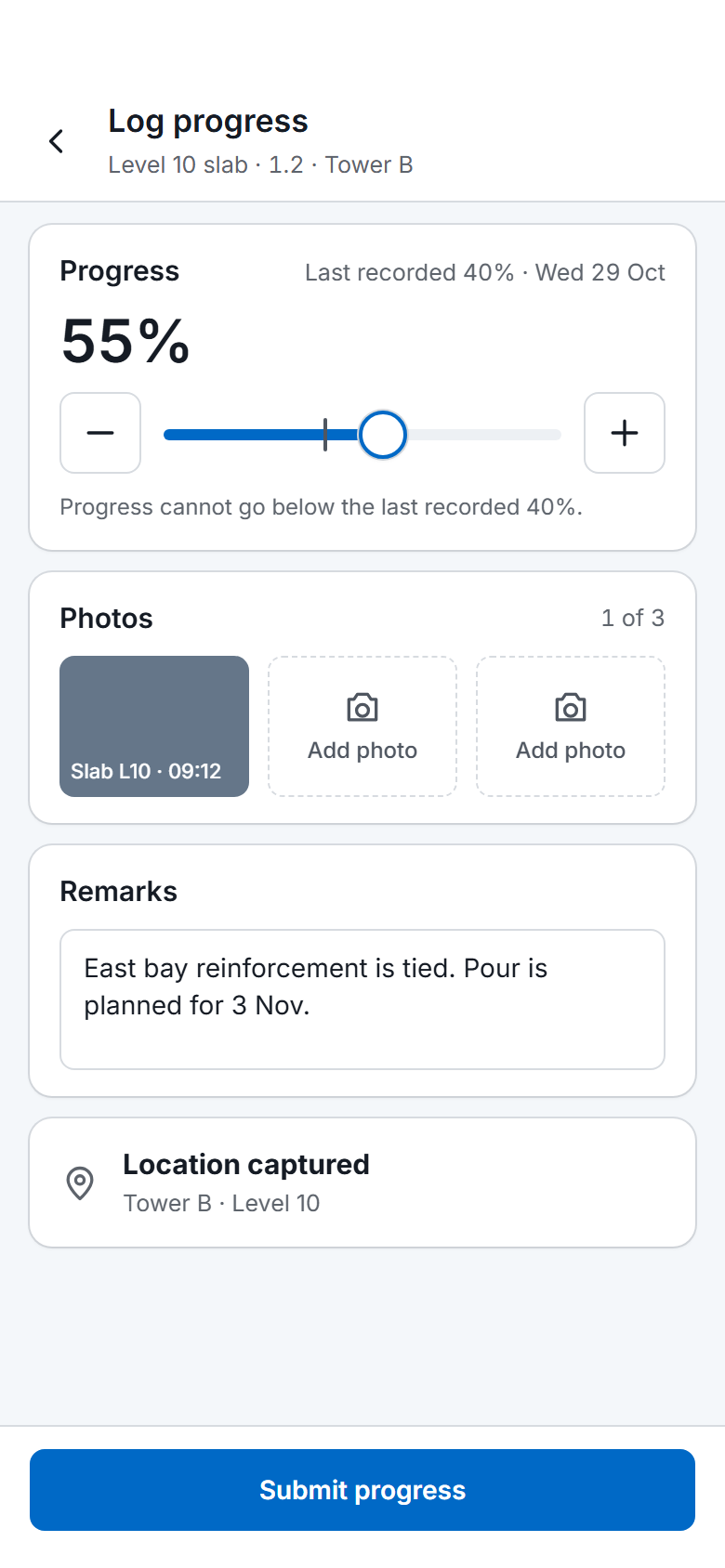
The SuperWise phone app progress log for one task: a slider and stepper from the last recorded 40 percent to 55 percent, one photo taken and two to add, remarks, a captured location and a Submit progress button.

Integrations with other tools

SuperWise imports schedules from Microsoft Project files (MPP or XML) and from Excel. A bill inward can be marked as passed to Tally, with who did it and when. Zapier carries six triggers and three actions, such as creating a site issue from another tool.

Powerplay's page says it works with Tally and SAP. SuperWise has no documented direct SAP or Tally connection, so if that link is a requirement, Powerplay's statement is the one to test.

Sources: Powerplay home page

How a rollout runs

SuperWise is set up in two layers. Company masters such as users, roles, organisations, resources and schedule templates are entered once, and each project then gets its schedule, its BOQ and its site entries. Resources import in bulk from Excel.

Start with one project and one report. A DPR from a single project shows quickly whether your site team enters data on the phone, before you commit other projects.

Migration and onboarding

SuperWise documents no importer for another tool's site records. Bring the structure across: resources by Excel, the schedule by an MPP, XML or Excel file, and start site entries from a cut-over date. Keep the old history as exported files.

Ask Powerplay for an export of your projects before you stop using it. The pages we read do not describe one, and that may differ in your contract.

Sources: Powerplay home page

Frequently asked questions

Is Powerplay a direct replacement for SuperWise?

That depends on your scope. Powerplay's site lists progress, material, checklists and procurement in one app. SuperWise covers those site records and also RA bills, measurement sheets and approval steps. If contractor billing evidence has to sit in the same system, compare that row first.

Which product handles RA bills?

SuperWise runs RA bills against work orders, with retention and mobilization deductions and the status Draft, Submitted, Approved, Paid. The Powerplay page we read does not mention RA bills.

Can SuperWise import a schedule I built elsewhere?

Yes, from Microsoft Project files (MPP or XML), a Primavera XER file or an Excel template. The import creates a schedule template that you place in the schedule and approve. SuperWise writes no MPP or XER file back.

Does SuperWise connect to Tally and SAP?

Not as a live connection. A bill inward carries a passed-to-Tally marker with who and when, reports download as Excel and PDF, and Zapier moves records to other tools. Powerplay's site says it works with Tally and SAP.

Is this the same Powerplay as trypowerplay.com?

The old address trypowerplay.com now redirects to getpowerplay.ai, which is the site this page reads. We compared against that site only, on 3 November 2026, and mark this as provisional until the owner confirms the product match.

How do I check the Powerplay statements on this page?

Each one is quoted in the Sources list with the day we read it. Open the link and search for the phrase. Pages change, so read the current page before you decide.

Sources

Each statement about another product links to that product's own site. A table cell that says the page does not mention a topic describes that page only; it does not say the product lacks the feature.

  1. Powerplay home page (read )

    trypowerplay.com answered 301 to https://www.getpowerplay.ai/ on 3 November 2026, which redirects to this address. The page title is "Powerplay | Prevent delays, save margins with AI Workforce". The pivot from the earlier Powerplay site is not confirmed by Powerplay on this page.

    • ALL-IN-ONE MOBILE & DESKTOP APP
    • Real-time progress updates on your schedule
    • See work done with proofs, use of material, machinery and labour on every task
    • Raise Issues and clear roadblocks faster
    • Deliver quality work with checklist
    • Works with Tally, SAP, so you don’t switch data
    • Roles & Permission, combined with Approvals
    • Planner AI creates schedule from the BOQ
    • All your project documents at one place
    • Know what to procure. Get materials delivered in time, within budget

See the comparison on your own site data

Book a demo and we walk through a DPR, a measurement sheet and an RA bill with your project data.