Comparison · In4Velocity

Site records and RA bills beside an ERP suite

The vendor's own pages describe an ERP suite for real estate and construction, with sales and finance included. This page sets it beside SuperWise and says when a suite or a site system fits.

At a glance

Three rows of the comparison: SuperWise and In4Velocity
Topic SuperWise In4Velocity
Projects Yes Yes
RA bills and measurement Yes Not found
Suite scope No Yes

In4Velocity statements read on . Not found means the pages we read do not mention it.

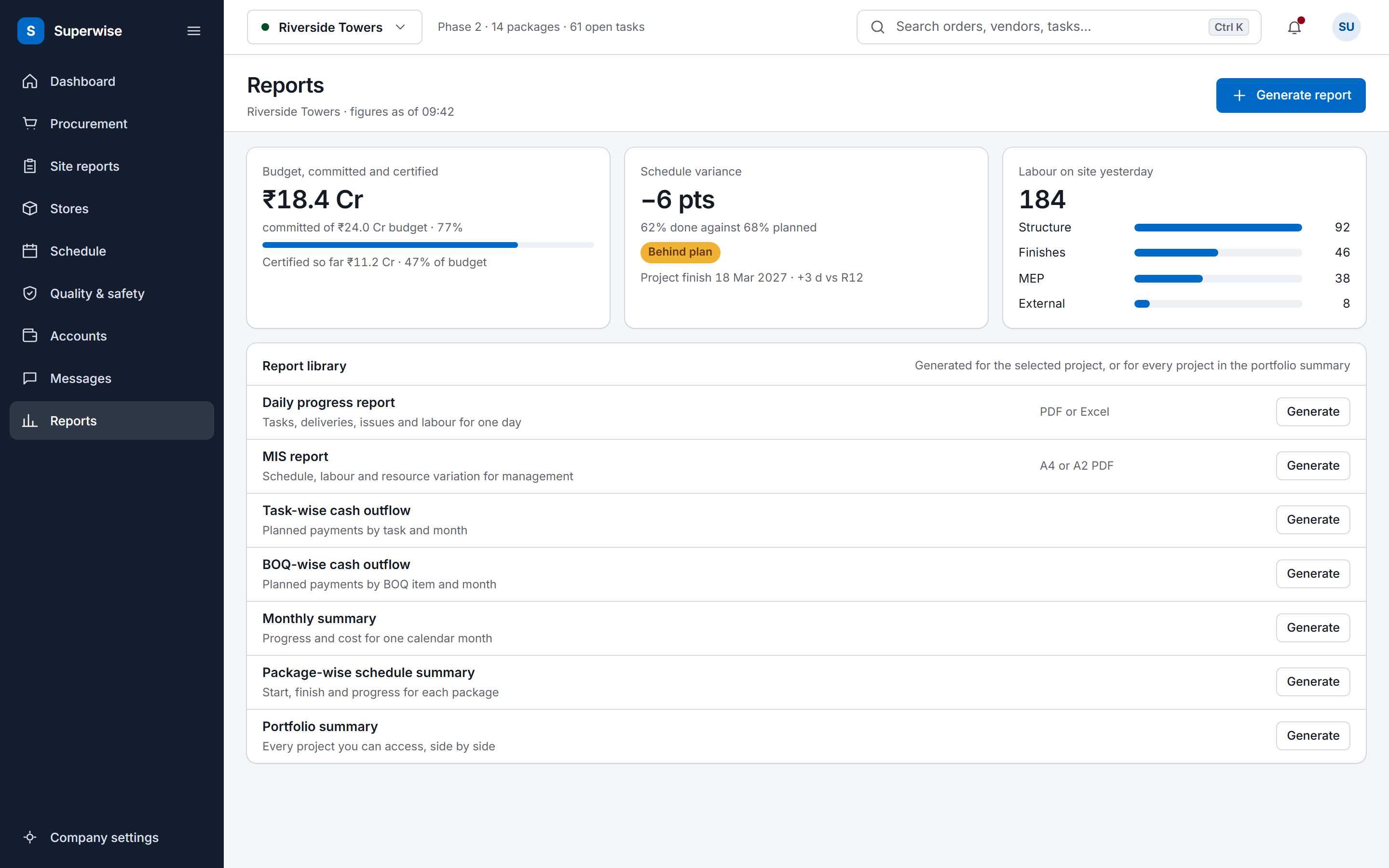
The SuperWise reports hub: a cost tile for budget, committed and certified, a schedule variance tile, labour deployment by package, and a library of the reports a project can generate.

Where In4Velocity fits well

In4Velocity's In4Suite page describes an ERP built for the real estate and construction industry, with Projects Setup & Control and Sales Booking, Payment plans, Collections among its modules. Its home page says it brings finance, CRM and sales together with construction project management, leasing, operations and analytics.

Its add-ons page lists native mobile apps for users, customers and agents, a contractor portal for tenders and work orders, and integrations with QuickBooks and MagicBricks. Its business intelligence page lists interactive dashboards on Qlik and export to Excel. For a developer who wants sales, CRM, finance and projects in one suite, those pages describe that scope.

Sources: In4Velocity In4Suite ERP page, In4Velocity home page, In4Velocity add-ons page, In4Velocity business intelligence page

Module by module

The SuperWise cell is what the product guide documents. The In4Velocity cell is what its own pages say, with the source beside it.

Read on . Yes Partly Not found on its public pages

Modules in In4Velocity and SuperWise, with the source of each In4Velocity cell
Module SuperWise In4Velocity
Projects Yes CPM schedule with WBS tasks and baselines. Progress is recorded per task or uploaded in Excel. Yes Lists Projects Setup & Control among its modules. Source: In4Velocity In4Suite ERP page
RA bills and measurement Yes RA bills against work orders, with retention and mobilization deductions. Status runs Draft, Submitted, Approved, Paid. Not found on its public pages The pages we read do not mention RA bills or a measurement book. Source: In4Velocity In4Suite ERP page
Contractors Yes Vendor portal for quotations, proposals and bills. External users see only their own organisation. Yes Lists a contractor portal to see new tenders and work orders. Source: In4Velocity add-ons page
Mobile Yes Mobile app for site entries such as delivery challans. A tenant setting notifies procurement when one is submitted. Yes Lists a native Android or iOS app for end users, and apps for customers and agents. Source: In4Velocity add-ons page
Dashboards Yes Project dashboard and portfolio summary. Reports download as PDF or Excel. Yes Lists interactive dashboards on Qlik, with export of chart data to Excel. Source: In4Velocity business intelligence page
Integrations Partly Zapier with six triggers and three actions. Bills inward carry a passed-to-Tally marker. Reports download as Excel and PDF. Yes Lists QuickBooks and MagicBricks integrations. Source: In4Velocity add-ons page
Suite scope No Site records, procurement, schedule and billing. Sales, CRM and a general ledger are outside the product. Yes Says it brings finance, CRM and sales together with construction project management. Source: In4Velocity home page

A cell that says the page does not mention a topic describes that page only. It does not say the product lacks the feature.

Fit, side by side

Who should choose which

Pick on the work you need done first. Each side rests on something the product states or documents.

Choose SuperWise if

  • You need site entries, measurement sheets and RA bills against work orders, in a system the site team fills in.
  • You want a vendor portal where quotations, proposals and bills stay inside the vendor's own organisation.
  • You want to run beside a suite: sales and finance stay there, and SuperWise carries site entries, schedule progress and contractor bills.

Where SuperWise differs

SuperWise covers the site and contract side and has no sales or finance modules: daily records, delivery and labour challans, measurement sheets and RA bills against work orders, with approval steps that record who approved and when.

The In4Velocity pages we read do not mention RA bills or a measurement book. A developer who bills through contractors, and wants the quantity trail kept with the bill, should compare that row.

Sources: In4Velocity In4Suite ERP page, In4Velocity add-ons page

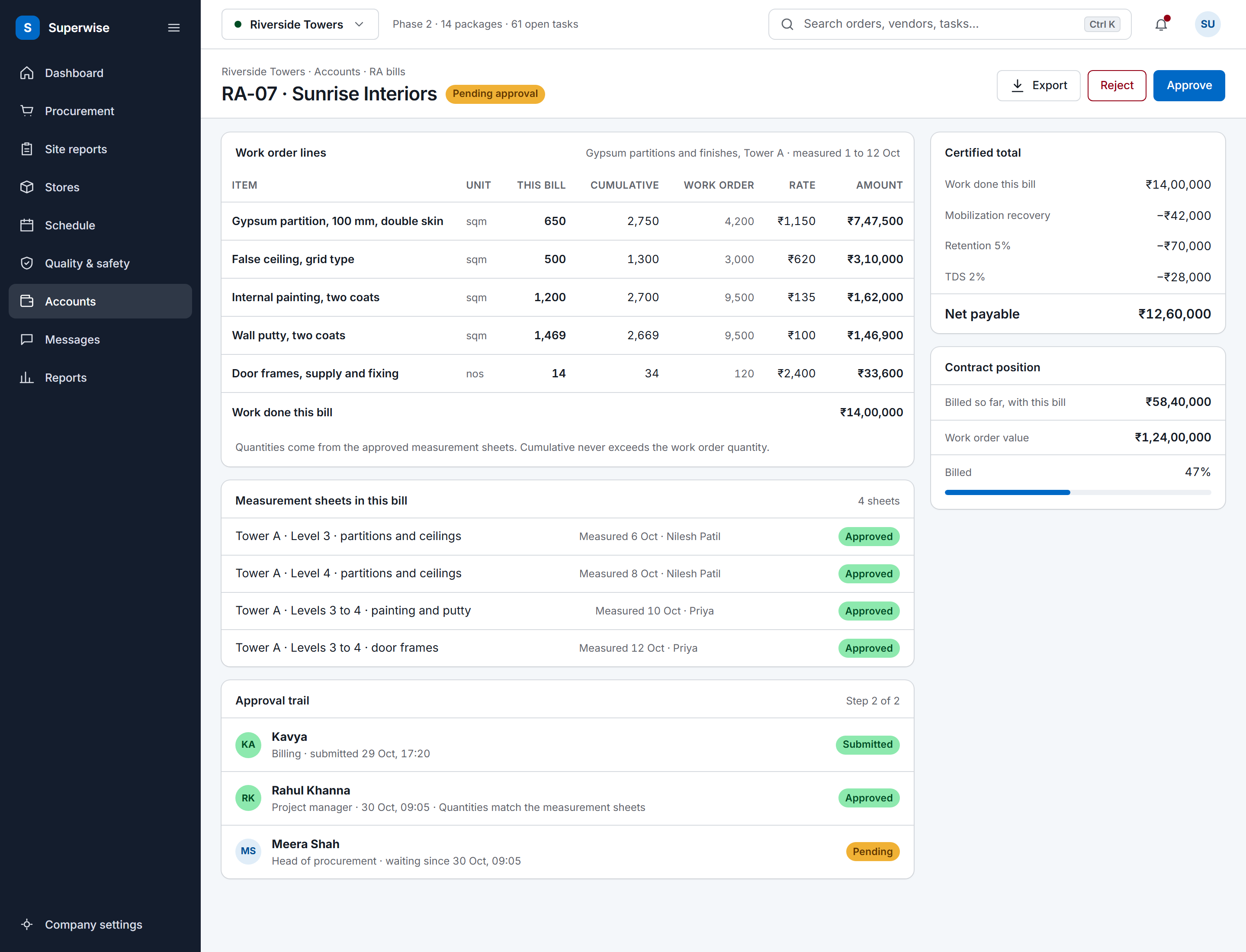
A SuperWise running account bill for a contractor: work order lines with this bill, cumulative and work order quantities, rate and amount, the certified total with mobilization recovery, retention and TDS deducted to a net payable, the approval trail and the contract position.

Audit and evidence

SuperWise stores the evidence on the record: quality status and photos on a delivery challan, attachments on an issue, and the approver, date and comment of every approval step.

In4Velocity lists dashboards such as Cost to Completion and Purchase Order, and export of the data behind the charts to Excel. The pages we read do not describe what an approval step stores.

Sources: In4Velocity business intelligence page
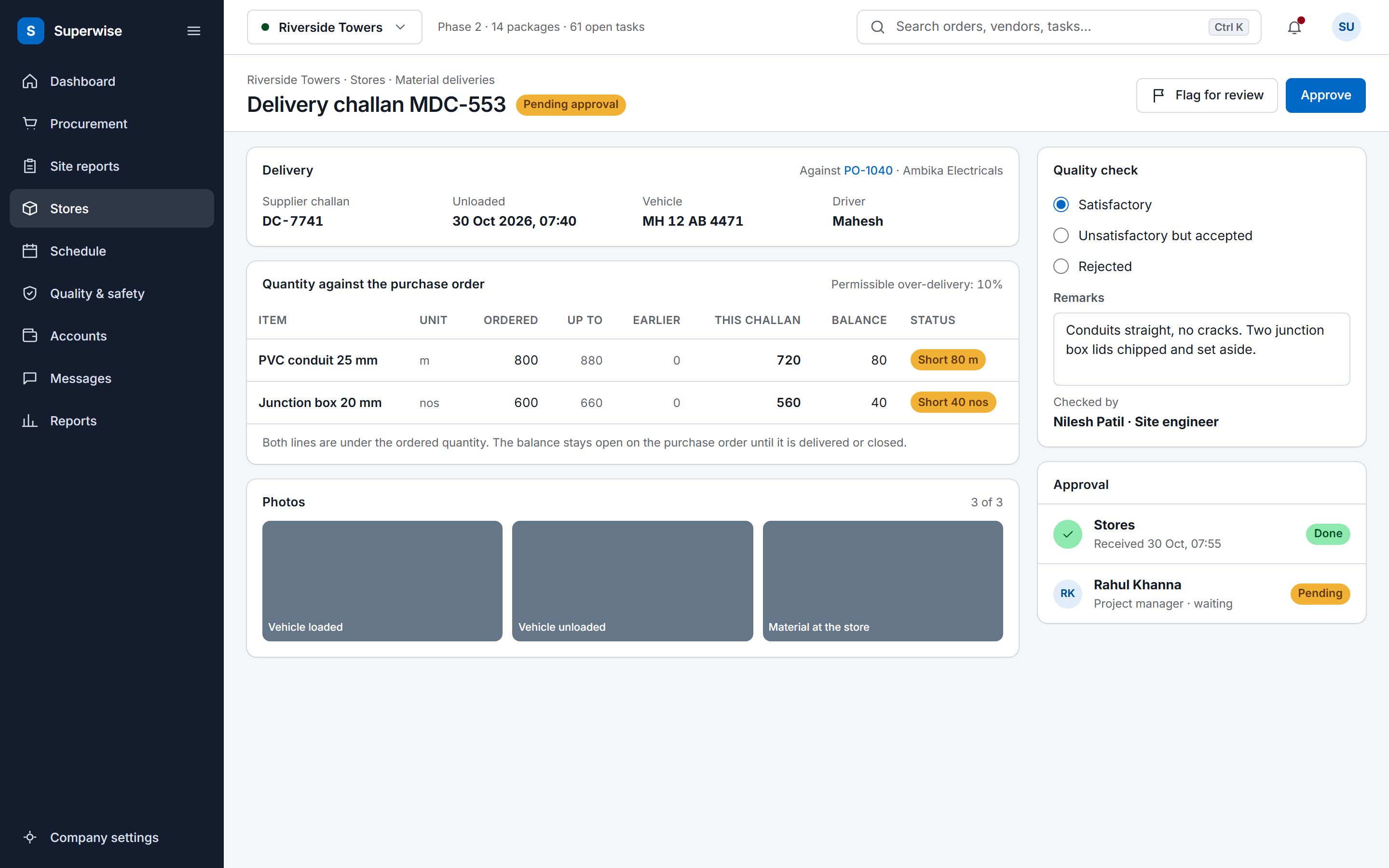
A SuperWise delivery challan record against a purchase order: supplier challan, vehicle and driver, ordered and delivered quantities with the permissible variation and a Short status on two lines, three photo tiles, a quality check with remarks, and Approve and Flag for review buttons.

Integrations with other tools

SuperWise imports MPP, XML and Excel schedules, has Zapier triggers and actions, and marks a bill inward as passed to Tally with who and when. It documents no QuickBooks connection.

In4Velocity's add-ons page says that with QuickBooks integrated you can track payments and business reports better, and lists a MagicBricks lead feed. If QuickBooks is your ledger, that is a difference on its own description.

Sources: In4Velocity add-ons page

How a rollout runs

A full suite touches sales, finance and projects at once. SuperWise can start with one project: company masters first, then the schedule, the BOQ and site entries.

Where an ERP already holds the ledger and sales, run SuperWise beside it for site records and contractor bills.

Migration and onboarding

SuperWise documents no importer for another suite's data. Resources import from Excel and the schedule from an MPP, XML or Excel file. BOQ and work orders are entered in the product.

Keep sales and finance history in In4Suite. The pages we read do not describe a data export, so ask In4Velocity what it offers for your contract.

Sources: In4Velocity In4Suite ERP page

Frequently asked questions

Does SuperWise cover sales and CRM like In4Velocity?

No. In4Velocity's pages list sales booking, CRM and finance in one suite. SuperWise covers site records, procurement chains, measurement sheets and RA bills.

Which product keeps RA bills with their measurements?

SuperWise does: measurement sheets feed the RA bill quantities, and the bill runs against a work order with retention and mobilization deductions. The In4Velocity pages we read do not mention RA bills.

Does SuperWise integrate with QuickBooks?

No documented connection exists. Reports download as Excel and PDF, and Zapier moves records to other tools. In4Velocity's add-ons page lists a QuickBooks integration.

Can I run SuperWise beside In4Suite?

Yes, by role. Keep sales and finance in the suite and use SuperWise for site entries, schedule progress and contractor bills. Nothing syncs them automatically; Zapier and Excel carry data between them.

How do I check the In4Velocity statements?

Each statement is quoted in the Sources list with the day we read the page. Open the link and search for the phrase, and read the current page before you decide.

Sources

Each statement about another product links to that product's own site. A table cell that says the page does not mention a topic describes that page only; it does not say the product lacks the feature.

  1. In4Velocity In4Suite ERP page (read )

    • An ERP Software To Manage Your Real Estate Business
    • An ERP software built for Real Estate & Construction industry.
    • Projects Setup & Control
    • Sales Booking, Payment plans, Collections
  2. In4Velocity home page (read )

    • Unify your Real Estate and Construction operations with In4Suite®, Our All-in-One ERP Solution.
    • unifying every aspect of your business—from finance, CRM, and sales to construction project management, leasing, operations, and analytics—into one scalable solution.
  3. In4Velocity add-ons page (read )

    • A native Android or iOS app to allow the end user to have most of the key functionalities that can be done while mobile or away from the office
    • A native mobile app that provides a unique way for the end customers to check on the progress of their units purchased.
    • An online portal for Contractors to login and have a look at the new Tenders and Work orders.
    • With QuickBooks integrated to our system, you can now track payments and business reports better.
    • A lead in MagicBricks will be pulled into the platform
  4. In4Velocity business intelligence page (read )

    • Integrated with Qlik, discover hidden insights on the fly.
    • you can create interactive dashboards customized to your needs for your core business processes.
    • Point and click to export your data behind the charts in real-time to Excel.

See the comparison on your own site data

Book a demo and we walk through a DPR, a measurement sheet and an RA bill with your project data.