Comparison

Fieldwire and SuperWise for site teams and billing engineers

Fieldwire's own pages describe tasks, drawings and forms for the field. This page lines them up against SuperWise and says where a field tool is enough and where billing and planning need more.

At a glance

Three rows of the comparison: SuperWise and Fieldwire
Topic SuperWise Fieldwire
Daily reports and forms Yes Yes
Schedule import Partly Partly
RA bills and measurement Yes Not found

Fieldwire statements read on . Not found means the pages we read do not mention it.

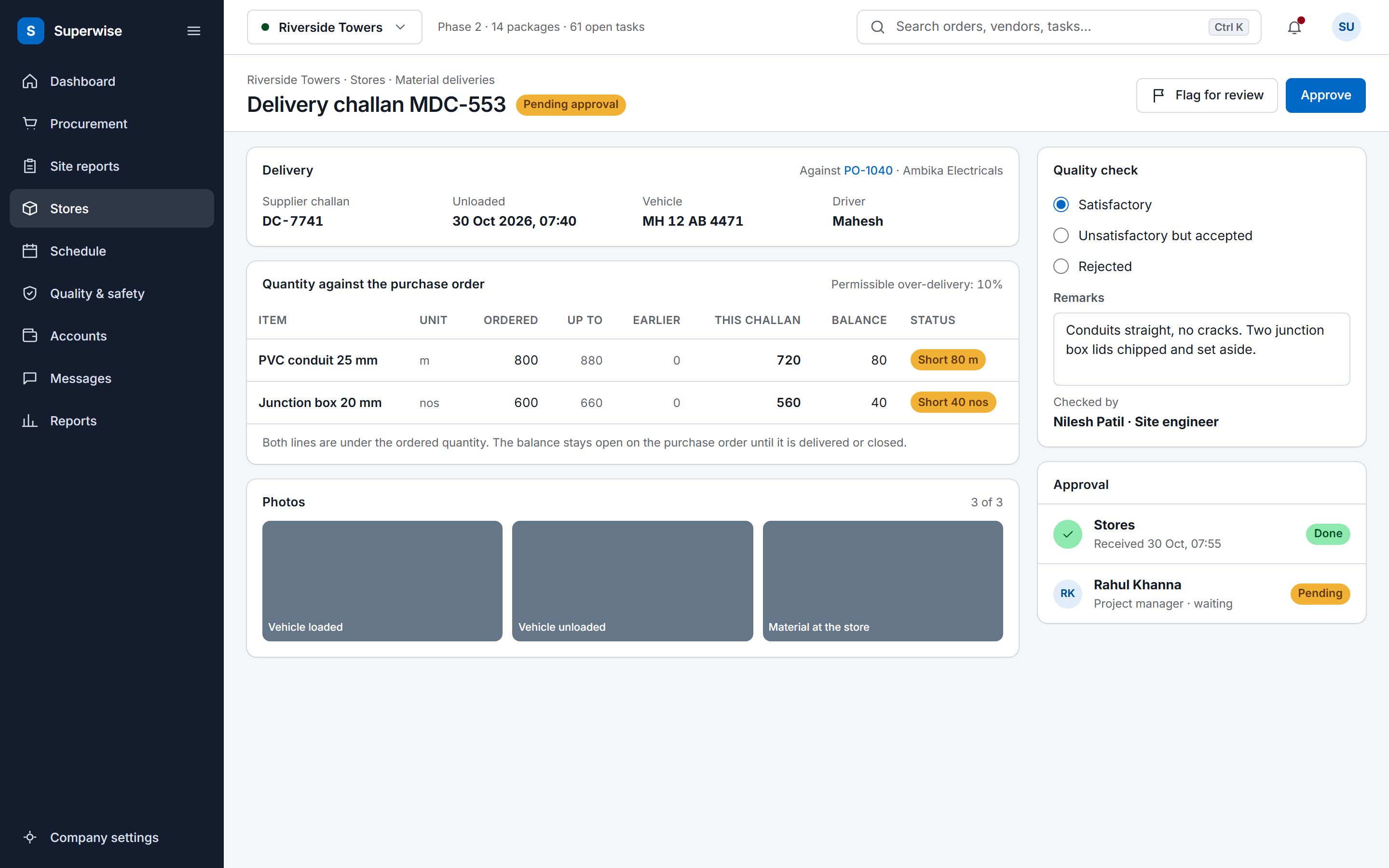
A SuperWise delivery challan record against a purchase order: supplier challan, vehicle and driver, ordered and delivered quantities with the permissible variation and a Short status on two lines, three photo tiles, a quality check with remarks, and Approve and Flag for review buttons.

Where Fieldwire fits well

Fieldwire's home page lists tasks, up-to-date drawings, plan markups with notes, photos and videos, and markups and as-builts that can be recorded even when offline. Its forms page lists paperless daily reports and safety forms, and its scheduling page lists a Kanban board, a Gantt chart and calendar-based field scheduling.

If your site teams mainly need drawings in hand, tasks assigned from them and forms such as daily reports, timesheets and inspection requests, those pages describe exactly that. The reports page lists PDF Summary, Detailed and CSV exports.

Sources: Fieldwire home page, Fieldwire forms page, Fieldwire scheduling page, Fieldwire reports page

Module by module

The SuperWise cell is what the product guide documents. The Fieldwire cell is what its own pages say, with the source beside it.

Read on . Yes Partly Not found on its public pages

Modules in Fieldwire and SuperWise, with the source of each Fieldwire cell
Module SuperWise Fieldwire
Daily reports and forms Yes DPR generated from the day's site records, in sections you select, as PDF or Excel. Yes Lists digital forms for daily reports, timesheets, inspection requests and RFIs. Source: Fieldwire home page
Schedule Yes CPM schedule with WBS tasks and baselines. Progress is recorded per task or uploaded in Excel. Yes Lists Kanban, Gantt and calendar-based field scheduling. Source: Fieldwire scheduling page
Schedule import Partly Schedule templates import from Microsoft Project (MPP or XML), Primavera (XER) and Excel. No MPP or XER file is written. Partly Lists importing an external task spreadsheet to set up a project. Source: Fieldwire scheduling page
BOQ and budget Yes Project BOQ with contract quantities and rates; every RA bill line ties back to it. Partly Lists importing cost codes and a budget for quick project setup. Source: Fieldwire budget page
RA bills and measurement Yes RA bills against work orders, with retention and mobilization deductions. Status runs Draft, Submitted, Approved, Paid. Not found on its public pages Lists capturing work performed on the jobsite to help you get paid. The pages we read do not mention RA bills or a measurement book. Source: Fieldwire home page
Reports Yes MIS report, monthly summary and cash outflow reports, as PDF or Excel. The MIS report comes in A4 or A2. Yes Lists PDF Summary, Detailed and CSV report exports. Source: Fieldwire reports page
Integrations Partly Zapier with six triggers and three actions. Bills inward carry a passed-to-Tally marker. Reports download as Excel and PDF. Yes Lists a REST API for data extraction, analysis, automation and syncing. Source: Fieldwire integrations page

A cell that says the page does not mention a topic describes that page only. It does not say the product lacks the feature.

Fit, side by side

Who should choose which

Pick on the work you need done first. Each side rests on something the product states or documents.

Choose SuperWise if

  • Billing is the hard part: work orders, measurement sheets and RA bills that tie back to a project BOQ.
  • You want one DPR built from the day's challans, labour, progress and issues, downloaded as PDF or Excel.
  • You plan with Microsoft Project or Excel and want templates, working calendars and baselines.

Where SuperWise differs

SuperWise carries the work from site records into contract billing. Measurement sheets in the measurement book format feed an RA bill, which runs against a work order with retention and mobilization deductions and approval steps.

The Fieldwire pages we read do not mention RA bills, a measurement book or BOQ quantities. They do list capturing work performed on the jobsite to help you get paid, which is the closest wording on billing.

Sources: Fieldwire home page

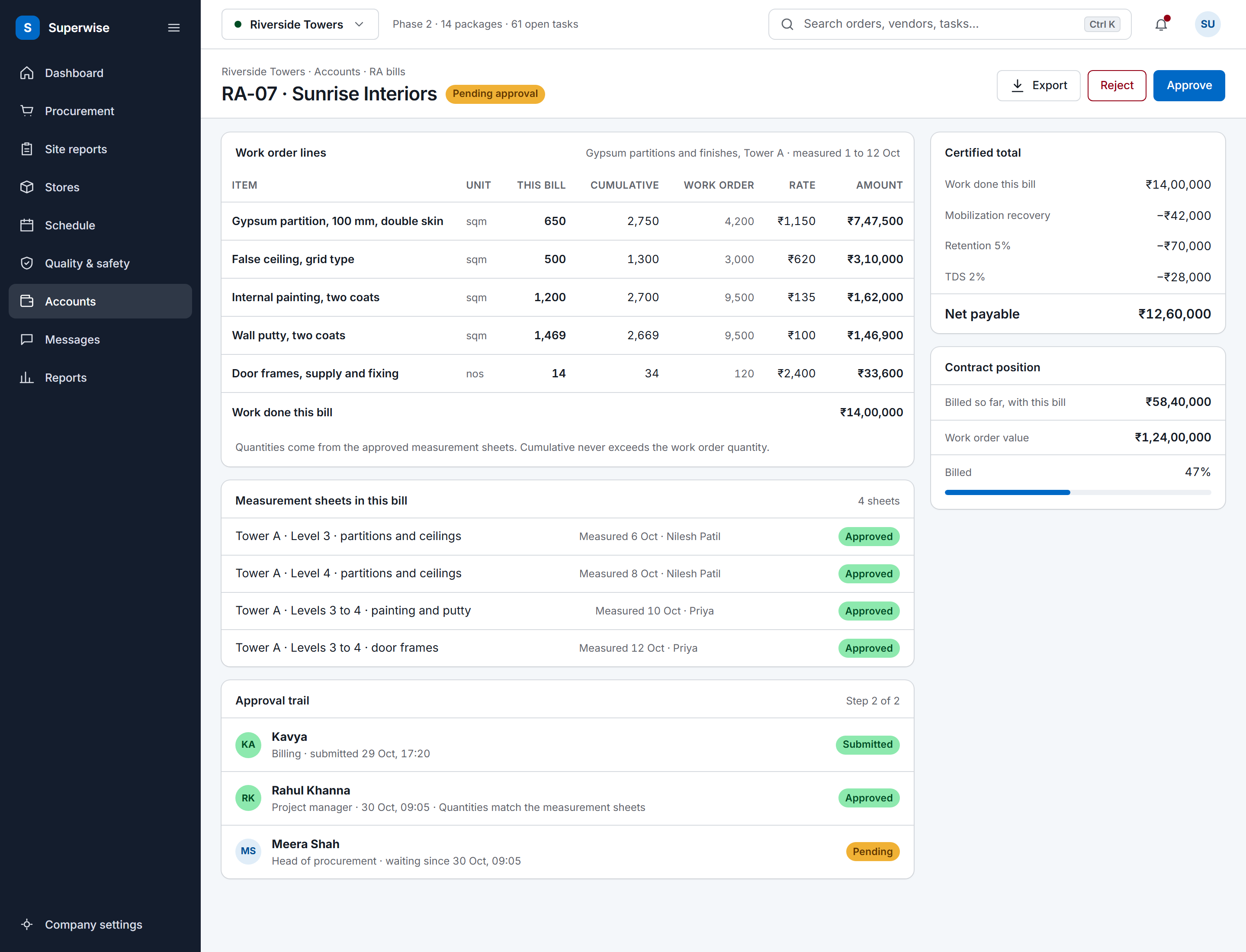
A SuperWise running account bill for a contractor: work order lines with this bill, cumulative and work order quantities, rate and amount, the certified total with mobilization recovery, retention and TDS deducted to a net payable, the approval trail and the contract position.

Audit and evidence

SuperWise attaches evidence to the record that needs it: photos on delivery challans, attachments on issues, and an approver, date and comments at every approval step.

Fieldwire lists plan markups with notes, photos and videos. The pages we read do not describe a multi-step approval record.

Sources: Fieldwire home page

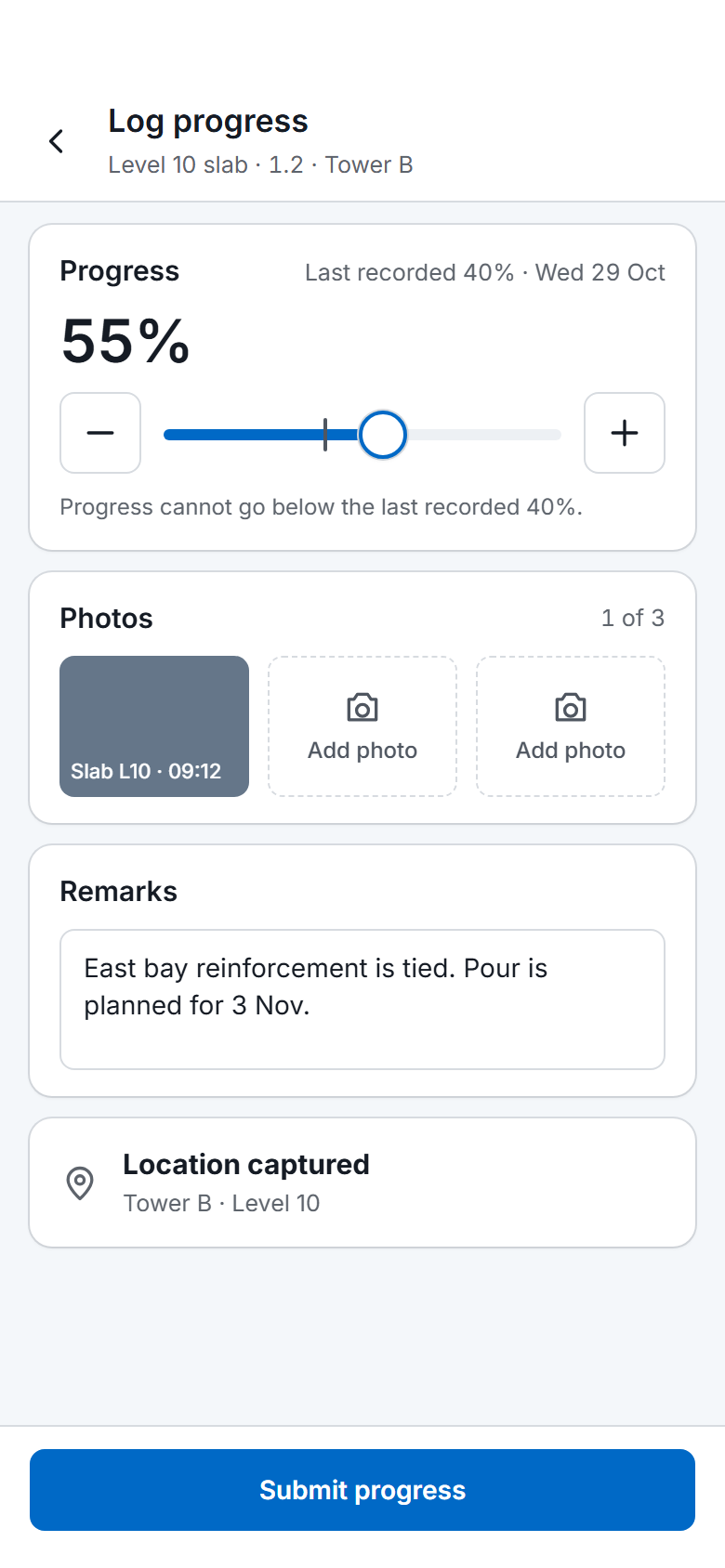
The SuperWise phone app progress log for one task: a slider and stepper from the last recorded 40 percent to 55 percent, one photo taken and two to add, remarks, a captured location and a Submit progress button.

Integrations with other tools

SuperWise imports MPP, XML and Excel schedules and has Zapier triggers and actions. It documents no public API beyond the endpoints Zapier uses.

Fieldwire's integrations page lists a REST API for data extraction, analysis, automation and syncing, and its home page says an open API integrates with any technology. If you plan your own integration work, that is a clear difference.

Sources: Fieldwire integrations page, Fieldwire home page

How a rollout runs

A field tool and a contract system roll out differently. SuperWise needs company masters and a project BOQ before billing is useful; site entries and the DPR can start earlier on one project.

Run the DPR on one project first and hold the RA bill step until the BOQ and work orders are in.

Migration and onboarding

Fieldwire's scheduling page says you can import an external task spreadsheet to set up a project. SuperWise imports a schedule template from Excel or an MPP or XML file, and resources from Excel.

Drawings and photos stay where they are. Move the schedule and the master data, then start site entries from a cut-over date.

Sources: Fieldwire scheduling page

Frequently asked questions

Is Fieldwire enough for a contractor in India?

It can be, if the need is drawings, tasks and forms in the field. Fieldwire lists those on its own pages. If RA bills, retention and a measurement book have to live in the same system, the pages we read do not mention them, so compare that row.

Does Fieldwire have an India page?

We did not find one. Its language menu lists English, French, German, Czech, Spanish, Italian, Dutch, Swedish and Polish, and the Australian, Irish and UK English sites. The path /in/ returned a not found page on 3 November 2026.

Can SuperWise do what Fieldwire does with drawings?

The product guide documents no plan viewer or drawing markup, so we do not claim one. SuperWise documents document management under planning documents. Fieldwire lists drawings and plan markups on its home page.

Can I use both?

Yes. Some teams keep a drawing and task tool in the field and run billing and approvals elsewhere. Zapier can move site issues and progress events out of SuperWise. Fieldwire lists a REST API for the other direction.

How do I check the Fieldwire statements?

Each statement is quoted in the Sources list with the day we read the page. Open the link and search for the phrase, and read the current page before you decide.

Sources

Each statement about another product links to that product's own site. A table cell that says the page does not mention a topic describes that page only; it does not say the product lacks the feature.

  1. Fieldwire home page (read )

    The language menu lists no India-specific page. https://www.fieldwire.com/in/ returned HTTP 404 on 3 November 2026.

    • Assign tasks, work from up-to-date drawings, and align the field and office, all from any device.
    • Mark up plans with notes, photos, and videos.
    • Record your markups and as-builts with easy-to-use mobile editing, even when offline.
    • Digitize forms for daily reports, timesheets, inspection requests, and RFIs.
    • Create schedules of upcoming work.
    • use an open API to integrate with any technology using a single cloud platform
    • Capture work performed on the jobsite to reduce risk and help you get paid.
  2. Fieldwire integrations page (read )

    • Connect systems via Fieldwire's REST API for data extraction, analysis, automation, and syncing with other platforms.
  3. Fieldwire scheduling page (read )

    • Easy project scheduling using Kanban board, Gantt chart, and calendar-based field scheduling.
    • import an external task spreadsheet to set up your project with minimal effort
  4. Fieldwire forms page (read )

    • Paperless daily reports, safety forms, and more.
  5. Fieldwire reports page (read )

    • Export a PDF Summary Report, Detailed Report, or CSV Report.
  6. Fieldwire budget page (read )

    • Import your cost codes and budget for quick project setup.

See the comparison on your own site data

Book a demo and we walk through a DPR, a measurement sheet and an RA bill with your project data.